Music
You can browse and listen to your music, audio books and podcasts using the music player.
Use the Media Go™ application on your computer to transfer content to and from the memory
card in your phone. For more information, see Connecting your phone to a computer on
page 57.
Using the music player
To play audio content
1
From the Home screen screen, tap . If does not appear on the Home screen,
drag
upwards, then find and tap Music player .
2
Tap .
3
Tap to browse audio by artist. Tap to use playlists. Tap to browse audio
by track.
4
Scroll up or down and browse to a track.
5
Tap a track to play it.
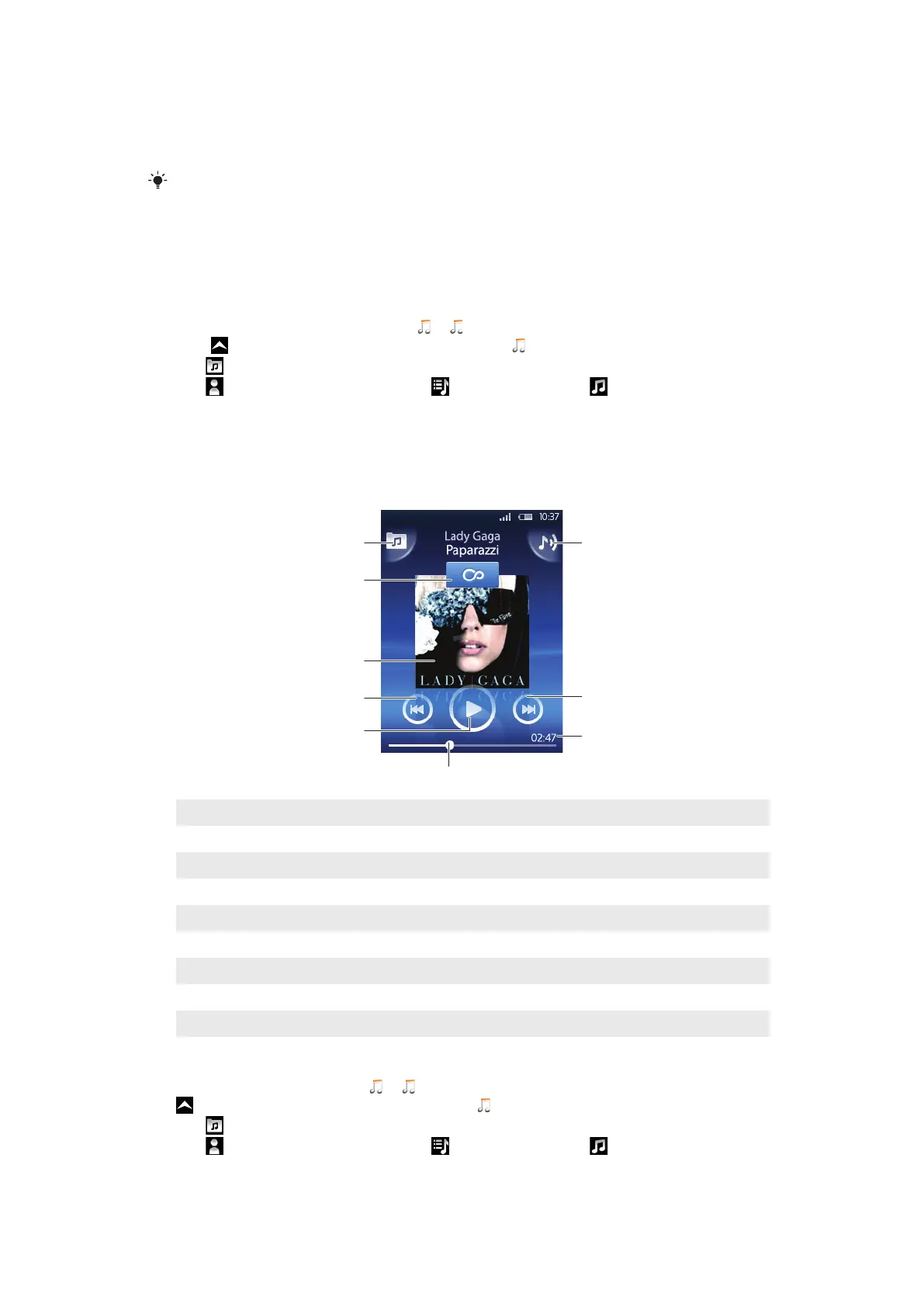
Music player overview
1 Browse the music on the memory card
2 Infinite button: find related material online
3 Cover art (if available)
4 Go to the previous track in the current play queue, or rewind
5 Play/Pause button
6 Progress indicator: fast forward or rewind by dragging or tapping
7 Time remaining of current track
8 Go to the next track in the current play queue, or fast forward
9 View the current play queue
To browse your audio content
1
From the Home screen, tap . If does not appear on the Home screen, drag
upwards, then find and tap Music player .
2
Tap .
3
Tap to browse audio by artist. Tap to use playlists. Tap to browse audio
by track.
4
Scroll up or down and browse to a track.
61
This is an Internet version of this publication. © Print only for private use.








 To Next Page