7
GB
D:\SONY TV\SY150069_4K XFLL EU RG\4575969111\01GB-KD55X8005C\030ADD_GB.fm masterpage: Right
GB
KD-55X8005C / 49X8005C
4-575-969-11(1)
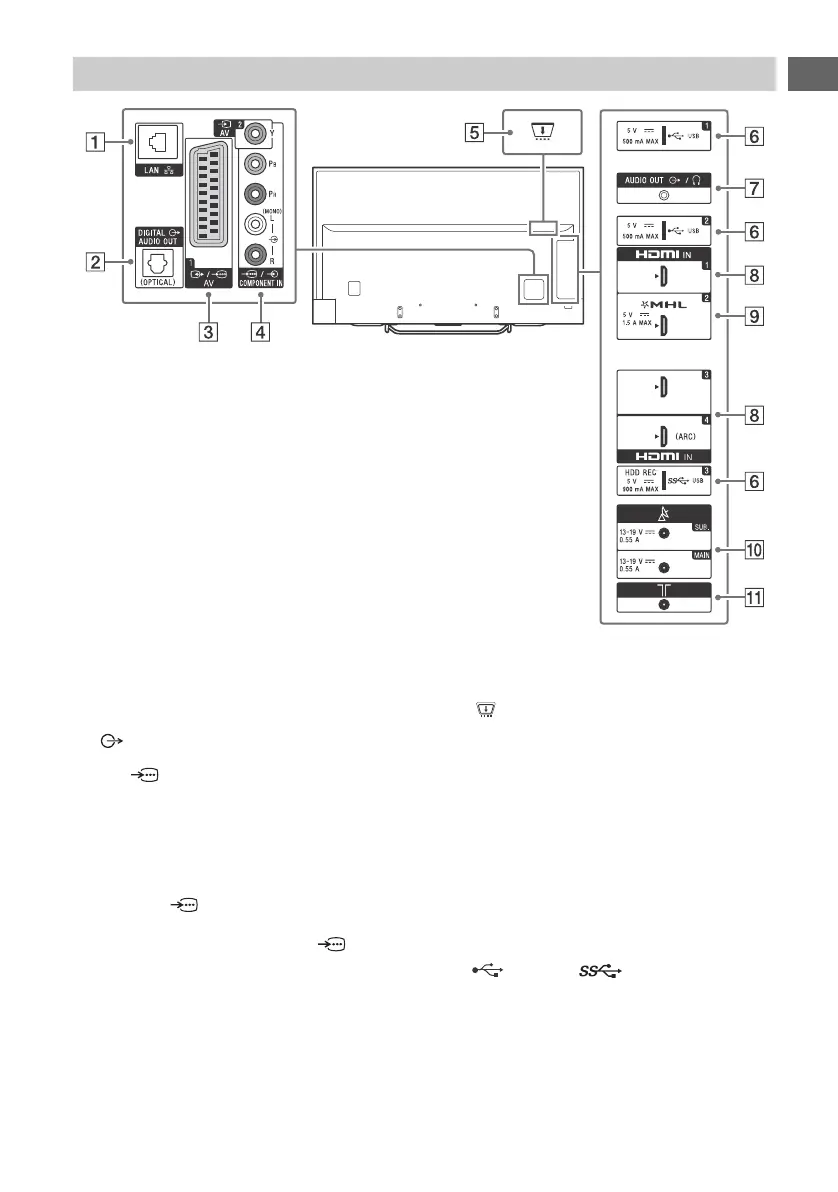
LAN
DIGITAL AUDIO OUT (OPTICAL)
/ AV 1
• Connect with a SCART cable. When you
connect an analogue decoder, the TV
tuner outputs scrambled signals to the
decoder, and the decoder unscrambles
the signals before outputting them.
AV 2, / COMPONENT IN
• For a composite connection:
Use AV 2, and (L/R) of /
COMPONENT IN*
1
.
• For a component connection:
Use Y, PB, PR, and (L/R).
CAM (Conditional Access Module)
• Provides access to pay TV services. For
details, refer to the instruction manual
supplied with your CAM.
• Do not insert the smart card directly into
the TV CAM slot. It must be fitted into the
Conditional Access Module provided by
your authorised dealer.
• CAM is not supported in some countries/
areas. Check with your authorised dealer.
• A CAM message may appear when you
switch to a digital programme after using
the Internet video.
USB 1/2, USB 3 (HDD REC)*
2
*
3
• Connecting a large USB device may
interfere with other connected devices
beside it.
• When connecting a large USB device,
connect to the USB 1 jack.
Inputs and Outputs


 To Next Page
 Loading...