9
GB
D:\SONY TV\SY150069_4K XFLL EU RG\4575969111\01GB-KD55X8005C\030ADD_GB.fm masterpage: Right
GB
KD-55X8005C / 49X8005C
4-575-969-11(1)
Using Remote Control
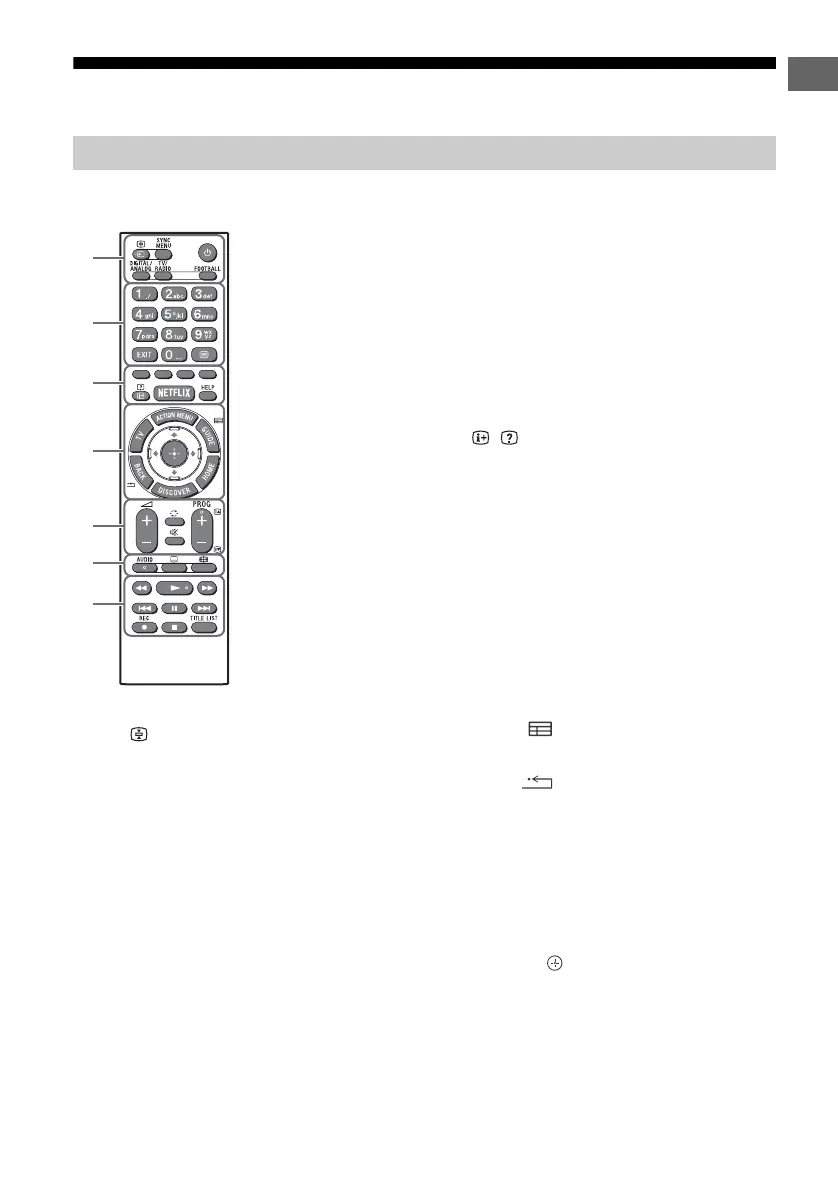
/ (Input select/Text hold)
In TV mode: Display and select the input
source.
In Text mode: Hold the current page.
SYNC MENU*
1
Display the BRAVIA Sync Menu.
(TV standby)
Turn on or turn off the TV (standby mode).
DIGITAL/ANALOG
Switch between digital and analogue mode.
TV/RADIO
Switch between TV or RADIO broadcasts.
FOOTBALL*
1
Turn Live Football Mode on or
off (when the feature is available).
Number buttons
EXIT
Return to the previous screen or exit from
the menu. When an Interactive Application
service is available, press to exit from the
service.
(Text)
Display text information.
Colour buttons
Execute correspondent function at that time.
/ (Info/Text reveal)*
1
Display information.
NETFLIX*
1
Access the “NETFLIX” online service.
HELP
Display Help Menu.
ACTION MENU
Display a list of contextual functions.
TV*
1
Switch to a TV channel or input from other
applications.
GUIDE/ *
1
Display the digital programme guide.
BACK/
Return to previous screen.
HOME
Display the TV Home Menu.
DISCOVER
Bring up the Content Bar to search for
content.
//// (Item select/Enter)
Remote Control Parts Description
Ȫ
ȩ
ȫ
Ȭ
ȭ
Ȯ
ȯ
IR (infrared) Remote Control


 To Next Page
 Loading...