Customizing the Fn (Function) button
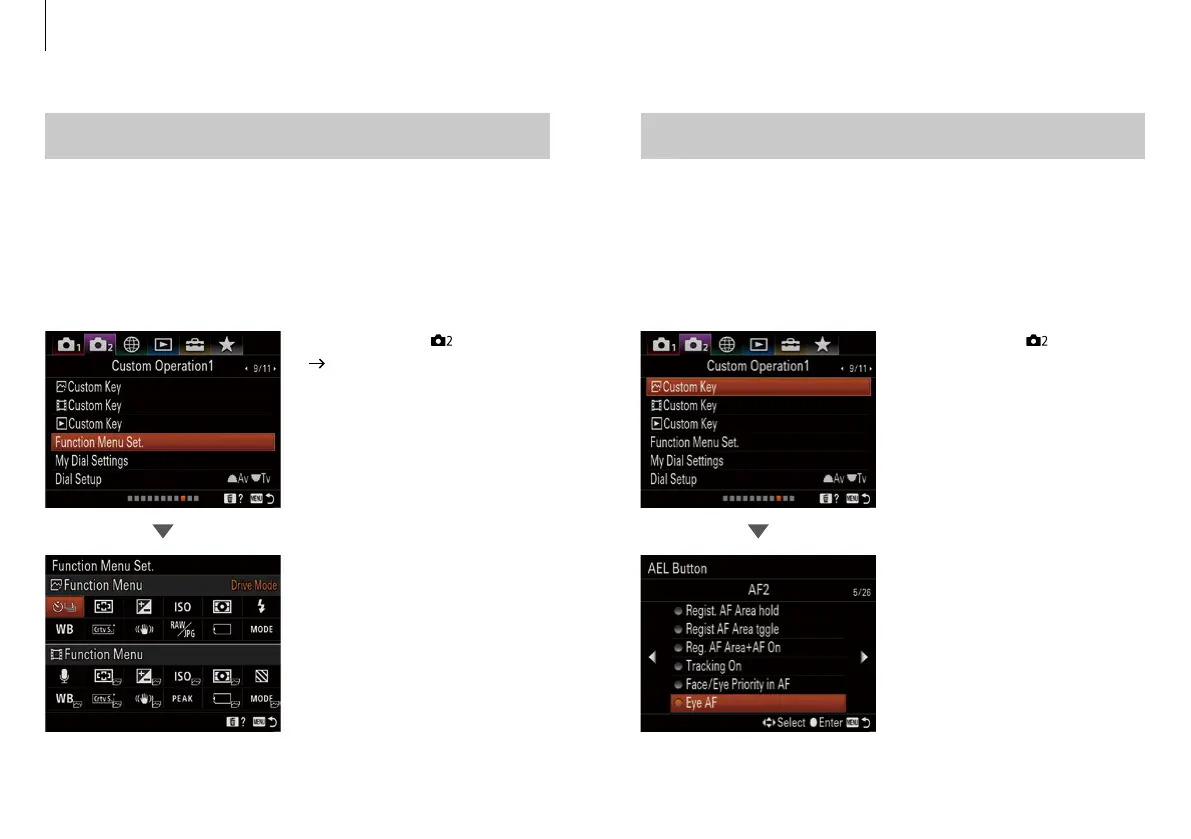
Register frequently used functions to the Fn (function) button
for fast access while shooting.
• MENU button - [ ] 9 / 11
[Function Menu Set.]
• Up to 12 frequently used
functions can be registered in
both Still and Movie to the Fn
(Function) button separately.
Customizing the Eye AF
The camera focuses on the subject's eyes while the button is
held. In addition to half-pressing the shutter button or pressing
the AF-On button, Eye AF can be activated by assigning to a
selected button.*
• MENU button - [ ] 9 / 11
(Custom Operation1) – Custom
Key
• Select a desired button, then
assign the [Eye AF] function to
that button.
*
When activating Eye AF from a custom button, the subject is tracked over the full screen.
Center button is assigned as a default in α9.
Custom settings
56 57


 To Next Page