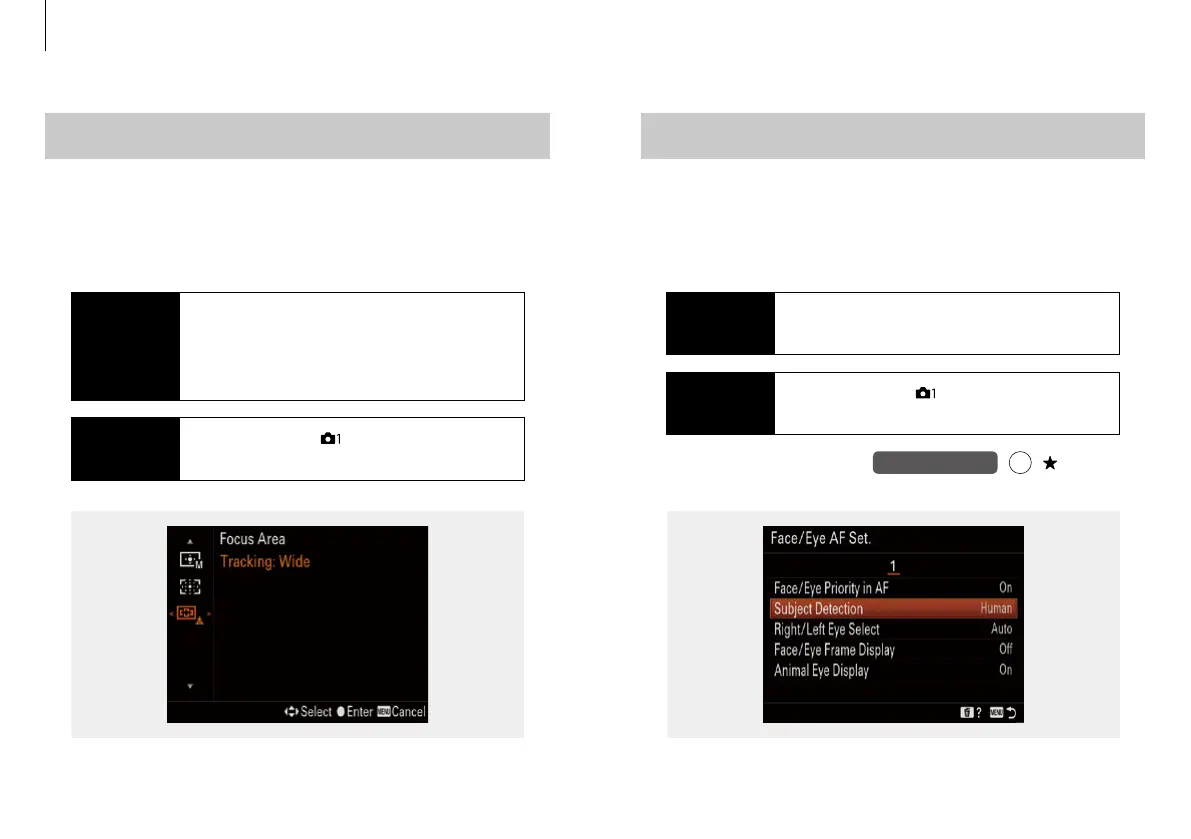
Select the subject from Human and Animal.* The Eye AF function
is activated within the selected focus area by half-pressing the
shutter button or pressing the AF-ON button.**
Real-time Eye AF - Subject Detction
Custom key (Shoot.)
(My Menu)
Assignable to
Procedure
MENU button - [ ] 6 / 14 (AF2) -
[Face / Eye AF Set.] - Subject Detection
Available
Settings
Human / Animal
Fn
Select the Focus Area. It determines the initial Focus Area while
using the Tracking Mode. The selected tracking area is activated
by half-pressing the shutter button. The subject is tracked over
the full screen while the Tracking function is activated.
Focus Area - Real-time Tracking
Procedure
MENU button - [ ] 5 / 14 (AF1) -
[Focus Area] - Tracking
Available
Settings
Tracking: Wide, Zone, Center, Flexible
Spot S, M, L, Expand Flexible Spot
*
Only one subject can be selected and the other subject cannot be selected.
**
Only activates when a face is detected withing the Focus Area selected.
Main focus settings
8 9


 To Next Page