17
Playback
3 Insert a BD-ROM with BONUSVIEW/
BD-LIVE.
The operation method differs depending
on the disc. Refer to the instruction
manual supplied with the disc.
z
To delete data in the USB memory, select “Erase
BD Data” in the (Video), and press ENTER.
All data stored in the buda/budb folder will be
erased.
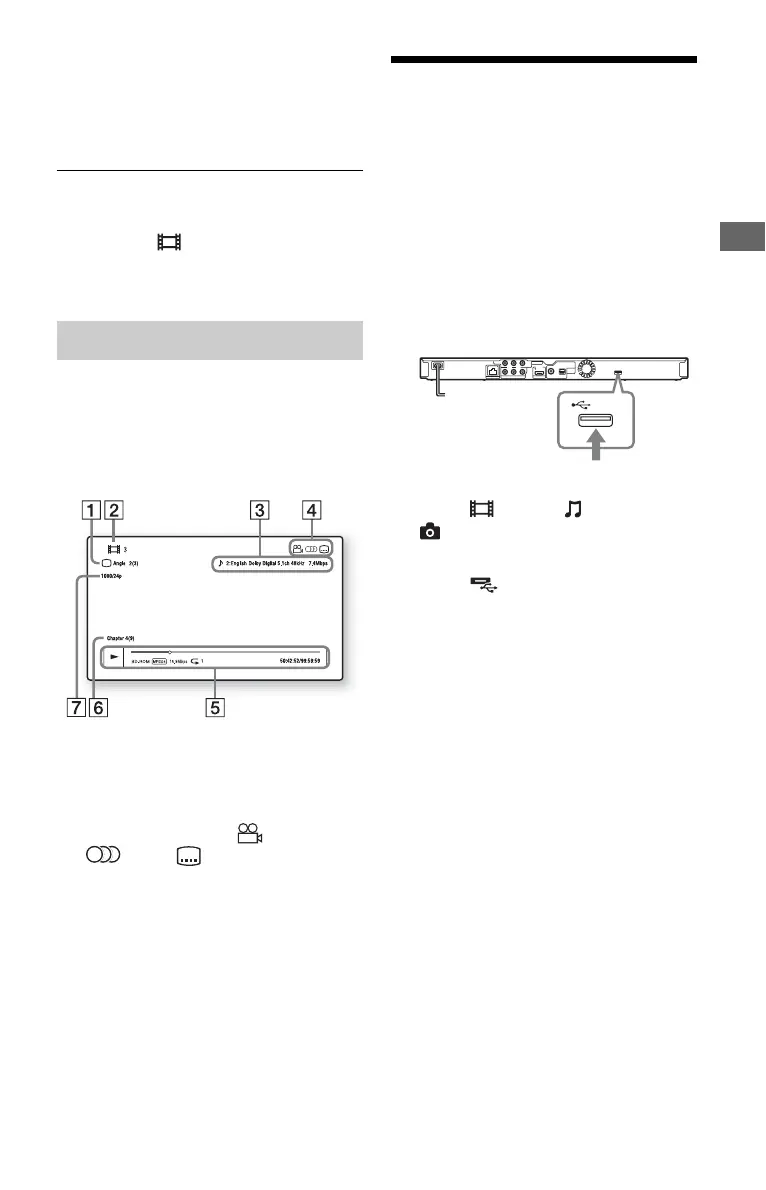
You can check the playback information,
etc., by pressing DISPLAY.
The displayed information differs depending
on the disc type and player status.
Example: when playing a BD-ROM
A The currently selected angle
B Title number or name
C The currently selected audio setting
D Available functions ( angle,
audio, subtitle)
E Playback information
Displays the Play mode, Playing status
bar, Disc type, Video codec, Bitrate,
and Repeat type.
F Chapter number
G Output resolution/Video frequency
Playing from a USB
Device
You can play video/music/photo files on the
connected USB device.
For playable USB devices, see “Playable
types of files” (page 31).
1 Connect the USB device to the USB
jack on the player.
Refer to the instruction manual supplied
with the USB device before connecting.
2 Select (Video), (Music), or
(Photo) on the home menu using
</,.
3 Select (USB device) using M/m,
and press ENTER.
Displaying the play information
USB device


 To Next Page