Need help?
Do you have a question about the Sony BDP-S6500 and is the answer not in the manual?
Identifies and describes the player's front and rear panel controls and connections.
Explains the function of each button on the remote control for operating the player.
Instructions for connecting the Blu-ray player to a TV or AV amplifier.
Instructions for updating the player's software via internet or USB memory.
Resets player settings to factory defaults or erases personal information.
Guides for diagnosing and resolving common picture, sound, and playback problems.
 General
| 3D | Yes |
|---|---|
| Depth | 192 mm |
| Width | 255 mm |
| Height | 39 mm |
| Weight | - g |
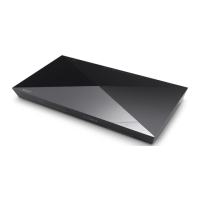
| Device type | Blu-Ray player |
| Product color | Black |
| Audio decoders | Dolby TrueHD, DSD, DTS Neo:6, DTS-HD Master Audio |
| Disc types supported | BD-R, BD-RE, BD-ROM, CD-R, CD-RW, DVD+R, DVD+R DL, DVD+RW, DVD-R, DVD-R DL, DVD-RW |
| Supported video modes | - |
| Card reader integrated | No |
| USB 2.0 ports quantity | USB 2.0 ports have a data transmission speed of 480 Mbps, and are backwards compatible with USB 1.1 ports. You can connect all kinds of peripheral devices to them. |
| Audio formats supported | AAC, AC3, FLAC, LPCM, M4A, MKA, MP3, WAV, WMA |
| Image formats supported | GIF, JPG, MPO, PNG |
| Video formats supported | 3G2, 3GP, AVC, M2TS, M4V, MKV, MOV, MP4, MPEG, MPEG1, MPEG2, MPEG4, MPG, MTS |
| Digital audio coaxial out | 1 |
| Audio output channels | - channels |

 To Next Page