14
Step 2: Easy Setup
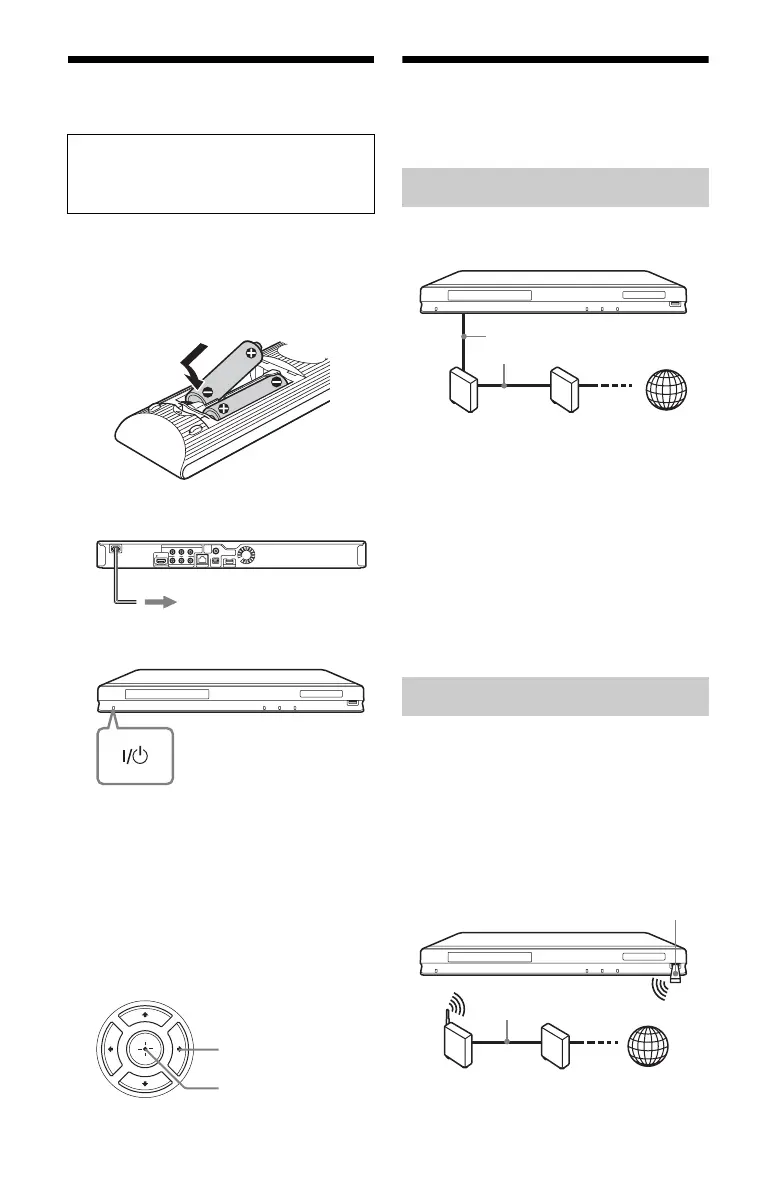
1 Insert two Size AA (R6) batteries by
matching the 3 and # ends on the
batteries to the markings inside the
battery compartment.
2 Plug the player into the AC outlet.
3 Press [/1 to turn on the player.
4 Turn on the TV, then switch the input
selector on your TV so that the signal
from the player appears on your TV
screen.
5 Perform “Easy Setup.”
Follow the on-screen instructions to
make the basic settings using </M/m/
, and ENTER on the remote.
Connecting to the
Network
Use a LAN cable to connect to the LAN (100)
terminal on the player.
z
Using a shielded interface cable (LAN cable),
straight or crossing, is recommended.
To set the network settings
Select “Network Settings,” “Internet
Settings,” then “Wired Setup” (page 31), and
follow the on-screen instructions to complete
the setup.
Turn off the player, then connect the USB
Wireless LAN Adapter (UWA-BR100 only
available as of November 2010) to the USB
jack on the front or rear of the player.
b
The USB Wireless LAN Adapter may not be
available in some regions/countries.
When turned on for the first time
Wait for a short while before the player
turns on and starts “Easy Setup.”
to AC outlet
ENTER
</M/m/,
Wired Setup
USB Wireless Setup
ADSL modem/
Cable modem
Broadband
router
LAN cable
(not supplied)
Internet
LAN cable
(not supplied)
Wireless LAN
router
ADSL modem/
Cable modem
Internet
USB Wireless
LAN Adapter



 To Next Page