15
US
Getting Started
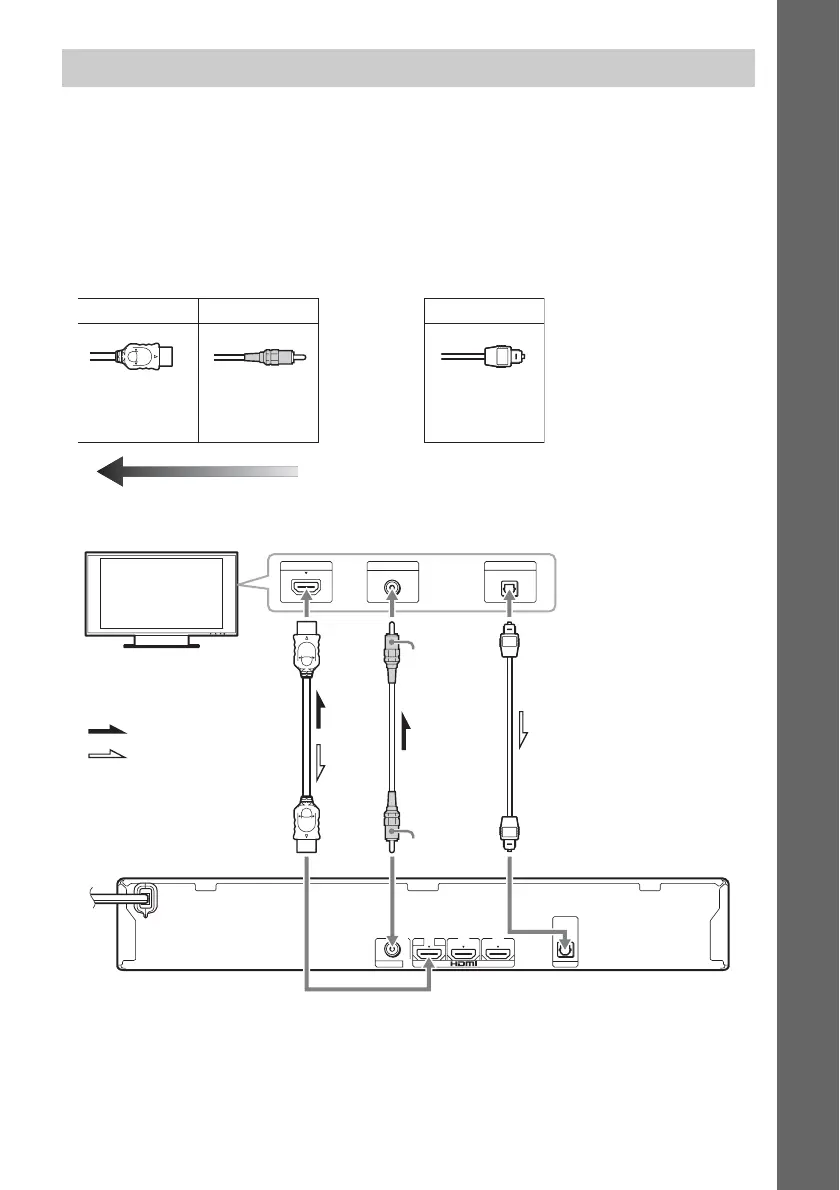
Connect the system to your TV to display the image of the system on your TV, and listen to TV sound
via the system’s speakers.
Depending on the jacks and functions on your TV, select the connection method.
• When your TV has an HDMI jack that is marked “ARC
1)
”: Connection A
• When your TV has an HDMI jack: Connections A and C
• When your TV does not have HDMI jacks: Connections B and C
1)
Audio Return Channel. For details, see “About Audio Return Channel” (page 16).
2)
The HDMI cable is supplied with Mexican and Latin American models and BDV-T28 only.
3)
Available only when your TV is compatible with the Audio Return Channel function.
Connecting the TV
AB C
HDMI cable
2)
Image quality
Video connections
Video cord
(not supplied)
Digital optical cord
(not supplied)
Audio connection
VIDEO IN DIGITAL OUT
OPTICAL
HDMI IN
VIDEO OUT
OPTICAL
DIGITAL IN
TV
ARC
OUT
IN 1 IN 2
AB C
TV
Rear panel of the unit
or
Yellow
Yellow
: Video signal
: Audio signal
Signal flow
3)



 To Next Page