36
US
Listening to the Radio
You can enjoy radio sound with the system’s
speakers.
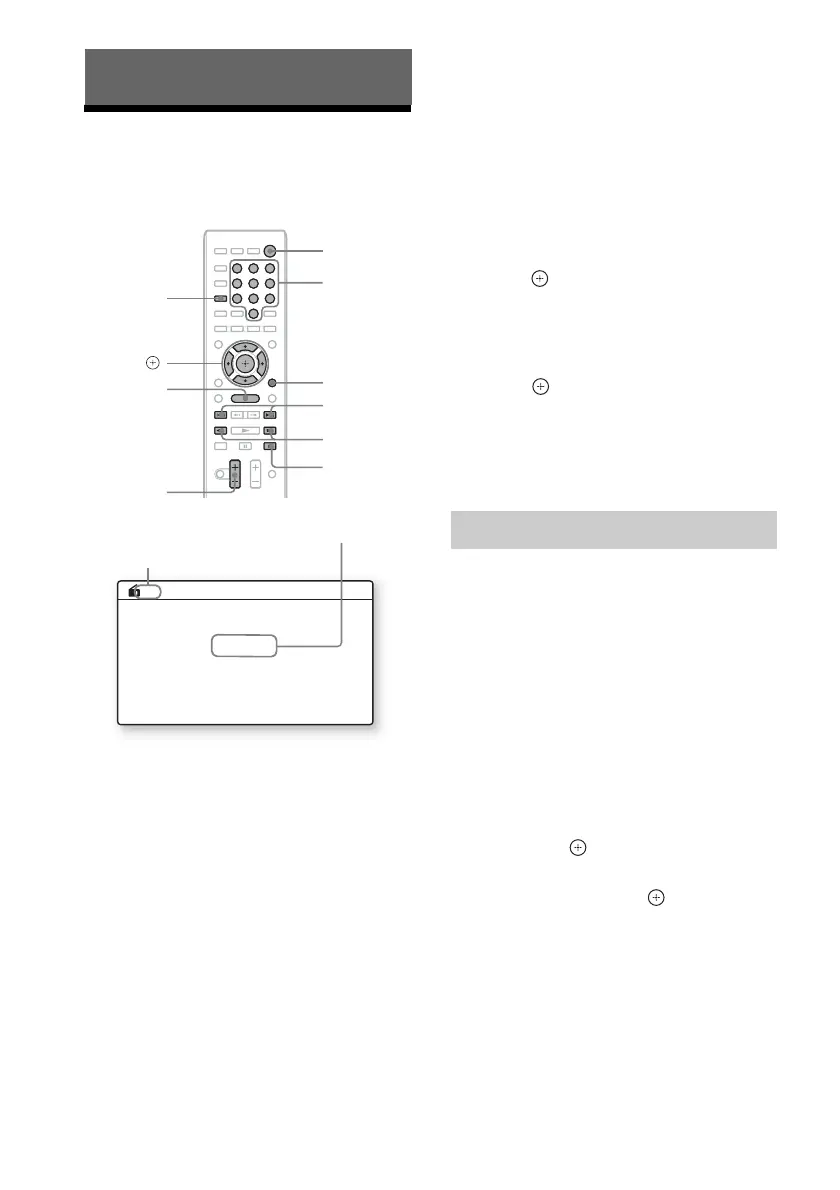
1 Press FUNCTION repeatedly until “FM”
appears in the front panel display.
2 Select the radio station.
Automatic tuning
Press and hold TUNING +/– until the auto
scanning starts.
[Auto Tuning] appears on the TV screen.
Scanning stops when the system tunes in a
station.
To stop the automatic tuning manually,
press TUNING +/– or x.
Manual tuning
Press TUNING +/– repeatedly.
3 Adjust the volume by pressing
VOL +/–.
If an FM program is noisy
If an FM program is noisy, you can select
monaural reception. There will be no stereo
effect, but reception will improve.
1 Press OPTIONS.
The option menu appears on the TV screen.
2 Press X/x to select [FM Mode], then
press .
3 Press X/x to select [Monaural].
• [Stereo]: Stereo reception.
• [Monaural]: Monaural reception.
4 Press .
The setting is made.
To turn off the radio
Press "/1.
You can preset up to 20 stations. Before tuning,
make sure to turn down the volume to minimum.
1 Press FUNCTION repeatedly until “FM”
appears in the front panel display.
2 Press and hold TUNING +/– until the
auto scanning starts.
Scanning stops when the system tunes in a
station.
3 Press OPTIONS.
The option menu appears on the TV screen.
4 Press X/x to select [Preset Memory],
then press .
5 Press X/x to select the preset number
you want, then press .
6 Repeat Steps 2 to 5 to store other
stations.
To change the preset number
Select the desired preset number by pressing
PRESET +/–, then perform the procedure from
Step 3.
Tuner
8
0
97
564
231
x
PRESET +/–
VOL +/–
TUNING +/–
C/X/x/c,
HOME
"/1
Number
buttons
FUNCTION
OPTIONS
FM 07
88.00
MHz
Current preset number
Current station
Presetting radio stations



 To Next Page