27
GB
Getting Started
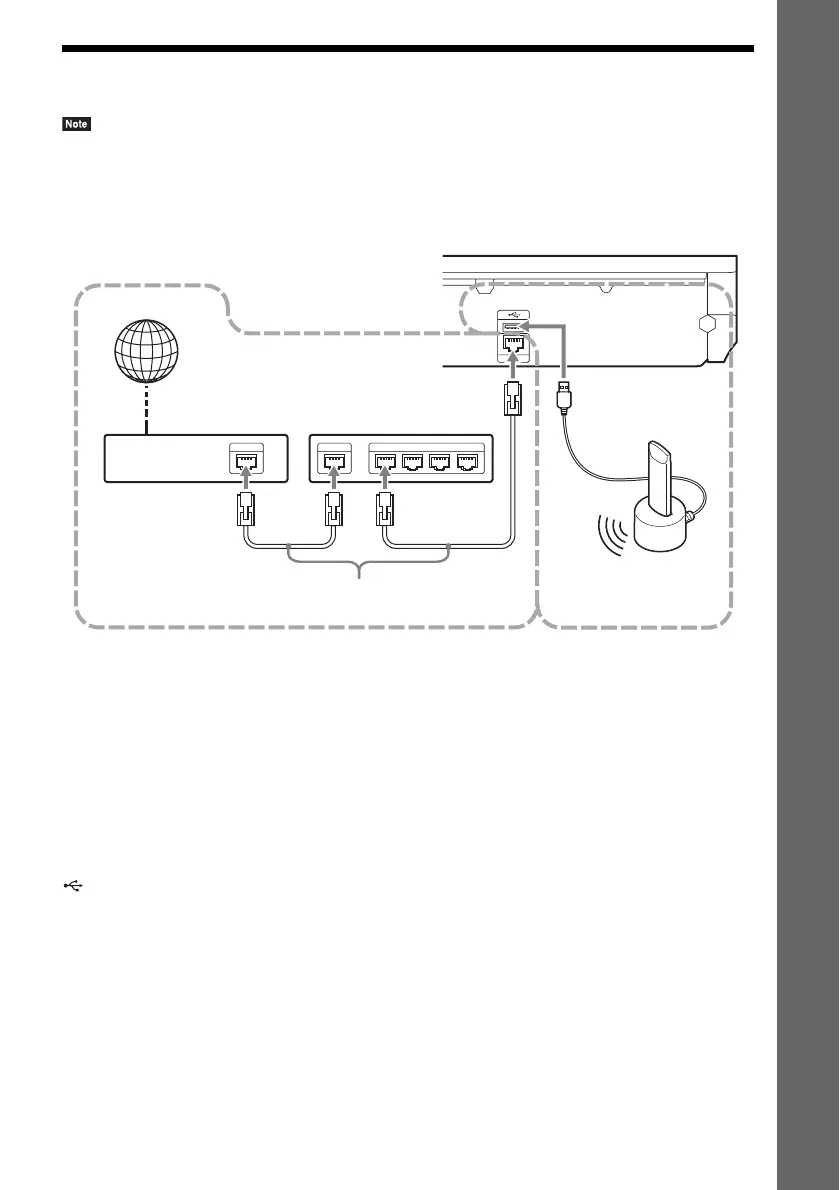
Step 3: Connecting to the Network
• To connect the system to your network, you need to make network settings that suit your usage environment and
components. For details, see “Setting up the Network” (page 53) and “[Network Settings]” (page 62).
Select the method based on your LAN (Local Area Network) environment.
1 Wired Setup
Use a LAN cable to connect to the LAN (100) terminal on the unit.
2 USB Wireless Setup
Use a wireless LAN via the USB Wireless LAN Adapter (Sony UWA-BR100* only).
The USB Wireless LAN Adapter may not be available in some regions/countries.
* As of November 2010.
Turn the unit off before connecting the extension cable or inserting the USB Wireless LAN Adapter.
After inserting the USB Wireless LAN Adapter to the base and connecting the extension cable to the
(USB) port (front or rear), turn the unit on again.
LAN 1 LAN 2 LAN 3 LAN 4WANETHER
LAN (100)
1
2
ADSL modem/
cable modem
Broadband router
LAN cable
(not supplied)
Internet
Rear panel of the unit
USB
Wireless LAN
Adapter
(not supplied)













 To Next Page