14
US
BDV-E6100/BDV-E4100/BDV-E3100/BDV-E2100
4-446-733-11(1)
D:\NORM'S JOB\SONY HA\SO120029\BDV-
E6100_4100_3100_E2100\4446733111_US (U2)\030UNP.fm
masterpage: Left
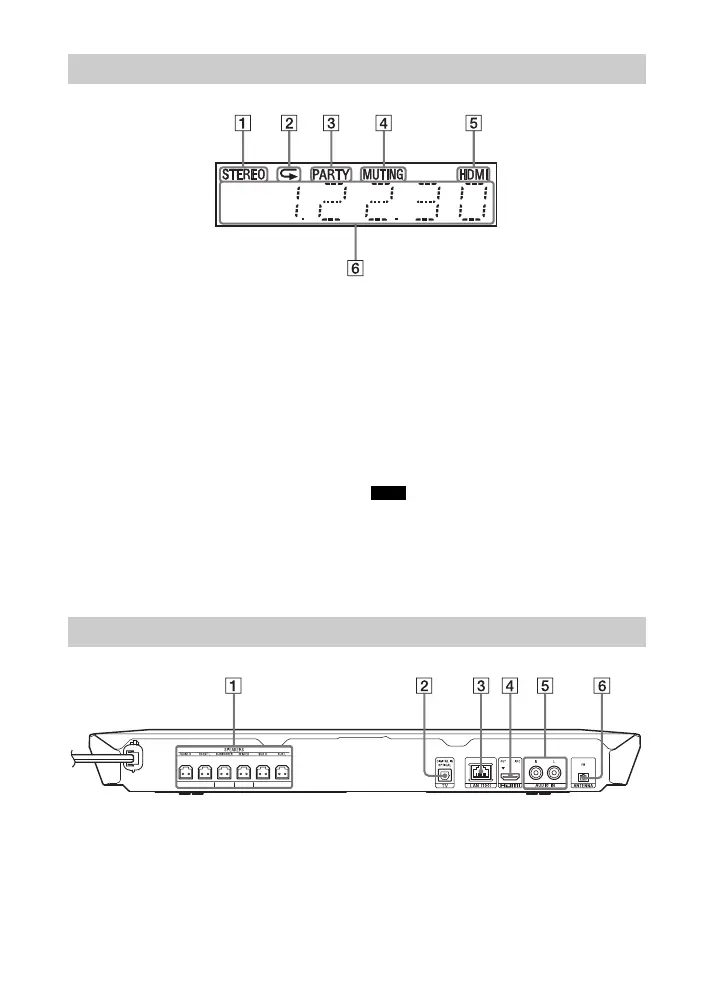
A Lights up when stereo sound is
received. (Radio only)
B Lights up when repeat play is
activated.
C Lights up when the system is
playing via the PARTY
STREAMING function.
D Lights up when muting is on.
E Lights up when the HDMI (OUT)
jack is correctly connected to an
HDCP (High-bandwidth Digital
Content Protection) compliant
equipment with HDMI or DVI
(Digital Visual Interface) input.
F Displays the system’s status,
such as radio frequency, etc.
When you press DISPLAY, the stream
information/decoding status is
displayed when the function is set to
“TV”.
The stream information/decoding
status may not appear depending on
the stream or item being decoded.
When the [Main Unit illumination] is set to
[Auto] in [System Settings], the front panel
display lights off if you do not operate the unit for
about 10 seconds.
A SPEAKERS jacks (page 18)
B TV (DIGITAL IN OPTICAL) jack
(page 19)
C LAN (100) terminal (page 21)
D HDMI (OUT) jack (page 19)
E AUDIO IN (L/R) jacks (page 20)
F ANTENNA (FM) terminal
(page 21)
Indicators in the front panel display
Note
Rear panel



 To Next Page