32
US
BDV-E6100/BDV-E4100/BDV-E3100/BDV-E2100
4-446-733-11(1)
D:\NORM'S JOB\SONY HA\SO120029\BDV-
E6100_4100_3100_E2100\4446733111_US (U2)\050PLA.fm
masterpage: Left
Playing via a Network
Sony Entertainment Network serves as a
gateway delivering selected Internet
content and a variety of on-demand
entertainment straight to your unit.
• Some Internet content requires registration via a
PC before it can be played. For further details,
visit the following website:
http://www.sony.com/blurayhtsupport/
• Some Internet content may not be available in
some countries/regions.
1 Prepare for Sony Entertainment
Network.
Connect the system to a network
(page 21).
2 Press SEN.
3 Press B/V/v/b to select the
Internet content and a variety of
on-demand entertainment, then
press .
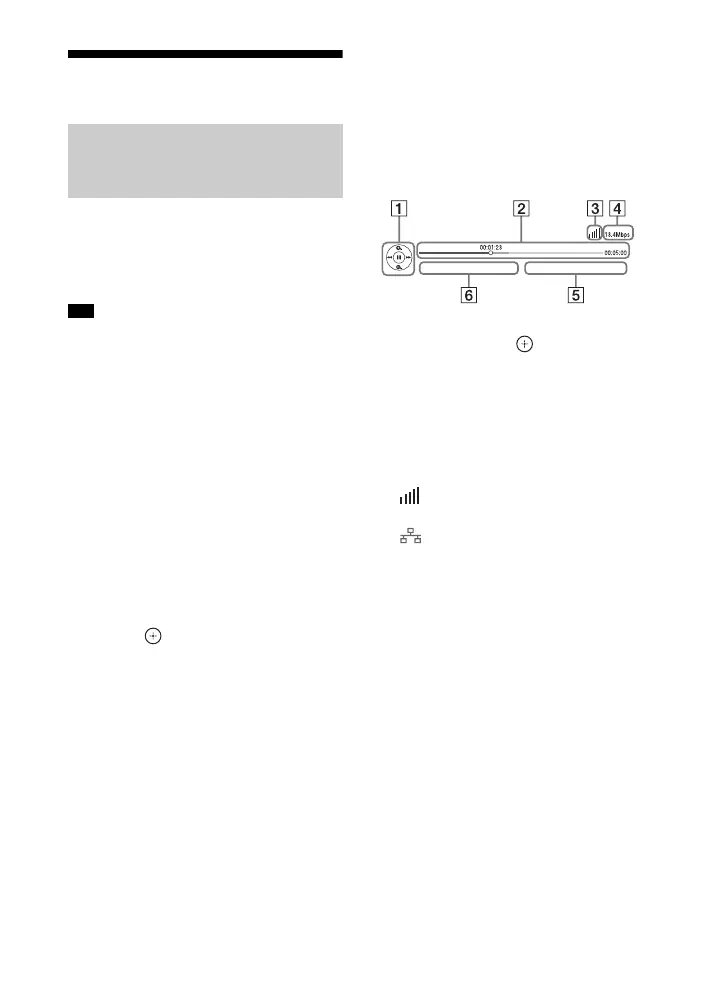
Video streaming control
panel
The control panel appears when a video file
starts playing. The displayed items may
differ depending on the Internet content
provider.
To display again, press DISPLAY.
A Control display
Press B/V/v/b or for playback
operations.
B Playing status bar
Status bar, cursor indicating the
current position, playing time, duration
of the video file
C Network condition indicator
Indicates signal strength for a
wireless connection.
Indicates a wired connection.
D Network transmission speed
E The next video file name
F The currently selected video file name
Enjoying Sony
Entertainment Network
(SEN)
Tip



 To Next Page