27
US
BDV-E6100/BDV-E4100/BDV-E3100/BDV-E2100
4-446-733-11(1)
D:\NORM'S JOB\SONY HA\SO120029\BDV-
E6100_4100_3100_E2100\4446733111_US (U2)\050PLA.fm
masterpage: Right
Playback
You can enjoy Blu-ray 3D Discs with the
3D logo*.
*
1 Prepare for Blu-ray 3D Disc
playback.
• Connect the system to your
3D-compatible TV using a High
Speed HDMI cable (page 19).
• Set [3D Output Setting] and [TV
Screen Size Setting for 3D] in
[Screen Settings] (page 46).
2 Insert a Blu-ray 3D Disc.
The operation method differs
depending on the disc. Refer to the
operating instructions supplied with
the disc.
Refer also to the operating instructions of your
3D-compatible TV.
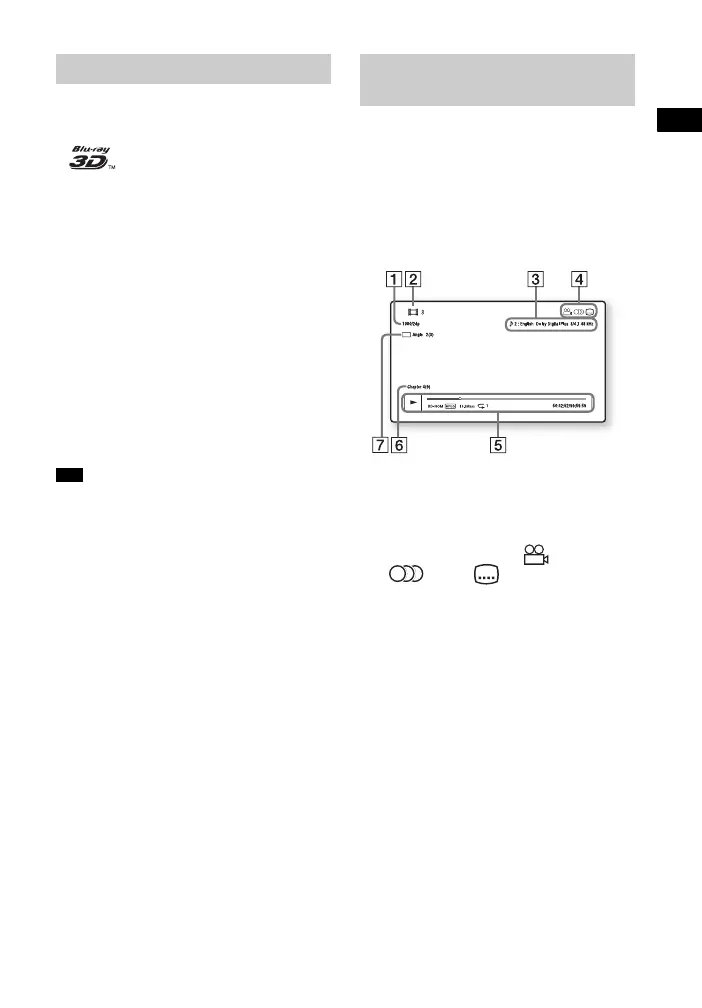
You can check the playback information,
etc., by pressing DISPLAY.
The displayed information differs
depending on the disc type and system
status.
Example: when playing a BD-ROM
A Output resolution/Video frequency
B Title number or name
C The currently selected audio setting
D Available functions ( angle,
audio, subtitle)
E Playback information
Displays play mode, playing status
bar, disc type, video codec, bit rate,
repeat type, elapsed time, total playing
time
F Chapter number
G The currently selected angle
Enjoying Blu-ray 3D
Tip
Displaying the playback
information



 To Next Page