External Audio Device
39
US
Using an S-AIR Product
About S-AIR products
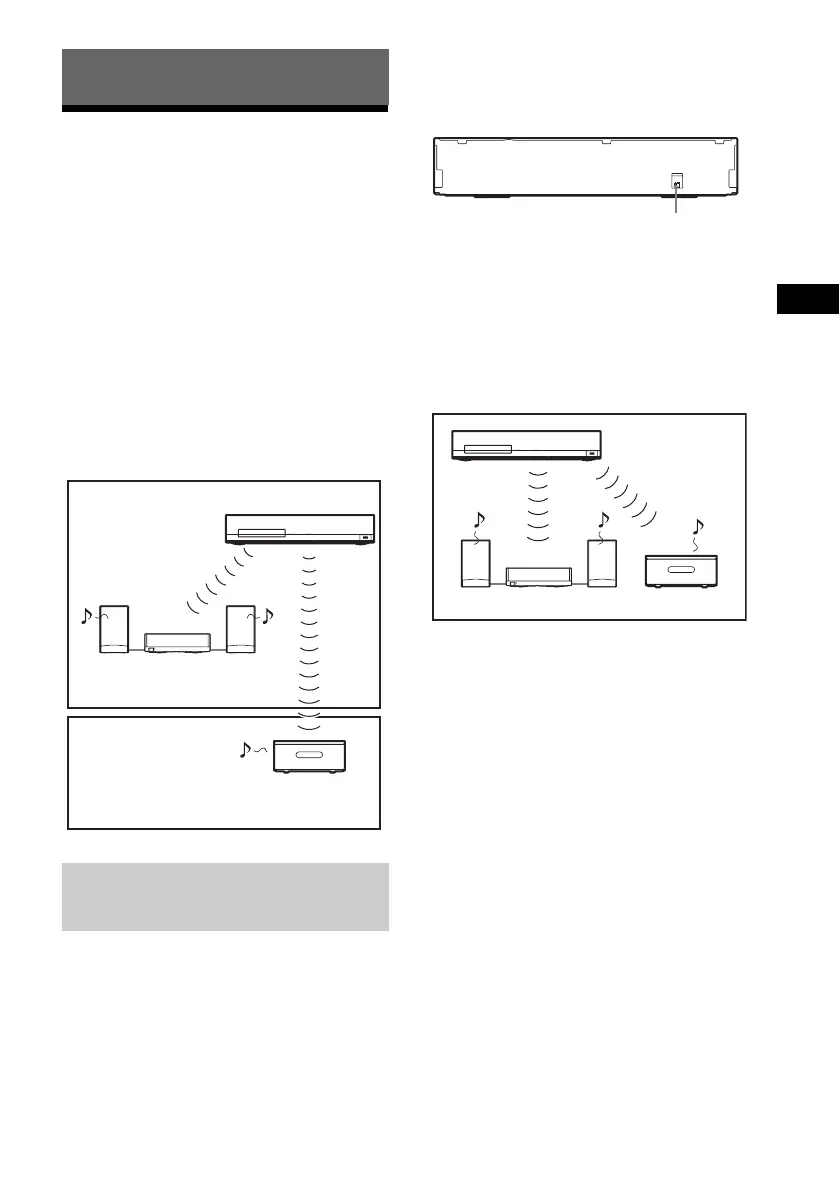
There are two types of S-AIR product.
• S-AIR main unit (this unit): This is for
transmitting sound. You can use up to three
S-AIR main units. (The number of usable
S-AIR main units depends on the use
environment.)
• S-AIR sub unit: This is for receiving sound.
– Surround amplifier (supplied): You
can enjoy surround speaker sound
wirelessly.
– S-AIR receiver (optional): You can
enjoy system sound in another room.
Simply by matching the ID of the unit and the
S-AIR sub unit, you can activate wireless
transmission.
To set the ID of the unit
1 Set the S-AIR ID switch of the unit to
the desired ID.
You can select any ID (A, B, or C).
2 Press "/1.
The system turns on.
3 Set the S-AIR sub unit to the same ID.
Wireless transmission is activated as
follows (example):
To set the ID of the surround
amplifier
1 Make sure that the SURROUND
SELECTOR switch of the surround
amplifier is set to SURROUND.
2 Set the S-AIR ID switch of the surround
amplifier to match the ID (A, B, or C) of
the unit.
3 Press "/1 on the surround amplifier.
When wireless transmission is activated,
the S-AIR/STANDBY indicator of the
surround amplifier turns green.
For details of the S-AIR/STANDBY
indicator, see “Surround amplifier”
(page 11).
To set the ID of the S-AIR
receiver
Refer to the operating instructions of the S-AIR
receiver.
External Audio Device
Setting the S-AIR ID to activate
wireless transmission
For the surround amplifier
For the S-AIR receiver
S-AIR sub unit
(surround amplifier)
S-AIR main unit
S-AIR sub unit
(S-AIR receiver)
(not supplied)
Room A
Room B
S-AIR ID
ABC
S-AIR ID switch
ID A
ID A ID A


 To Next Page