3
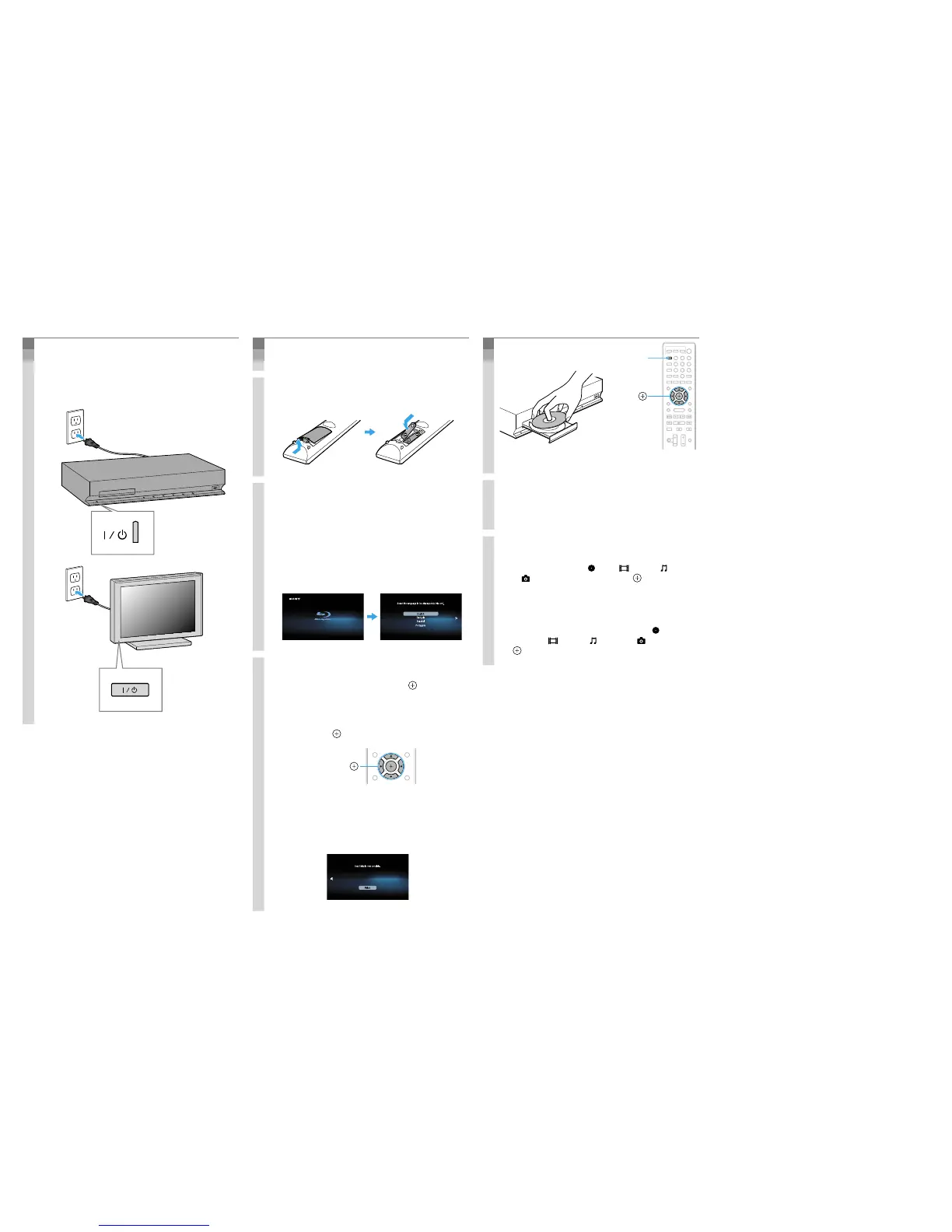
Connect the AC power cords/
Conecte los cables de alimentación de ca
Connect the AC power cords (
ʓ
), and
turn on the power (
ʔ
).
Conecte los cables de alimentación de
ca (
ʓ
) y, a continuación, encienda la
alimentación (
ʔ
).
ʓ
ʔ
ʓ
ʔ
4
Perform “Easy Setup”/
Realización de la “Conguración fácil”
Do not insert a disc before performing the “Easy Setup”.
No inserte ningún disco antes de llevar a cabo la “Configuración fácil”.
1. Insert batteries into the remote.
Inserte las pilas en el mando a distancia.
2. Switch the input selector on your TV
so that system screens like the ones
below appear on the TV screen.
Cambie el selector de entrada del
televisor de manera que aparezcan
pantallas similares a las que aparecen
en la pantalla del televisor.
“Easy Setup” screen/
Pantalla “Configuración fácil”
Starting up/
Inicio
3. Perform basic settings by following
the on-screen instructions in “Easy
Setup” using
V
/
j
/
/
p
and
.
Siga las instrucciones en pantalla para
realizar los ajustes básicos en
“Configuración fácil” mediante
V
/
j
/
/
p
y
.
V
/
j
/
/
p
,
[Easy Setup is now complete.] appears when “Easy
Setup” is complete.
Aparece el mensaje [Ha completado la configuración
fácil.] cuando finaliza la “Configuración fácil”.
5
Play a disc/
Reproducción de discos
V
/
j
/
/
p
,
8
0
97
564
231
ì
1. Press ì, and place a disc on the tray.
Pulse
ì y coloque un disco en la
bandeja.
2. Press
ì to close the disc tray.
Playback starts. If playback does not start
automatically, select
in the [Video], [Music],
or
[Photo] category, and press .
Pulse ì para cerrar la bandeja de
discos.
Comienza la reproducción. Si la reproducción no
se inicia automáticamente, seleccione
en la
categoría
[Vídeo], [Música] o [Foto] y pulse
.
Enjoying more BD functions
Refer to “Enjoying BONUSVIEW/BD-LIVE” in the
Operating Instructions.
Más funciones de BD
Consulte “Utilización de BONUSVIEW/BD-LIVE” en
el Manual de instrucciones.



 To Next Page