21
GB
Getting Started
Step 4: Performing the
Easy Setup
Before performing Step 4
Make sure all connections are secure, and then
connect the AC power cord (mains lead).
Follow the Steps below to make the basic
adjustments for using the system.
Displayed items vary depending on the country
model.
1 Turn on the TV.
2 Press [/1.
3 Switch the input selector on your TV so
that the signal from the system
appears on the TV screen.
The Easy Setup Display for OSD language
selection appears.
4 Perform the [Easy Setup]. Follow the
on-screen instructions to make the
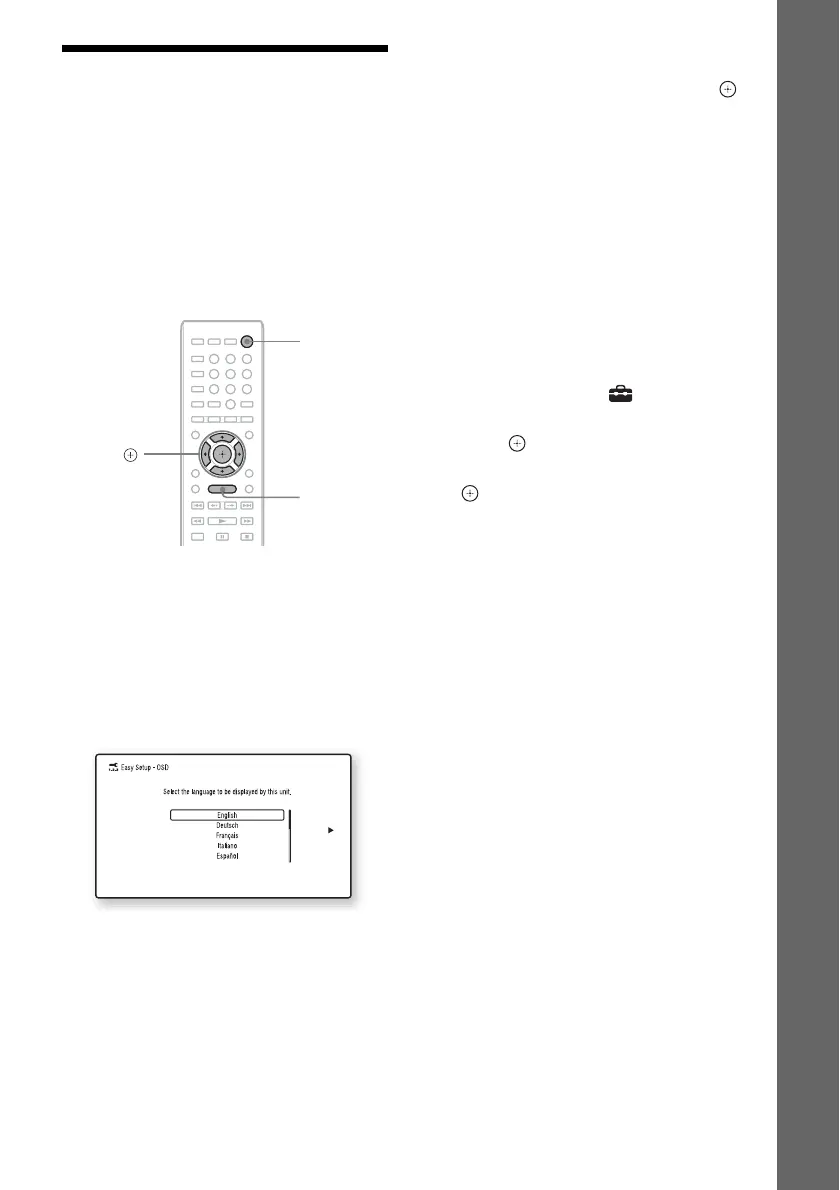
basic settings using C/X/x/c, and .
Depending on the connection method
(page 14), perform the following setting.
• HDMI cable connection: Follow the
instructions that are displayed on the TV
screen.
• Video cord connection: Select [16:9] or
[4:3] so that the picture is displayed
correctly.
To recall the Easy Setup Display
1 Press HOME.
The home menu appears on the TV screen.
2 Press C/c to select [Setup].
3 Press X/x to select [Easy Setup], then
press .
4 Press C/c to select [Start], then press
.
The Easy Setup Display appears.
8
0
97
564
231
C/X/x/c,
HOME
"/1


 To Next Page