20
GB
Getting Started
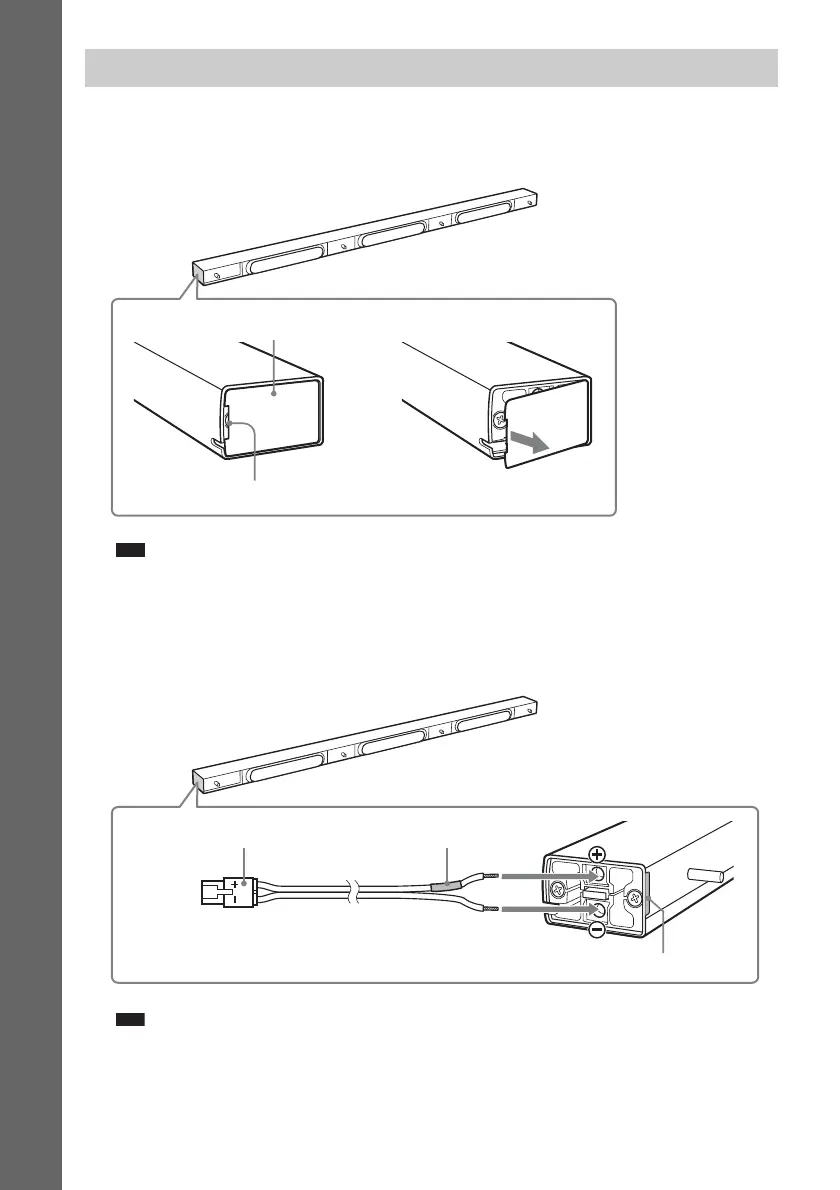
1 Remove the cover from the speaker.
Pry up the cover by inserting a thin, flat object into the slit in the cover. To replace the cover, see
Step 3. The removed cover is used in a later step, so be careful not to lose it.
Note
• When assembling, take care not to touch the speaker unit.
2 Connect the speaker cords to the speaker.
Use the speaker cords (green). Be sure to match the speaker cords to the appropriate terminals on
the speakers: the speaker cord with the color tube to 3, and the speaker cord without the color tube
to #. Do not catch the speaker cord insulation in the speaker terminals.
Note
• When assembling, take care not to touch the speaker unit.
Assembling the center speaker
Center speaker
Cover
,
Slit
Center speaker
Connector (green)
#
3
Color tube (green)
Check the polarity on the label.


 To Next Page