59
GB
Getting Started
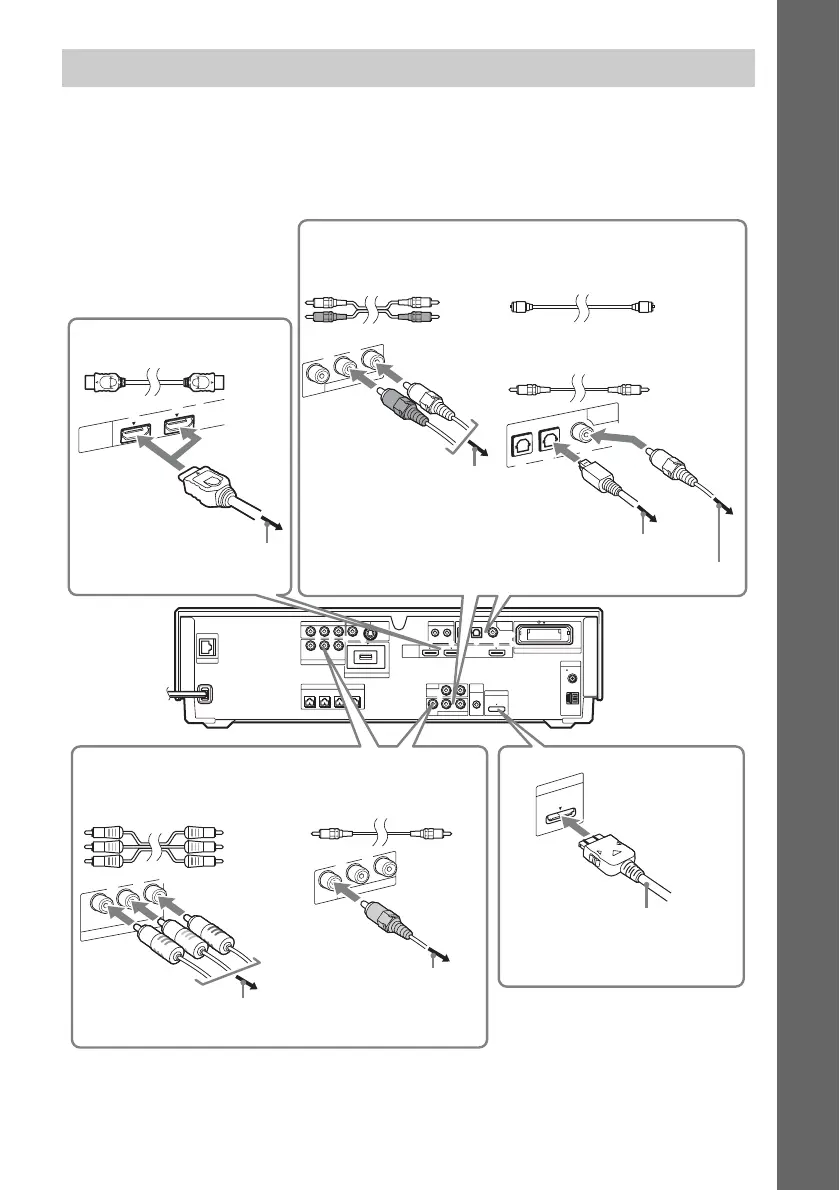
You can enjoy the connected component(s) using the six speakers of the system.
• Set-top box/digital satellite receiver, VCR, or PlayStation, etc. (without HDMI OUT jack): 1
• Set-top box/digital satellite receiver or PLAYSTATION
®
3, etc. (with HDMI OUT jack): 2
• DIGITAL MEDIA PORT adapter: 3
3 Connecting the other components
COAXIAL
OPTICAL
COAXIAL75
FM
AM
ANTENNA
DIGITAL
HDMI
DMPORT
EZW-RT10
TV
SAT/CABLE IN
VIDEO OUT IR REMOTE
LAN(100)
EXTERNAL
SPEAKER
SAT/CABLE
COMPONENT VIDEO OUT
COMPONENT VIDEO IN
A.CAL
MIC
SAT/CABLETV
IN 1 IN 2 OUT
IN
700mA
MAX
ECM-AC2
AUDIO IN
OUT IN
AUDIO
VIDEO
Y
Y
P
B
/
P
B
/ C
B
P
R
/ C
R
C
B
P
R
/
C
R
LR
LR
DC5V
DC5V 500mA MAX
S-VIDEOVIDEO
FRONT
R
FRONT
L
CENTER WOOFER
COAXIAL
OPTICAL
DIGITAL
SAT/CABLE
TV
IN
1
1
2
3
S
AT/C
A
B
LE
C
O
M
PO
N
EN
T V
ID
EO
IN
Y
P
B
/ C
B
P
R
/ C
R
S
A
T/C
A
B
LE
IN
A
U
D
IO
V
ID
E
O
LR
S
A
T/C
A
B
LE
IN
A
U
D
IO
V
ID
E
O
LR
DMPORT
700mA
MAX
DC5V
H
D
M
I
IN 1 IN 2
Rear panel of the unit
(Ex. BDV-IT1000)
To the component video output jacks of
the component
To the HDMI OUT jack
of the component
To the video output
jack of the component
B Component video cord
(not supplied)
HDMI cable
(not supplied)
A Audio cord
(not supplied)
Green
Blue
Red
White
Red
To the digital optical output jack of the component
To the digital coaxial output jack of the component
B Digital optical cord
(not supplied)
B Digital coaxial cord
(not supplied)
or
Audio connection
To the audio output jacks of the
component
Video connection
A Video cord
(not supplied)
DIGITAL MEDIA PORT
adapter


 To Next Page