63
GB
Getting Started
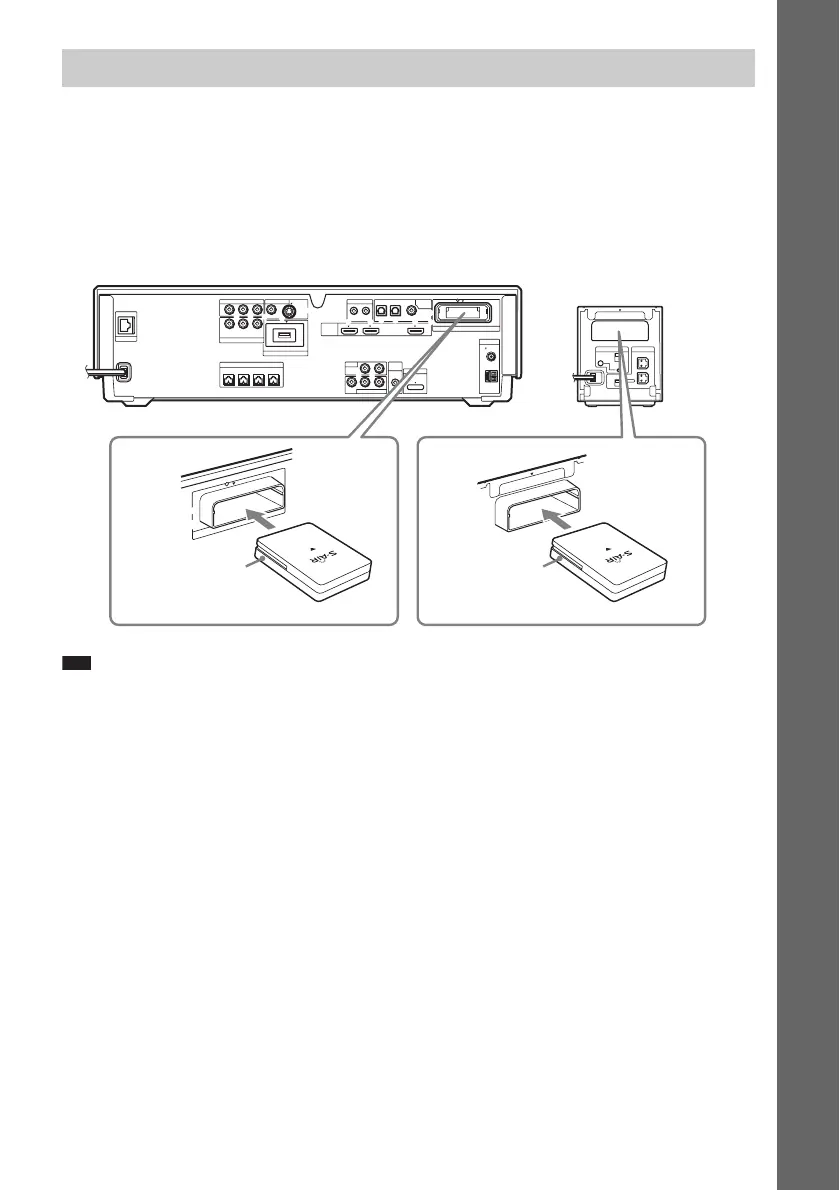
You can transmit sound from the unit to an S-AIR product, such as a surround amplifier or S-AIR
receiver.
An S-AIR product is a component that is compatible with the S-AIR function.
To use the S-AIR function, you need to insert the wireless transceivers into the unit, surround amplifier,
and S-AIR receiver.
For details of the S-AIR function, see “Using an S-AIR Product” (page 99).
Note
• When you insert the wireless transceiver, make sure that the AC power cord (mains lead) is not connected to a wall
outlet (mains).
• Do not touch the terminals of the wireless transceiver.
• Insert the wireless transceiver with the S-AIR logo facing up.
• Insert the wireless transceiver so that the V marks are aligned.
• Do not insert other than the wireless transceiver into the EZW-RT10 slot.
5 Inserting the wireless transceiver
R
SURROUND SELECTOR
S-AIR ID
EZW-RT
10
SPEAKER
SURROUND
PAI R IN G
C
B
A
SURROUND
BACK
L
COAXIAL
OPTICAL
COAXIAL75
FM
AM
ANTENNA
DIGITAL
HDMI
DMPORT
EZW-RT10
TV
SAT/CABLE IN
VIDEO OUT IR REMOTE
LAN(100)
EXTERNAL
SPEAKER
SAT/CABLE
COMPONENT VIDEO OUT
COMPONENT VIDEO IN
A.CAL
MIC
SAT/CABLETV
IN 1 IN 2 OUT
IN
700mA
MAX
ECM-AC2
AUDIO IN
OUT IN
AUDIO
VIDEO
Y
Y
P
B
/
P
B
/ C
B
P
R
/ C
R
C
B
P
R
/
C
R
LR
LR
DC5V
DC5V 500mA MAX
S-VIDEOVIDEO
FRONT
R
FRONT
L
CENTER WOOFER
E
Z
W
-R
T
10
EZW-RT10
Wireless
transceiver
Wireless
transceiver
Rear panel of the
surround amplifier
Rear panel of the unit (Ex. BDV-IT1000)


 To Next Page