66
GB
Getting Started
• To enjoy the BD-Live function, we recommend using an Internet connection with an effective speed of 1 Mbps or
greater, depending on your connection environment and network condition.
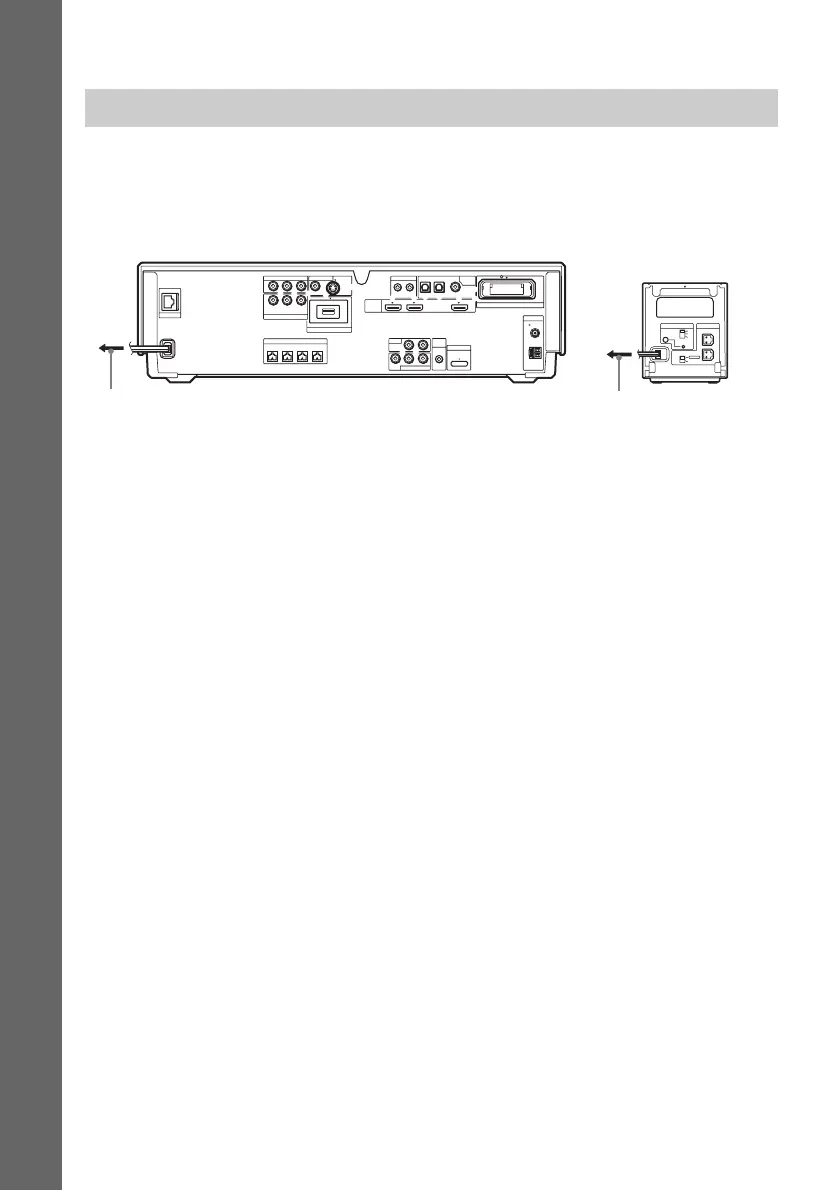
Before connecting the AC power cords (mains leads) of the unit and the surround amplifier to a wall
outlet (mains), connect the front, center speakers and subwoofer to the unit and surround speakers to
the surround amplifier.
8 Connecting the AC power cords (mains leads)
R
SURROUND SELECTOR
S-AIR ID
EZW-RT
10
SPEAKER
SURROUND
PAI R IN G
C
B
A
SURROUND
BACK
L
COAXIAL
OPTICAL
COAXIAL75
FM
AM
ANTENNA
DIGITAL
HDMI
DMPORT
EZW-RT10
TV
SAT/CABLE IN
VIDEO OUT IR REMOTE
LAN(100)
EXTERNAL
SPEAKER
SAT/CABLE
COMPONENT VIDEO OUT
COMPONENT VIDEO IN
A.CAL
MIC
SAT/CABLETV
IN 1 IN 2 OUT
IN
700mA
MAX
ECM-AC2
AUDIO IN
OUT IN
AUDIO
VIDEO
Y
Y
P
B
/
P
B
/ C
B
P
R
/ C
R
C
B
P
R
/
C
R
LR
LR
DC5V
DC5V 500mA MAX
S-VIDEOVIDEO
FRONT
R
FRONT
L
CENTER WOOFER
To the wall outlet (mains)
To the wall outlet (mains)
Rear panel of the
surround amplifier
Rear panel of the unit (Ex. BDV-IT1000)


 To Next Page