16
GB
BDV-N9200W/BDV-N9200WL/BDV-N7200W/BDV-N7200WL/BDV-N5200W
4-485-800-13(1)
D:\NORM'S JOB\SONY HA\SO140001\BDV-N9200_7200_5200_E3200
(PMRF 02)\4485800131_GB (CEK)\030UNP.fm
masterpage: Left
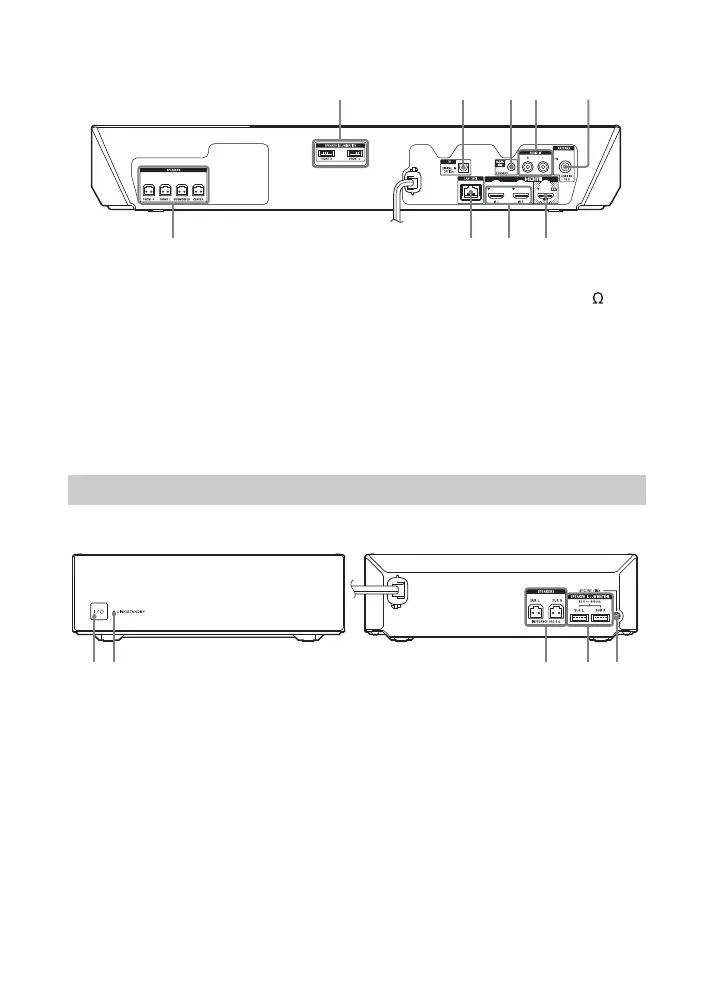
Rear panel
A SPEAKER ILLUMINATION terminals
(BDV-N9200WL/BDV-N7200WL
only) (page 21)
B TV (DIGITAL IN OPTICAL) jack
(pages 22, 23)
C A.CAL MIC jack (BDV-N9200W/
BDV-N9200WL/BDV-N7200W/
BDV-N7200WL only) (pages 28,
47)
D AUDIO IN (L/R) jacks (pages 22, 23)
E ANTENNA (FM COAXIAL 75 ) jack
(page 25)
F HDMI (OUT) jack (page 22)
G HDMI (IN 1/IN 2) jacks (page 23)
H LAN (100) terminal (page 25)
I SPEAKERS jacks (page 21)
A "/1 (on/standby)
B LINK/STANDBY indicator
(page 27)
You can check the status of wireless
transmission between the main unit
and surround amplifier.
C SPEAKERS jacks
D SPEAKER ILLUMINATION terminals
(BDV-N9200WL/BDV-N7200WL
only) (page 21)
E SECURE LINK button (page 53)
Starts the Secure Link function.
Surround amplifier


 To Next Page