17
US
Getting Started
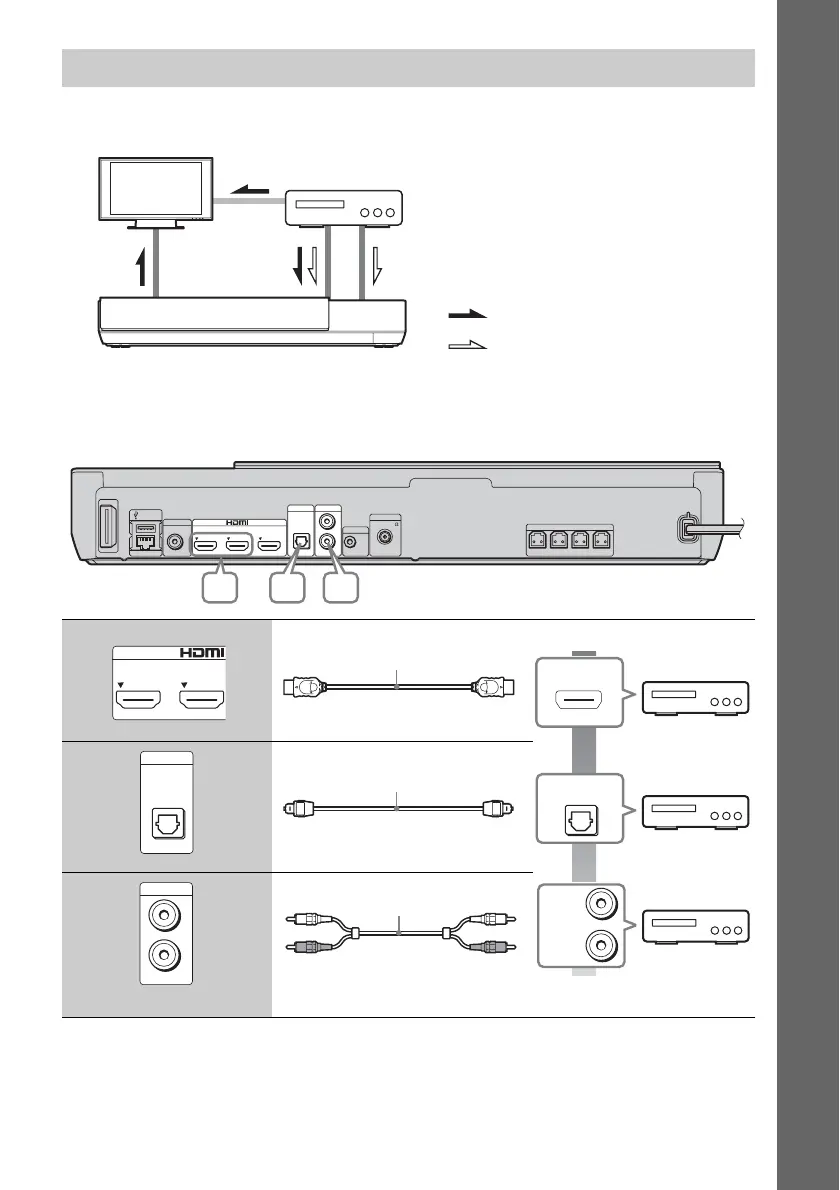
Connect the system, other components, and TV as follows.
* This connection is unnecessary for connection A (HDMI connection).
Select one of the following connection methods according to the jack type of the component.
* Use a High Speed HDMI cable.
Connecting the other components (Set-top box, etc.)
A High quality
Standard
quality
B
C
System
Signal flow
TV
: Audio signal
: Video signal
Video out*
Connection A
Component
(Set-top box, VCR, PlayStation
®
, or
digital satellite receiver, etc.)
Connection B, C
FM
ECM-AC3AUDIO INDIGITAL IN
OPTICAL
L
R
COAXIAL
75
ANTENNA
A.CAL MIC
AUDIO
TV
VIDEO OUT
USB 1
LAN (100)
OUT
IN 2IN 1
ARC
FRONT R FRONT L CENTERSUBWOOFER
SPEAKERS
B CA
IN 2IN 1
HDMI cable* (not supplied)
OPTICAL
DIGITAL OUT
L
R
AUDIO
OUTPUT
HDMI OUT
DIGITAL IN
OPTICAL
TV
Digital optical cord
(not supplied)
AUDIO IN
L
R
AUDIO
Audio cable (not supplied)


 To Next Page