...
I
O>
Location and Function of Parts
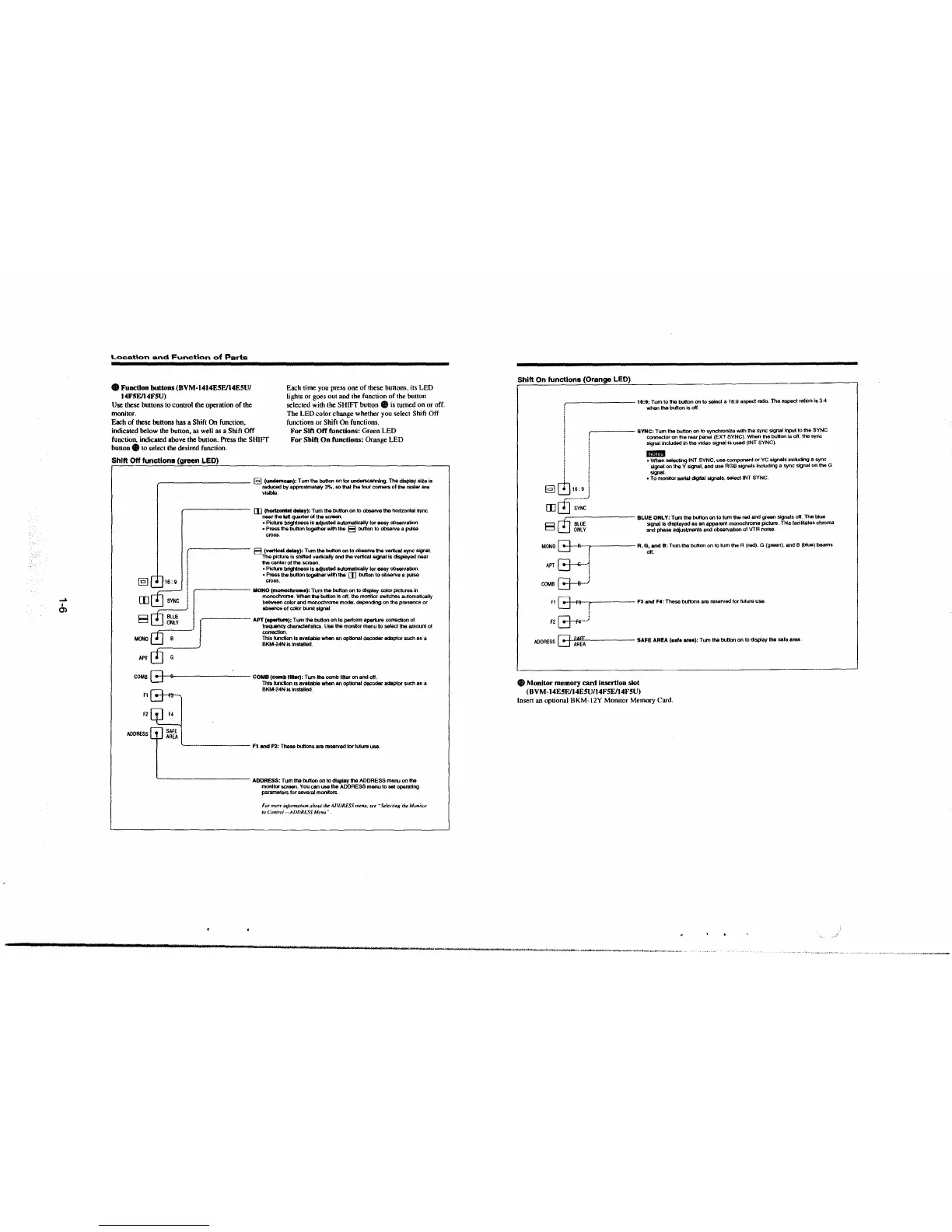
• Function buttons (BVM-1414E5E/14E5U/
Each time you press one of these buttons. its LED
lights or goes out and the function of the button
selected with the SH!Ff button 8 is turned on or off.
The LED color change whether you select Shift Off
functions or Shift On functions.
14FSE/14F5U)
Use these buttons to control the operation of the
monitor.
Each of these buttons has a Shift On function,
indicated below the button, as well as a Shift Off
function, indicated above the button. Press the SH!Ff
button 8 to select the desired function.
For Sift Off functions: Green LED
For Shift On functions: Orange LED
Shift Off functions (green LED)
~---------- @] (underscan): Tum the button on tor uncterscannlng. The display size is
reduced by approximately 3%. so that the IOUf comers of the raster are
visible.
,-------- [I] (horlzontal delay): Tum the button on to observe the horizontal sync
near the left quarter of the screen.
• Picture brightness Is adjusted automatically for easy observation
• Press the button together with th& E3 button to observe a pulse
cross
f E3 (vertk:al delay): Tum the button on to observe the vertical sync signal.
! The pictute is shifted vertically and the vertical S918l ls clsptayed near
! the center of the SC1'881'l.
} • Picture brightness Is adjusted automatically tor easy observation.
: • Press the button together with the []] button to observe a pulse
@] L±.J 16 : 9 / ! cross.
0
~
! fr= MONO (monochrome): Tum the button on lo display color pictures in
[I]
i monochrome. When the button Is off, the monitor switches automatically
SYNC
! between cok>r and monochrome mode, depending on the presence or
absence of color burst signal
E3 0
g~~~
J J APT (aperture): Tum the button on to pelfonn aperture correction ol
frequency characteristics. Use the monitor menu to select the amount of
~
correction.
MONO This hl1c:llon is avai~ when an optional decoder adaptor such as a
BKM·24N Is Installed
APT 0 G
COMB G 8 COMB(combfltter):Tumlhecomb1illeronandott.
This function 1s available
when an optional decoder adaptor such
~
a
B-
BKM·24N is Installed
fl f9--
f2
ADDRESS
·------ f1 and F2: These buttons are reserved 1orluture use.
~---------- ADDRESS: Tum the button on to display the ADDRESS menu on the
monitor screen. You can use the ADDRESS manu to set operating
parame1ers
lor severaJ monitors.
For more infonn11t1QII abmd ,~ ADDRESS menu, see .. Selec1in}l lhe Monilur
to Con/ro/-AD{)Rt.:SS Menu.··
Shift On functions (Orange LED)
,-------- 11:1: Tum to the button on to select a 16:9 aspect ratio. The aspect ration Is 3:4
when the button is off.
~---- SYNC: Tum the button on to synchronize with the sync signal Input to the SYNC
connector on the rear panel (EXT SYNC). When the button is off, the sync
signal
indudad in !he video signal is used (INT SYNC).
I
!
/
@] GJ16:9,
[I] cfr;~·~:
E3
~
~
oNi:v
mim
• When selecting INT SYNC, use component or YC signals including a sync
signal
on the Y signal, and use AGB signals Including a sync signal on the G
signal.
• To monitor serial <igjtal stgnals, seiect INT SYNC.
BLUE ONLY: Tum
the button on to tum the red and green signals ott. The blue
signal
Is displayed as an apparent monochrome picture. This facilitates chroma
and phase
adiust,nents and observabon al VTR noise.
MONO G R ( R, G, and 8: Tum the button on to tum the A (red), G (green). and B (bfua) beams
i ott.
APT~
!
COMB &-s-J
f1 G FS ( F3 and F4: These buttons are reserved tor future use.
i
F2G--·.J
ADDRESS G
z~~
SAFE AREA, .... area): Tum the button on to display the sale area
8 Monitor memory card insertion slot
(BVM-14E5E/14E5U/14FSE/14F5U)
Insert an optional BKM-12Y Monitor Memory Card.
-->t;t,Jo,>----· -·--,........---__ , ___ _,_,.~,. .. -,._~,--.-·


 To Next Page
 Loading...



