....
I
.s,.
....
Overview
The BKM-IOR Monitor Control Unit is a control unit
for Sony BVM-series color video monitors. Use it to
power monitors on and off, petform menu operations,
and carry our monitor setup and adjustment.
Controlling monitor groups
You can control up to 32 monitors from the BKM-
IOR. First, using the monitor menus, assign an address
number to each monitor. divide the monitors into
groups,
and assign a group number to each group.
Then you can use the
BKM-IOR to control individual
monitors or monitor groups simply
by entering
monitor address or group numbers. You can also
execute the same operation on all connected monitors.
or use the BKM-IOR to put all connected monitors into
the same setup
and adjustment state.
Setup and adjustmant with tha monitor
memory card
You can use an optional BKM-12Y Monitor Memory
Card to save and load monitor setup and adjustment
data. If your system includes more than one monitor,
you can use the monitor memory cards to exchange
data between monitors. This makes it easy to put all
monitors in your system into the same setup and
adjustment state.
Attach to 20-lnch monitors
You can use an optional BKM-32H Monitor Control
Unit Attachment Kit to attach the BKM-IOR to the
BVM-20FI U/20FIE and other BVM-series color
video monitors.
Rack Mounting
You can use an supplied rack mount attachment
screws and an optional MB-510 Rack Mount Kit to
mount the BKM-IOR in an EIA standard 19-inch rack.
Location and Function of Parts
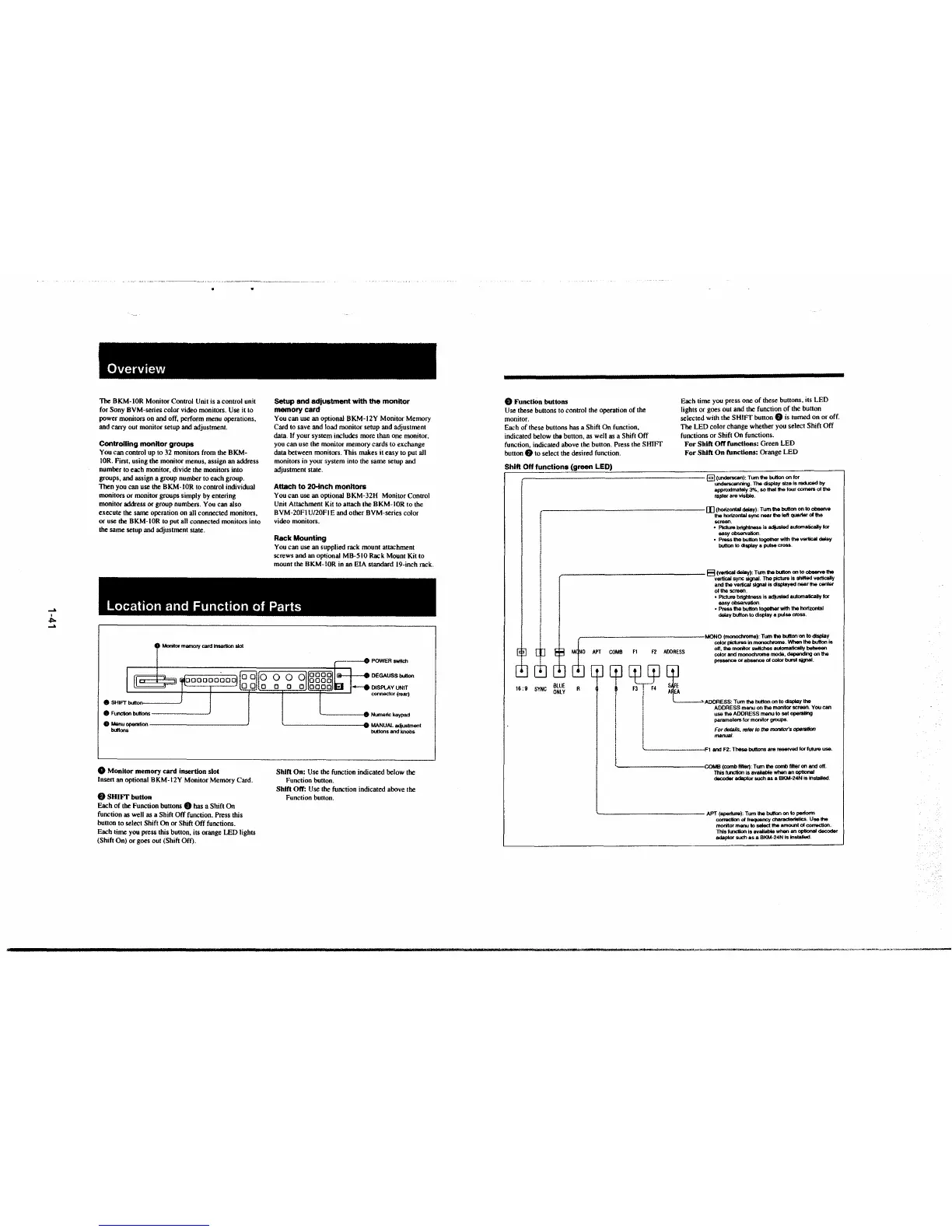
0 Mooitor memory card Insertion slot
• r;:::;-;::;i-
oooooo§ci) :o O;iQ O
lQ_,QJLg__ o
DEGAUSS button
8 Function buttoos, ------~
8 Menu_,.tion-----------~
buttons
0 Monitor memory card insertion slot
Insert an optional BKM-l 2Y Monitor Memory Card.
8 SHIFT button
Each of the Function buttons 9 has a Shift On
function as well as a Shift Off function. Press this
button to select Shift
On or Shift Off functions.
Each time you press this button, its orange LED lights
(Shift On) or goes out (Shift
Off).
connector (rear)
----- 9• Ni..rneric keypad
'----------1111 MANUAL adjustment
buttons
and knobs
Shin On: Use the function indicated below the
Function button.
Shin Off: Use the function indicated above the
Function
button.
9 Function buttons
Use these buttons to control the operation of the
monitor.
Each time you press one of these buttons, its LED
lights or goes out and the function of the button
selected with the SHIFT button
8 is turned on or off.
The LED color change whether you select Shift Off
functions or Shift
On functions.
Each of these buttons has a Shift On function,
indicated below
the button, as well as a Shift Off
function, indicated above the button. Press the SHIFT
button
e to select the desired function.
For Shin Off funcllons: Green LED
For Shift On functions: Orange LED
Shift Off functions (green LED)
§] (underscan}: Tum the button on for
underscanning. The display size is reckJC8d by
approximately 3%, so thal the lour comers of the
~fer are visible.
,,------------------- [I] (horizontal delay): Tum the button on to obserVe
! the horizontal sync near lhe left qualter of the
' screen.
• Pk:ture brightness is adiusted auaomatically tor
easy ob5ervation.
• Prass lhe button together with the v8"ical delay
. button to display a pulse cross.
I
i ~---------- -
'
~~·
_____ t=t (vertical delay): Tum 1he btJllon CJO to observe 1he
·• • fOC signal. The picture Is shffled verttcally
i and the\
ertlcal signal is displayed near the cenler
l ofthe
iCr8811,
: • Picture.
Drtghtness is adjusted automatically tor
.ervation.
I easy ob
i • Press ti
l8 button together with the horizontal
delay IJUtton to display a pulse cross.
I
~
[!]
BLUE
16: 9 SYNC ONLY
r----------------MONO (monochrome): Tum 1he button on lo display
COMB F1
F2 ADORESS
cp [P.rgJ
I Fl , F4
f !
! I
! !
! i
I I
L
A
i
color p6ctuf'8S in monochrome. When the button is
off, the monitor switches aulomatically between
color
and monochrome mode, ~Ing on 1he
presence or absence of color btxst signal.
ADDRESS: Tum the button on to clsplay the
ADDRESS menu on the monitor screen. You can
use the ADDRESS menu to set operating
paramelers
for monitor groups.
For details, ,el6r to the monitor's operation
manual.
I
'--·--·-------F1 and F2: These buttons are reserved for future use.
----------1COMB(combflfler):Tumthecombfll1eronandott.
This hn:tion is available when an optional
dacoder adaplor such as a BKM-24N is Installed.
'-------------- APT (aperture): Tum lhe button on to perform
corractton ol lrequency charactertsllcs. Use the
monitor menu to select tha amOllll of con&Ctlon.
This ft.flCllon Is avajlable when an optional decoder
adaptor such as a BKM-24N is ln5talled.


 To Next Page
 Loading...



