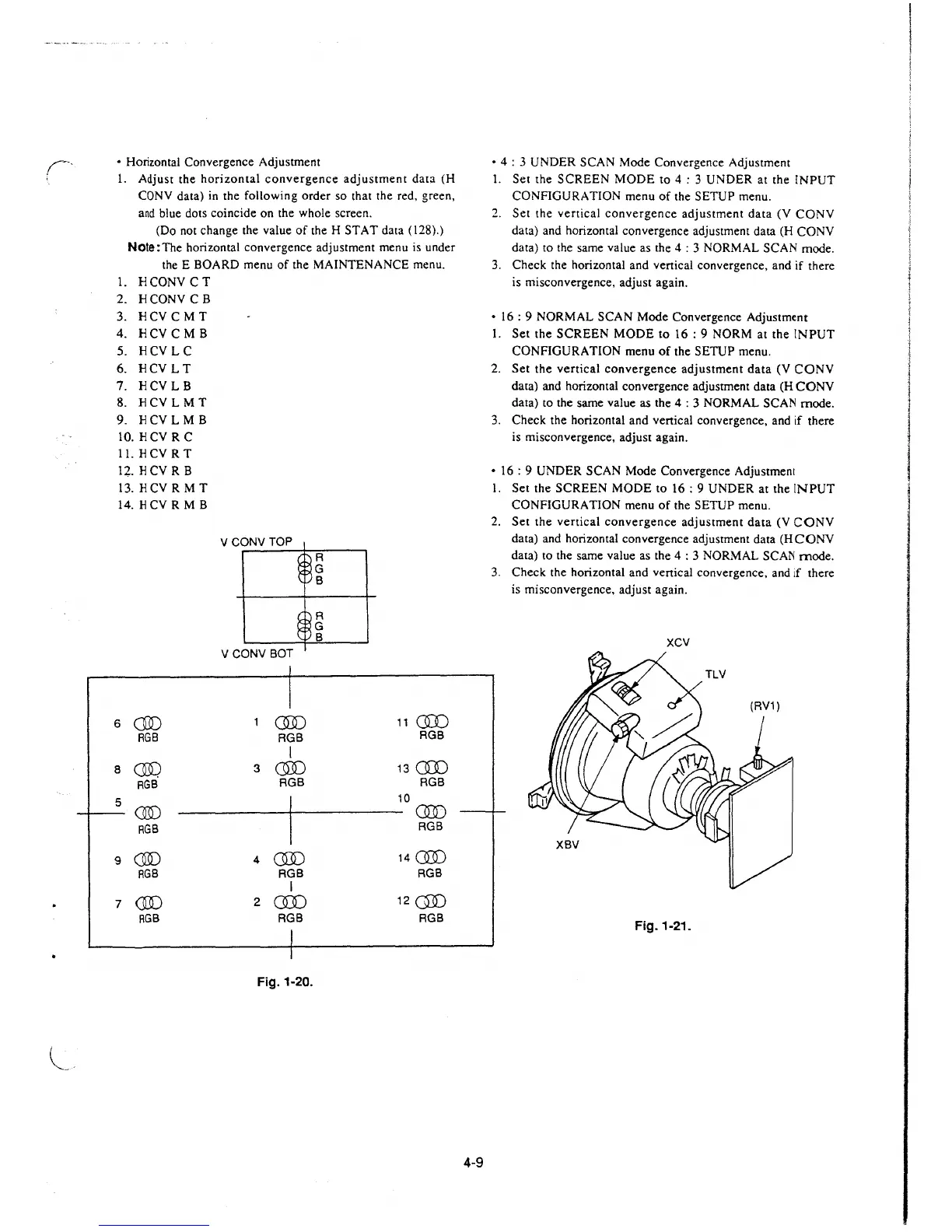
• Horizontal Convergence Adjustment
1. Adjust the horizontal convergence adjustment data (H
CONY data) in the following order so that the red, green,
and blue dots coincide on the whole screen.
(Do not change the value of the H STAT data (128).)
Note: The horizontal convergence adjustment menu is under
the E BOARD menu of the MAINTENANCE menu.
1. HCONV CT
2. HCONV CB
3. HCY CM T
4.
HCY CM B
5. HCYLC
6. HCV LT
7. HCYLB
8.
HCV L MT
9. HCY L MB
10. HCY RC
11. H CYR T
12. H CYR B
13. HCV RM T
14. HCY RMB
6
00
RGB
8
00.
RGB
5
00
RGB
9
CID
RGB
7
00
RGB
VCONVTOP
VCONV BOT
1
CID
RGB
I
3
00
RGB
4
CID
RGB
I
2
CID
RGB
I
I
Fig. 1-20.
A
G
B
R
G
B
11
C]J)
AGB
13 cm
RGB
10
00
AGB
14 00
RGB
120])
RGB
4-9
• 4 : 3 UNDER SCAN Mode Convergence Adjustment
I. Set the SCREEN MODE to 4 : 3 UNDER at the INPUT
CONFIGURATION menu of the SETUP menu.
2. Set the vertical convergence adjustment data (V CONY
data) and horizontal convergence adjustment data (H CONY
data)
to the same value as the 4 : 3 NORMAL SCAN mode.
3. Check the horizontal and vertical convergence, and if there
is misconvergence, adjust again.
• 16: 9 NORMAL SCAN Mode Convergence Adjustment
1. Set the SCREEN MODE to 16: 9 NORM at the INPUT
CONFIGURATION menu of the SETUP menu.
2. Set the vertical convergence adjustment data (V CONY
data) and horizontal convergence adjustment data (H CONY
data) to the same value as the 4 : 3 NORMAL SCAN mode.
3. Check the horizontal and vertical convergence, and if there
is misconvergence, adjust again.
• 16 : 9 UNDER SCAN Mode Convergence Adjustment
I. Set the SCREEN MODE to 16: 9 UNDER at the INPUT
CONFIGURATION menu of the SETUP menu.
2. Set the vertical convergence adjustment data (V CONY
data) and horizontal convergence adjustment data (HCONV
data) to the same value as the 4 : 3 NORMAL SCAN mode.
3. Check the horizontal and vertical convergence, and
1f there
is misconvergence, adjust again.
XCV
Fig. 1-21.







 To Next Page