EasyManua.ls Logo

Sony BVU-950 - Page 8

Sony BVU-950
92 pages
Print Icon
To Next Page IconTo Next Page
To Previous Page IconTo Previous Page
Loading...
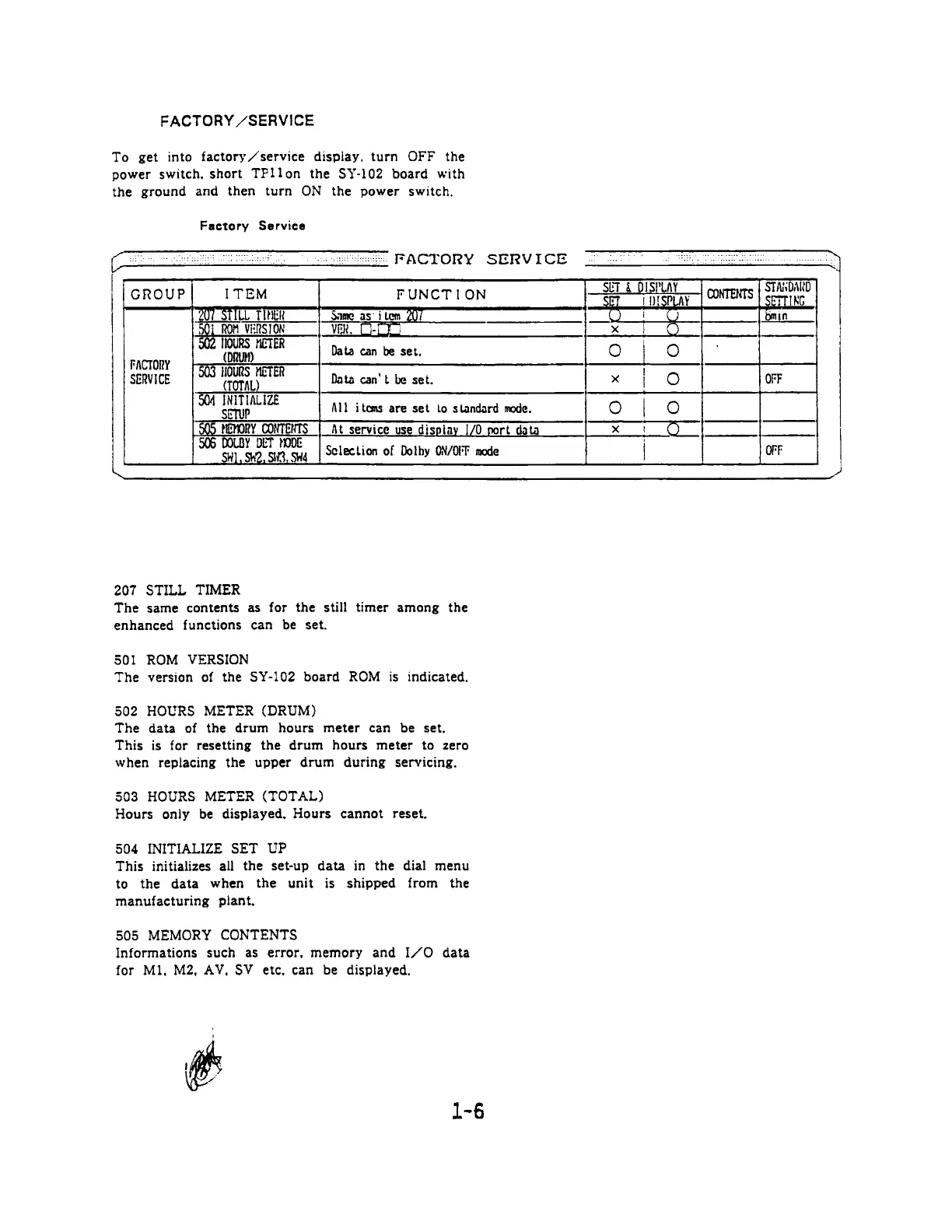
FACTORY
/SERVICE
To
get
into
factory/service
display,
turn
OFF
the
power
switch,
short
TFllon
the
SY-102
board
with
the
ground
and
then
turn
ON
the
power
switch.
Factory
Service
GROUP
ITEM
FUNCTION
Data
can
be
set.
FACTORY
SERVICE
Data
can't
be
set.
Alt
items
are
set
lo
standard
mode.
Sclection
of
Dolby
ON/OFF
mode
207
STILL
TIMER
The
same
contents
as
for
the
still
timer
among
the
enhanced
functions
can
be
set.
501
ROM
VERSION
The
version
of
the
SY-102
board
ROM
is
indicated.
502
HOURS
METER
(DRUM)
The
data
of
the
drum
hours
meter
can
be
set.
This
is
for
resetting
the
drum
hours
meter
to
zero
when
replacing
the
upper
drum
during
servicing.
503
HOURS
METER
(TOTAL)
Hours
only
be
displayed.
Hours
cannot
reset.
504
INITIALIZE
SET
UP
This
initializes
all
the
set-up
data
in
the
dial
menu
to
the
data
when
the
unit
is
shipped
from
the
manufacturing
plant.
505
MEMORY
CONTENTS
Informations
such
as
error,
memory
and
I/O
data
for
Ml,
M2,
AV,
SV
etc.
can
be
displayed.

Related product manuals