EasyManua.ls Logo

Sony C-48 - Power Sources and Operation; Battery Operation; External Power Supply; Technical Information

Sony C-48
7 pages
Print Icon
To Next Page IconTo Next Page
To Previous Page IconTo Previous Page
Loading...
POWER
SOURCES
AND OPERATION
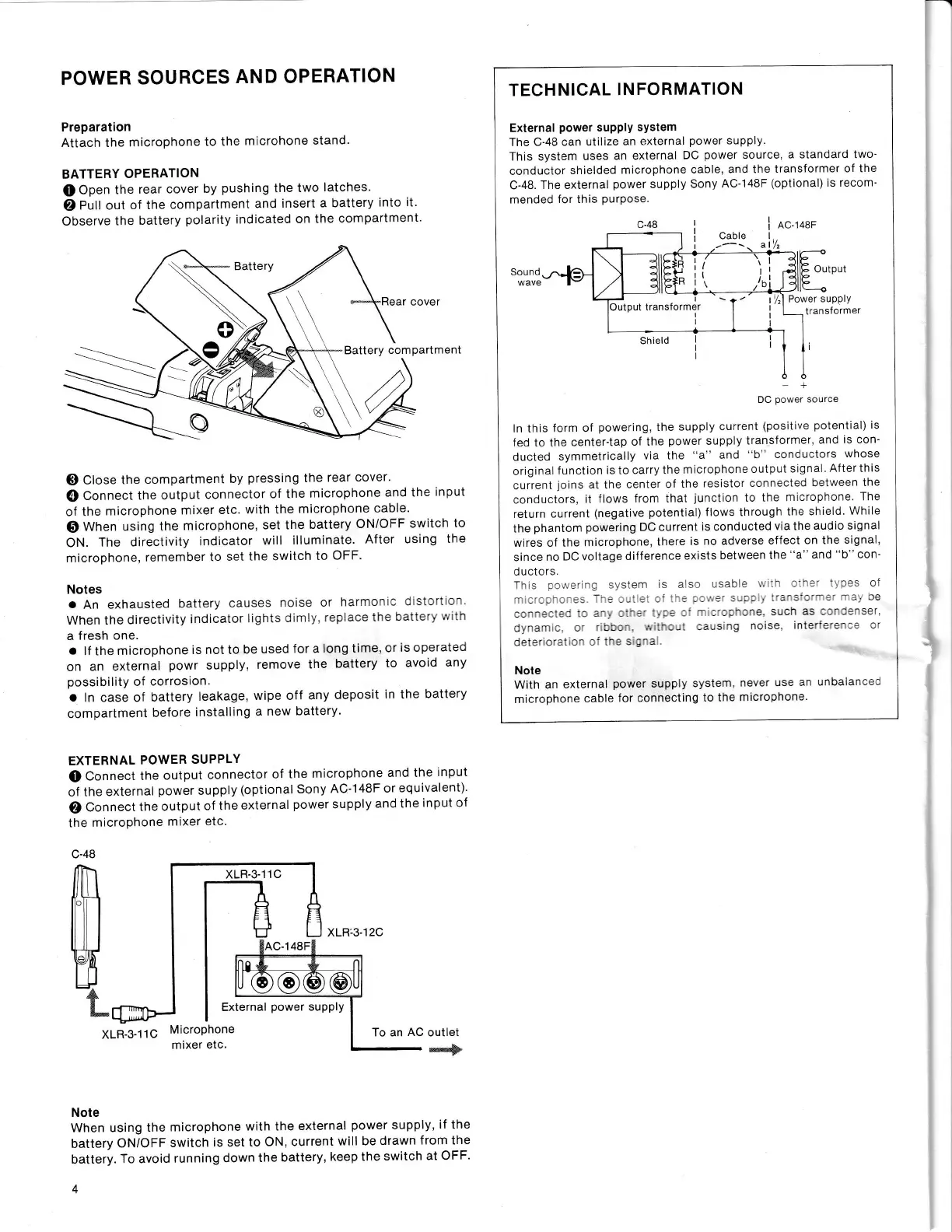
Preparation
Attach the
microphone
to the
microhone
stand
BATTERY
OPERATION
Q
Open
the
rear
cover
by
pushing
the
two
latches.
)
Pull out
of the
compartment
and
insert
a battery
into it'
Observe
the
battery
polarity
indicated
on the
compartment'
Battery
cover
Battery
compartment
o
G)
Close
the
compartment
by
pressing
the
rear
cover.
@
Connect
the output
connector
of the
microphone
and the
input
of the
microphone
mixer
etc.
with the
microphone
cable'
@
Wnen
using the
microphone,
set the
battery
ON/OFF
switch
to
ON.
The
directivity
indicator
will
illuminate.
After
using
the
microphone,
remember
to
set the
switch
to
OFF'
Notes
a
An exhausted
battery
causes
noise or
harmonic
distortiln
When the
directivity
indicator
lights dimly
replace
the
batter!'!"
tn
a
fresh one.
a
lf
the
microphone
is not to
be
used
for a
long time,
or
is operated
on
an external
powr
supply,
remove
the
battery
to
avoid
any
possibility
of
corrosion.
o
ln case of
battery
leakage,
wipe off
any
deposit
in the
battery
compartment
before
installing
a new
battery.
EXTERNAL
POWER
SUPPLY
(D
Connect
the
output
connector
of
the
microphone
and the
input
of
the
external
power
supply
(optional Sony
AC'148F
or
equivalent)'
)
Connect
the
output
of the
external
power
supply
and the
input of
the
microphone
mixer etc.
c-48
xLB-3-11C
xLR:3-12C
External
power
supply
XLR-3-11G
MicroPhone
mixer
etc.
To an
AC
outlet
effi*
Note
When
using the
microphone
with the
external
power
supply,
if
the
battery
ON/OFF
switch
is set
to
ON, current
will be drawn
from the
battery.
To avoid
running
down
the
battery,
keep the
switch
at OFF'
4
TECHNICAL
INFORMATION
External
power
suPPlY
system
The C-48
can utilize
an
external
power
supply.
This system
uses
an external
DC
power
source, a
standard two"
conductor
shielded
microphone
cable,
and the
transformer
of the
C-48.
The external
power
supply
Sony
AC-148F
(optional)
is recom-
mended
for
this
purpose.
ln this
form
of
powering,
the
supply
current
(positive
potential)
is
fed to the
center'tap
of the
power
supply
transformer.
and
is con'
ducted
symmetrically
via the
"a"
and
"b"
conductors
whose
original
f unction
is
to
carry the
microphone
output
signal.
After this
current
loins
at the
center of
the
resistor
connected
between the
conductors,
it
tlows
from that
junction
to
the
m crophone.
The
return
current
(negative
potential)
llows through
the shield.
While
the
phantom
powering
DC current
is conducted
via the
audio signal
wires of the
microphone,
there
is no adverse
effect
on the
signal,
since
no
DC
voltage difference
exists
between the
"a"
and
"b"
con'
d uctors.
Th s
3cn/ering
svstem
ls
also
usab e
v/'i'
::-:'
'. ces of
-
-'.:-.'::
-:.---:
:-
:
-.
-
:
:l
'''^:"
^:
:'
Je
ca-.ea:al
'.:
z''
a'-^a' .":=
-'
-
:-::':ne
such
as ::'::'rseT.
dynarc.
c'.ccc-.
",:-:-:
:ausing
noise,
inter'i':-:=
or
datd.
^.:'..
-
_:
rn.
<
_-:
Note
with an
external
power
supply
system,
never
use an
unbalanced
microphone
cable
f
or
connecting
to
the
microphone.
Cable
a
AC.1
48F
Output
Shield
Power supply
transformer
Sound
wave
+
DC
power
source
Output
transformer
I
I
I
I
I
:
I

Related product manuals