EasyManua.ls Logo

Sony CBK-WA100 - User Manual

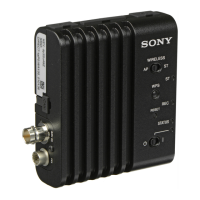
Sony CBK-WA100
45 pages
Print Icon
To Next Page IconTo Next Page
Loading...
Wireless Adapter
Operating Instructions
CBK-WA100
CBK-WA101
4-485-296-16 (1)
© 2013 Sony Corporation

Table of Contents

Other manuals for Sony CBK-WA100

Questions and Answers

  • M
    Melissa SmithAug 19, 2025
    Why does “E03-007 IP Address Setting Error” appear on my Sony CBK-WA100 Adapter?
    • M
      msandovalAug 19, 2025
      This error appears because there are conflicts between the network addresses for the wireless LAN and IP address setting. To resolve this, either manually change the address or change the setting of the network router.
  • E
    elizabeth00Aug 21, 2025
    What to do if the STATUS indicator lights in orange, and the file cannot be uploaded using Sony CBK-WA100 Adapter?
    • J
      jeanette26Aug 21, 2025
      If the STATUS indicator is orange and you can't upload the file, it might be due to a poor 3G/4G/LTE radio wave signal. Try changing your location and attempt the upload again.
  • B
    Barbara MccartyAug 23, 2025
    What to do if the STATUS indicator flashes in orange, and the file uploading fails on my Sony CBK-WA100 Adapter?
    • S
      Sarah RyanAug 23, 2025
      If the STATUS indicator flashes orange and the file upload fails, the user name and password for the server may be incorrect. Ensure you input the correct user name and password.
  • R
    Randall JonesAug 26, 2025
    Why is the Wi-Fi remote commander not appearing for my Sony CBK-WA100?
    • K
      Kyle ChambersAug 26, 2025
      The Wi-Fi remote commander might not appear because the USB cable is not connected or the firmware version of the camcorder/recorder is not adapted for the wireless adapter. Check that the USB cable is connected and that the firmware version of the camcorder/recorder is adapted for the wireless adapter.
  • J
    Joy BryantAug 28, 2025
    Why can't the terminal device access the Sony CBK-WA100 Adapter?
    • H
      hollandblakeAug 28, 2025
      The terminal device may not be able to access the wireless adapter due to incorrect connection settings on the terminal device, such as the IP address setting. Also, the communication setting between the access point and client may be invalid. Please check the connection settings of the terminal device, such as the IP address setting, and refer to the operating instructions of the access point for details on the communication settings.
  • J
    Jamie WongAug 30, 2025
    What to do if the Web menu does not appear for Sony Adapter?
    • R
      rgoodwinAug 30, 2025
      If the Web menu is not appearing, check the IP address setting and ensure that the port number (:8080) is added to the IP address.
  • E
    Erin ShawSep 1, 2025
    What to do if I cannot log in to the Sony CBK-WA100?
    • S
      Sharon WuSep 2, 2025
      If you cannot log in, check the user name and password that you set.
  • E
    ehudsonSep 4, 2025
    What to do if the original file cannot be uploaded using Sony Adapter?
    • R
      Ralph BrewerSep 4, 2025
      If the original file cannot be uploaded, check that the USB cable is connected and that the firmware version of the camcorder/recorder is adapted for the wireless adapter.
  • P
    penasavannahSep 6, 2025
    Why does the STATUS indicator flash in red, and the wireless LAN cannot be used on my Sony CBK-WA100 Adapter?
    • E
      Elizabeth SummersSep 6, 2025
      The connected wireless LAN module may not be compatible with the wireless adapter. For compatible wireless LAN modules, contact your Sony dealer or a Sony service representative.
  • A
    Alexander HamptonSep 8, 2025
    Why does the STATUS indicator flash in red, and the modem cannot be recognized by my Sony CBK-WA100 Adapter?
    • K
      kimberly09Sep 8, 2025
      The connected modem may not be compatible with the wireless adapter. For compatible modems, contact your Sony dealer or a Sony service representative.

Summary

Overview of Wireless Adapter Features

Key Features and Functions

Details the wireless adapter's capabilities and functions for connecting devices.

Remote Operation and File Handling

Enables remote control, proxy file creation, and file uploading via wireless networks.

Live Video Monitoring and Streaming

Allows live video monitoring and streaming from camcorders over wireless networks.

Compatibility and Requirements

Compatible Camcorder;Recorder Models

Lists compatible camcorders, recorders, and required firmware versions.

Required Devices and Terminal Compatibility

Specifies required devices and compatible terminal devices for using the adapter.

Location and Function of Parts

SDI IN and DC Input Connectors

Connects SDI signals and DC power to camcorder/recorder (CBK-WA100 only).

Setting the Camcorder;Recorder

Setting Rec;Stop Control Signals

Configures camcorder to output Rec/Stop signals for the wireless adapter.

Enabling Wireless LAN Function

Enables the wireless LAN function on the camcorder/recorder for remote control.

Connecting to the Terminal Device via Wireless LAN

Connecting in Access Point Mode (AP Mode)

Steps to connect a terminal device to the adapter acting as an access point.

Connecting to Access Point with WPS

Procedure for connecting to an access point using the WPS function.

Connecting via Wireless LAN Station Mode

Connecting in Station Mode (STA Mode)

Steps to connect the adapter to an existing access point as a client.

Connecting to Access Point without WPS

Steps to connect to an access point manually when WPS is not available.

Connecting to the Internet

Connecting via Modem

Details connecting the adapter to the Internet using an optional modem.

Internet Connection via Wireless LAN Station Mode

Connecting via 3 G;4 G;LTE Access Point

Steps for connecting to the Internet using a 3G/4G/LTE access point.

Connecting by Tethering a Smartphone;Tablet

Instructions for connecting to the Internet by tethering a smartphone/tablet.

Connecting to the Internet via LAN Cable

Recording Video;Audio of Camcorder;Recorder

Preparations: Usable SD Cards

Information on compatible SDHC memory cards and recommended Sony SD cards.

Recording by Interlocking to Camcorder

Recording proxy files by interlocking with camcorder's start/stop operations.

Recording by Interlocking to Recorder

Recording proxy files via interlocking with recorder's playback operations.

Advanced Recording Operations

Recording by Interlocking to Camcorder Playback

Recording proxy files by interlocking with camcorder playback.

Managing Recorded Files

Checking Files on SD Card

How to play, delete, or format files on the SD card via the 'SD Card' screen.

Uploading a File

Preparations: Registering Upload Server

Instructions for registering a server for file uploads.

Selecting Files for Upload

Process of selecting files from SD card or camcorder for uploading.

Uploading Files from SD Card;Camcorder

Specific steps to upload files from SD card or camcorder/recorder slots.

Managing File Uploads

Selecting Files for Transfer

How to select files for uploading and initiate the transfer.

File Transfer Process and Status

Initiates file transfer and checks status indicators during upload.

Streaming Live Video

Transmitting Live Video Image

Steps to transmit live video from camcorder via Internet or local network.

Controlling the Camcorder;Recorder Remotely

Wi-Fi Remote Commander (Smartphone)

Interface and controls for remote camcorder operation via smartphone.

Wi-Fi Remote Commander (Tablet)

Interface and controls for remote camcorder operation via tablet.

Remote Control via Content Browser Mobile

Understanding the Web Menu Interface

Initial Screen and Device Status

Describes the initial screen, device status display, and shortcut buttons.

Navigating the Setting Menu

Streaming Format Settings

Proxy Format Settings

Access Point Settings (AP Settings)

Wireless LAN Settings

Modem Settings

Upload Settings Management

Advanced Upload Settings

Job List for Upload Management

Updating the Wireless Adapter Firmware

Returning to Factory Settings

Important Operational Notes

Safe Use and Storage Guidelines

Guidelines for proper storage, handling, and environmental conditions.

Troubleshooting Wireless LAN Connections

Troubleshooting Internet Connections

Understanding Error;Warning Indicators

Product Specifications

Sony CBK-WA100 Specifications

General IconGeneral
BrandSony
ModelCBK-WA100
CategoryAdapter
LanguageEnglish

Related product manuals