CCB-WD1
4-735-433-11(1)
GB
11
C:\4735433111\4735433111CCBWD1CEE\01GB-CCBWD1CEE\01GB.indd
DTP data saved: 2017/11/29 16:03
PDF file created: 2017/11/29 16:09
Turning the power on
Connect the product to a power source using the AC Adaptor (supplied).
1
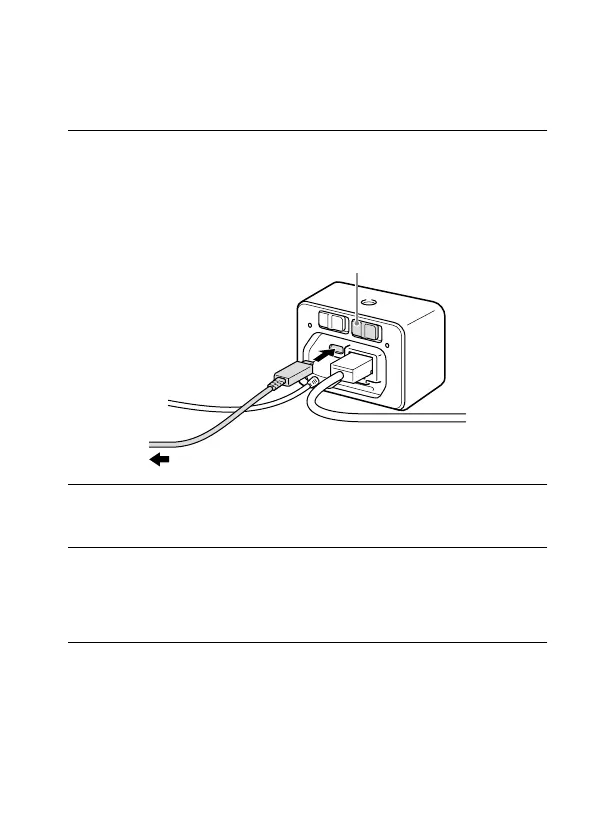
Connect the micro USB connector on the product with the USB
connector on the AC Adaptor (supplied) using the micro USB
cable (supplied), and then connect the AC Adaptor to a wall
outlet (wall socket).
• Do not connect the AC Adaptor to the multi terminal on the product.
To the AC Adaptor
ON/OFF (Power) switch
2
Make sure that the MASTER/CLIENT (Master/Client) switch on
the product is set properly (page9).
3
Set the ON/OFF (Power) switch to “ON.”
The product will turn on, and the power lamp will light up.
• If the power lamp blinks, the product is not connected to the network
properly. For details, refer to page13.





 To Next Page