CCB-WD1
4-735-433-11(1)
GB
8
C:\4735433111\4735433111CCBWD1CEE\01GB-CCBWD1CEE\01GB.indd
DTP data saved: 2017/11/29 16:03
PDF file created: 2017/11/29 16:09
Connecting the product to a camera
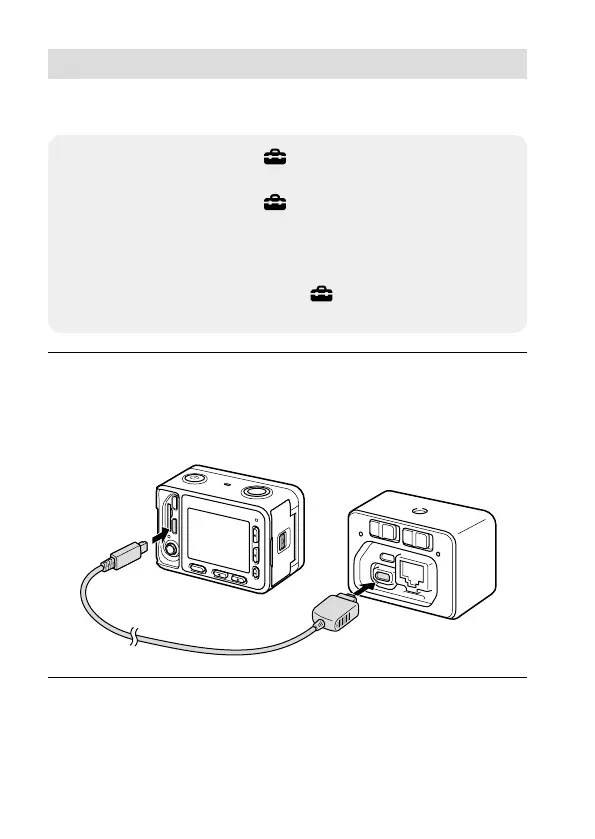
Connect the product to the camera using the multi terminal connecting
cable (supplied).
• On the camera, set MENU (Setup) [USB Connection] to
[PC Remote] before you connect it.
• On the camera, set MENU
(Setup) [PC Remote Settings]
[Still Img. Save Dest.] to [PC+Camera].
• Insert a memory card into the camera.
• If you will be using the camera for a long period of time, it is
recommended that you set MENU
(Setup)
[Auto Pwr OFF Temp.] to [High] on the camera.
1
Connect the multi terminal on the product with the Multi/
Micro USB Terminal on the camera using the multi terminal
connecting cable (supplied).
• You cannot connect the camera to the micro USB connector on the
product.
DSC-RX0
Camera control box
Hint
• Two cables with different lengths are supplied. Use the appropriate one for
the installation environment.










 To Next Page