The instructions in this manual are for CCD-TR44.
As you read through this manual, buttons and settings on the camcorder are shown in capital letter.
e.g. Set the POWER switch to CAMERA.
r Contents of the recording cannot be compensated if recording or playback is not made due to a
malfunction of the camcorder, video tape, etc. I
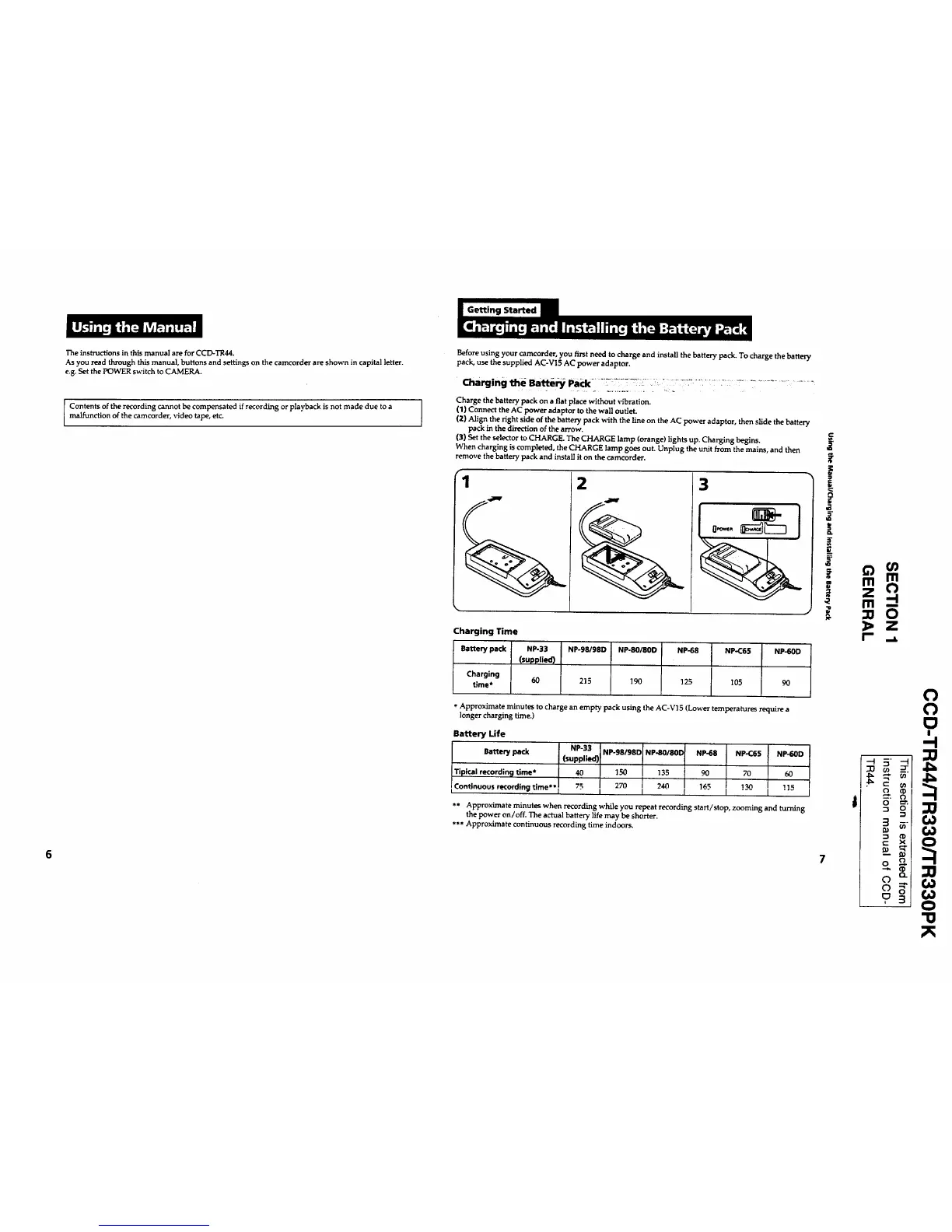
Before using your camcorder, you first need to charge and install the battery pack. To charge the battery
pack, use the supplied AC-V15 AC power adaptor.
Charge the battery pack on a flat place without vibration.
(1) ConneCt the AC power adaptor to the wall outlet.
(2) Align the right side of the battery pack with the llne on the AC power adaptor, then slide the battery
pack in the direction of the arrow.
(3) Set the selector to CHARGE. The CHARGE lamp (orange) lights up. Charging begins.
When charging is completed, the CHARGE lamp goes out. Unplug the unit from the mains, and then
remove the battery pack and install it on the camcorder.
'1
2 3
Charging Time
Battery pack NP-33
(supplied)
Charging 60
time*
NP-98/98D
215
NP-80/80D NP-68 NP-C65 NP-60D
190 !25 105 9O
*Approximate minutes to charge an empty pack using the AC-V15 (Lower temperatures require a
longer charging time.)
Battery Life
Battery pack NP-33 NP-g8/98D NP-80/80D NP-68 NP-C65 NP-60D
(supplied)
Tipical recording time* 40 150 135 90 70 60
Continuous recording time** " I I
** Approximate minutes when recording while you repeat recording start/stop, zooming and turning
the power on/off. The actual battery life may be shorter.
*** Approximate continuous recording time indoors.
€
i
crt
m rrl
z O
m--
B.
o
o
o
-.4
"o










 To Next Page