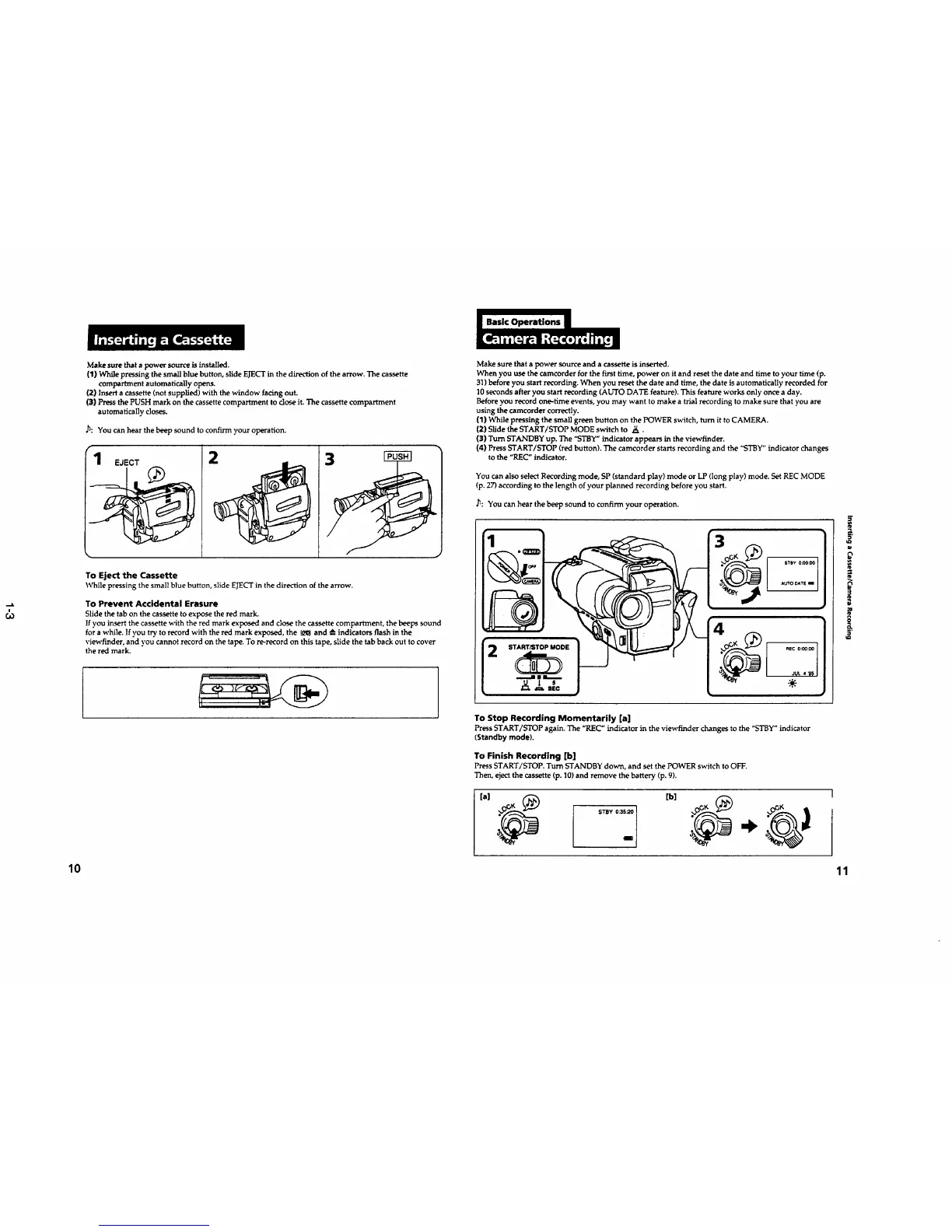
Make sure that a power source is installed.
(1} While pressing the small blue button, slide EJECTin the direction of the arrow. The cassette
compartment automatically opens.
(2) Insert a cassette (not supplied) with the window facing out.
(3) Press the PUSH mark on the cassette compartment to dose it. The cassette compartment
automatically doses.
,h: You can hear the beep sound to confirm ),our operation.
rl EJECT
2
3
To Eject the Cassette
While pressing the small blue button, slide EJECTin the direction of the arrow.
To Prevent Accidental Erasure
Slide the tab on the cassette to expose the red mark.
If you insert the cassette with the red mark exposed and close the cassette compartment, the beeps sound
for a while. If you try to record with the red mark exposed, the _ and _--indicators flash in the
viewfinder, and you cannot record on the tape. To re-record on this tape, slide the tab back out to cover
the red mark.
Make sure that a power source and a cassette is inserted.
When you use the camcorder for the first time, power on it and reset the date and time to your time (p.
31) before you start recording. When you reset the date and time, the date is automatically recorded for
10seconds after you start recording (AUTO DATE feature). This feature works only once a day.
Before you record one-time events, you may want to make a trial recording to make sure that you are
using the camcorder correctly.
(1) _naile pressing the small g_=en button on the POWER switch, turn it to CAMERA.
(2) Slide the START/STOP MODE switch to ._..
(3) Turn STANDBY up. The "STBY" indicator appears in the viewfinder.
(4) Press START/STOP (red button). The camcorder starts recording and the "STBY"indicator changes
to the "REC" indicator.
You can also select Recording mode, SP (standard play) mode or LP (long play) mode. Set REC MODE
(p. 27) according to the length of your planned recording before you start.
_: You can hear the beep sound to confirm your operation.
I .... I
I ..V. | s I I -:÷:-
L "" =" "=_ ) L
To Stop Recording Momentarily [a]
Press START/STOP again. The "REC" indicator in the viewfinder changes to the "STBY" indicator
(Standby mode).
To Finish Recording [b]
Press START/STOP. Turn STANDBY down, and set the POWER switch to OFF.
Then, eject the cassette (p. 10)and remove the battery (p. 9).
[a)
STBY 0:3_
10 11










 To Next Page