EasyManua.ls Logo

Sony CDP-101 - Synchronized Playback with Cassette Deck

Sony CDP-101
88 pages
Print Icon
To Next Page IconTo Next Page
To Previous Page IconTo Previous Page
Loading...
cop-101
|
SYNCHRONIZED
PLAY
OF
THE
PLAYER
AND
A
CASSETTE
DECK
โ€”
Only
AEP
and
UK
model
โ€”
ai
(AEP
model:
up
to
Serial
No.
501,000
UK
model:
up
to
Serial
No.
600,300)
if
an
RM-65
synchro
remote
control
unit
is
used
to
connect
this
i
player
with
a
Sony
cassette
deck
equipped
with
a
4-pin
remote
con-
i
trol
jack,
the
operation
of
the
player
and
the
cassette
deck
will
be
synchronized.
Cassette
decks which
can
be
used
with
your
CD
player
for
this
special
synchronized
operation
are
those
Sony
models
which
are
equipped
with
a
4-pin
remote
conirol
jack.
An
RM-65
synchro
remote
control
unit
(optional)
is
required
to
connect
the
CD
player
and
the
cassette
deck.
|
CONNECTION
AND
PREPARATION
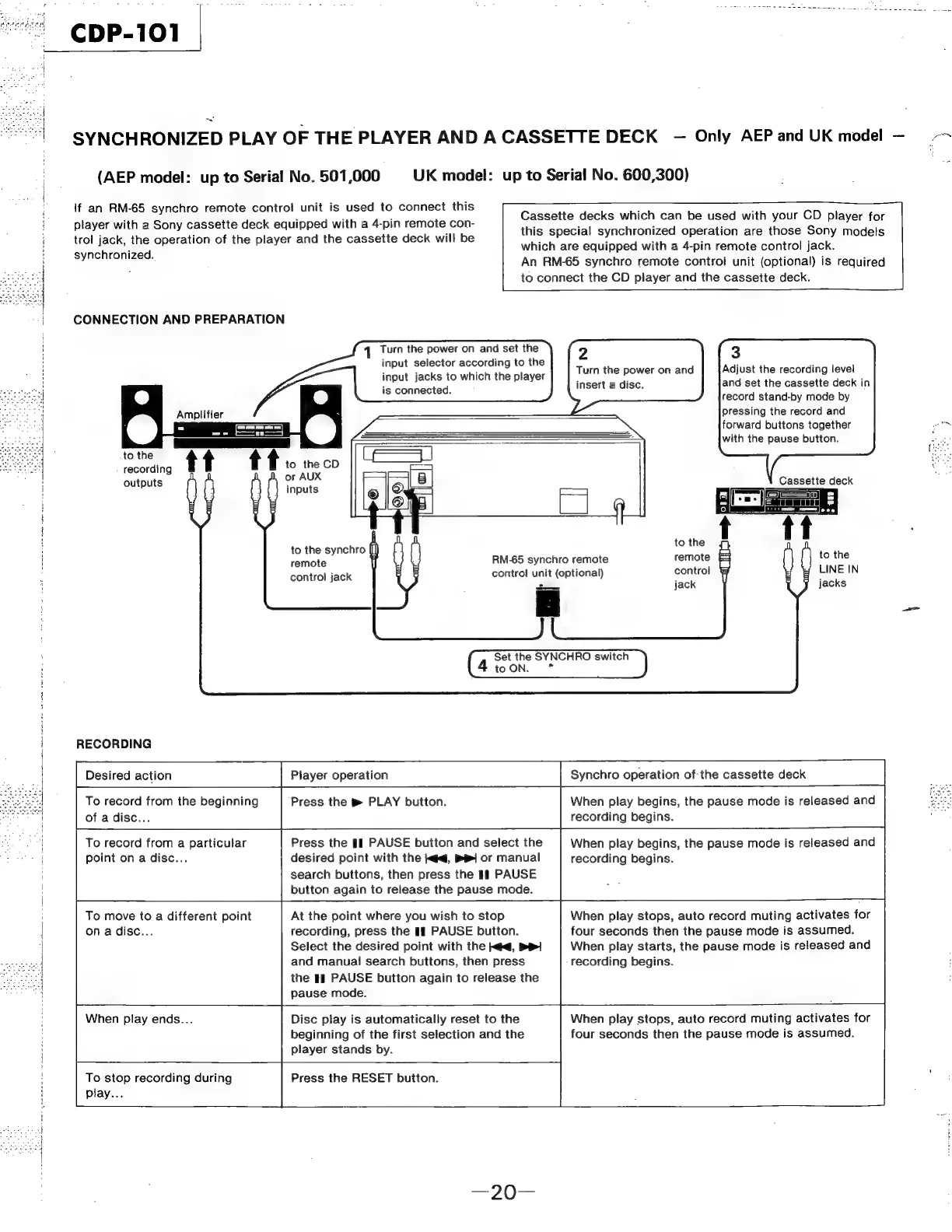
Turn
the
power
on
and
set
the
input
selector
according
to
the
input
jacks
to
which
the
player
is
connected.
3
Adjust
the
recording
level
and
set
the
cassette
deck
in
record
stand-by
mode
by
2
Turn
the
power
on
and
insert
a
disc.
pressing
the
record
and
forward
buttons
together
a
with
the
pause
button.
Amplifier
tt
tt:
to
the
recording
outputs
to
the
CD
or
AUX
inputs
Cassette
deck
to
the
to
the
synchro
remote
RM-65
synchro
remote remote
to
the
control
jack
contro!
unit
(optional)
control
LINE
IN
jack
jacks
Set
the
SYNCHRO
switch
4
toON.
*
RECORDING
Desired
action
Player
operation
Synchro
operation
of-the
cassette
deck
When
play
begins,
the
pause
mode
is
released
and
recording
begins.
Press
the
pm
PLAY
button.
To
record
from
the
beginning
of
a
disc...
Press
the
#1
PAUSE
button
and
select
the
desired
point
with
the
j<q,
Be]
or
manual
search
buttons,
then
press
the
1ยง
PAUSE
button
again
to
release
the
pause
mode.
When
play
begins,
the
pause
mode
is
released
and
recording
begins.
To
record
from
a
particular
point
on
a
disc...
When
play
stops,
auto
record
muting
activates
for
four
seconds
then
the
pause
mode
is
assumed.
When
play
starts,
the
pause
mode
is
released
and
recording
begins.
At
the
point
where
you
wish
to
stop
recording,
press
the
if
PAUSE
button.
Select
the
desired
point
with
the
ed,
DR
and
manual!
search
buttons,
then
press
the
Hl
PAUSE
button
again
to
release
the
pause
mode.
To
move
to
a
different
point
ona
disc...
When
play
stops,
auto
record
muting
activates
for
four
seconds
then
the
pause
mode
is
assumed.
When
play
ends...
Disc
play
is
automatically
reset
to
the
beginning
of
the
first
selection
and
the
player
stands
by.
To
stop
recording
during
Press
the
RESET
button.
play...

Related product manuals