EasyManua.ls Logo

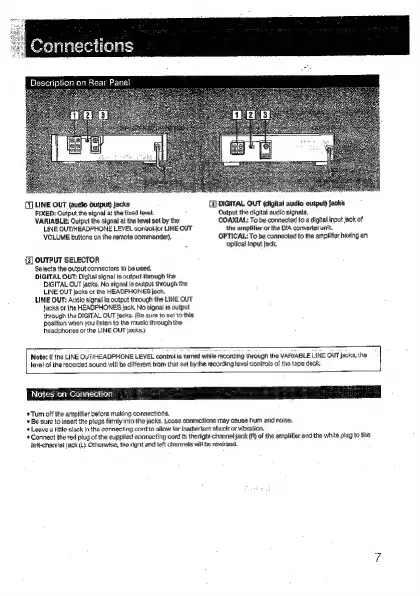
Sony CDP-707ESD - Connecting the Player; Rear Panel Connections Explained; Connection Best Practices

Sony CDP-707ESD
30 pages
Print Icon
To Next Page IconTo Next Page
To Previous Page IconTo Previous Page
Loading...
1H
2ke
3
12-3
fale}
1
elo]
(1)
LINE
OUT
(audio
output)
jacks
[QDIGITAL
OUT
(digital
audio
output)
jacks
FIXED:
Output
the
signal
at
the
fixed
level
Output
the
digital
audio
signals.
VARIABLE:
Output
the
signal
at
ths
level
set
by
the
LINE
OUTIHEADPHONE
LEVEL
coniroljor
LINE
OUT
VOLUME
buttons
on
the
remote
commander).
{Z]
OUTPUT
SELECTOR
Selects
the
output
connectors
to
be
used.
DIGITAL
OUT:
Digital
signal
is
output
through
the
DIGITAL
QUT
jacks.
No
signal
is
output
through
the
LINE
OUT
jacks
or
the
HEADPHONES
jack.
LINE
OUT:
Audio
signat
is
output
through
the
LINE
OUT
Jacks
or
the
HEADPHONES
jack.
No
signal
is
output
through
the
DIGITAL
OUT
jacks.
(Be
sure
to
set
to
this
position
when
you
tisten
to
the
music
through
the
headphones
or
the
LINE
OUT
jacks)
COAXIAL:
To
be
connected
to
a
digital
input
jack
of
the
amplifier
or
the
D/A
converter
unit.
OPTICAL:
To
be
connected
to
the
amplfierhaving
an
optical
input
jack.
Note:
If
the
LINE
OUT/HEADPHGNE
LEVEL
control
is
turned
while
recording
through
the
VARIABLE
LINE
OUT
jacks,
the
level
of
the
recorded
sound
will
be
different
from
that
set
bythe
recording
level
controls
of
the
tape
deck,
Notes:on
Connection
Tum
off
the
amplifier
before
making
connections,
‘=
Be
sure
to
insert
the
plugs
firmly
into
the
jacks.
Looss
connactions
may
cause
hum
and
noise,
+
Leave
a
tittle
slack
in
the
connecting
cord
to
allow
for
inadvertent
shock
or
vibration.
Connect
the
red
plug
of
the
eupplied
connecting
cord
to
the
right-channel
jack
(R)
of
the
amplifier
and
the
white
plug
to
the
Jeft-channel
jack
(L).
Otherwise,
the
right
and
left
channels
will
be
reversed.

Other manuals for Sony CDP-707ESD

Related product manuals