EasyManua.ls Logo

Sony CDP-CX205 - Page 6

Sony CDP-CX205
18 pages
Print Icon
To Next Page IconTo Next Page
To Previous Page IconTo Previous Page
Loading...
Getting
Started
Inserting
CDs
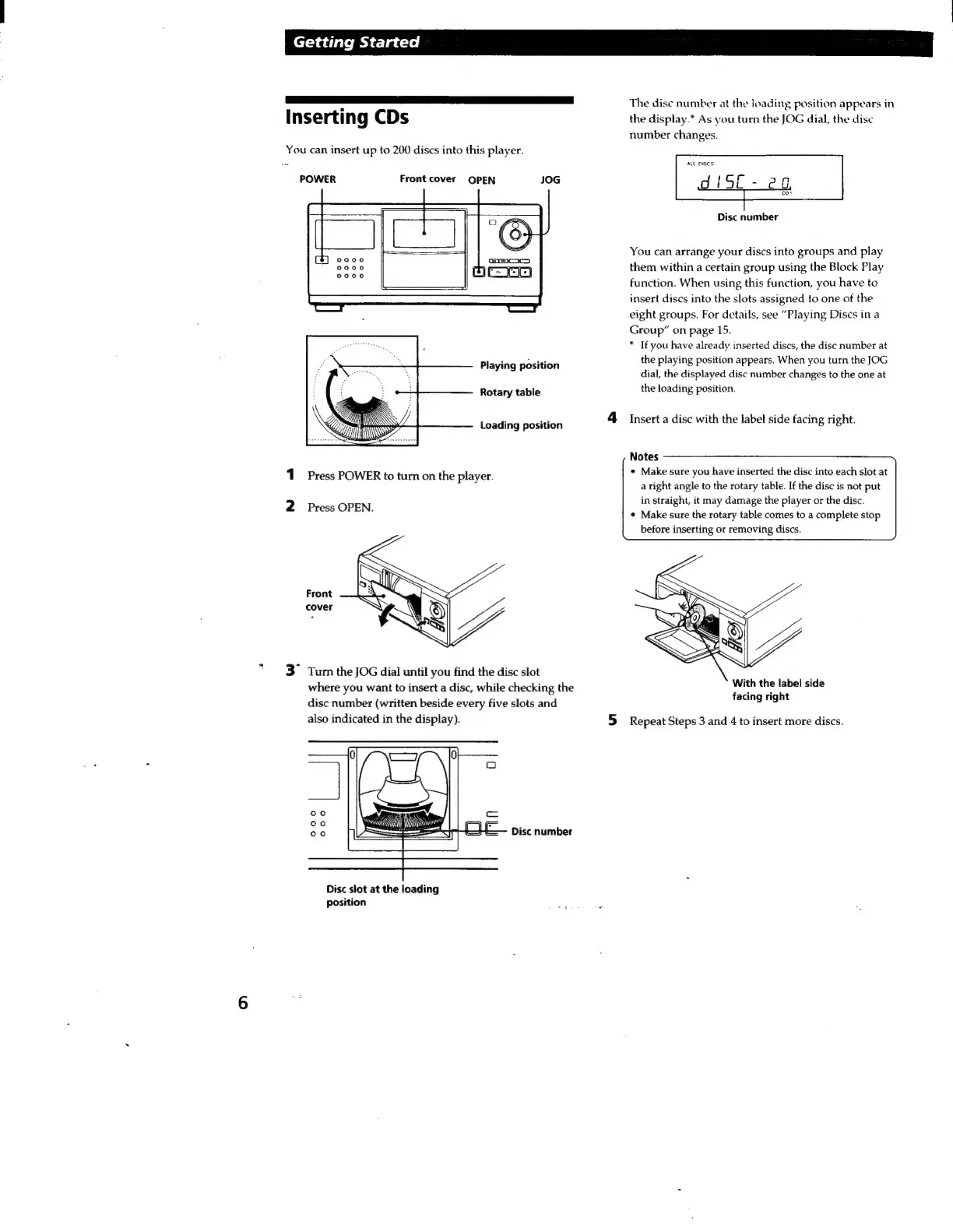
You
can
insert
up
to
200
discs
into
this
player.
POWER
Front
cover
OPEN
JOG
Playing
position
Rotary
table
Loading
position
1
Press
POWER
to
turn
on
the
player.
2
Press
OPEN.
*
Tum
the
JOG
dial
until
you
find
the
disc
slot
where
you
want
to
insert
a
disc,
while
checking
the
disc
number
(written
beside
every
five
slots
and
also
indicated
in
the
display).
Disc
number
Disc
slot
at
the
loading
position
The
dise
number
at
the
loading
position
appears
in
the
display.“
As
you
turn
the
JOG
dial,
the
disc
number
changes.
ALL
DISCS:
Disc
number
You
can
arrange
your
discs
into
groups
and
play
them
within
a
certain
group
using
the
Block
Play
function.
When
using
this
function,
you
have
to
insert
discs
into
the
slots
assigned
to
one
of
the
eight
groups.
For
details,
see
“Playing
Discs
in
a
Group”
on
page
15.
*
If
you
have
already
inserted
discs,
the
disc
number
at
the
playing
position
appears.
When
you
turn
the
JOG
dial,
the
displayed
disc
number
changes
to
the
one
at
the
loading
position.
4
Insert
a
disc
with
the
label
side
facing
right.
Notes
+
Make
sure
you
have
inserted
the
disc
into
each
slot
at
a
right
angle
to
the
rotary
table.
If
the
disc
is
not
put
in
straight,
it
may
damage
the
player
or
the
disc.
¢
Make
sure
the
rotary
table
comes
to
a
complete
stop
before
inserting
or
removing
discs.
With
the
label
side
facing
right
5
Repeat
Steps
3
and
4
to
insert
more
discs.

Related product manuals