EasyManua.ls Logo

Sony CDP-CX270 - Getting Started; Unpacking Contents; Hooking Up the System

Sony CDP-CX270
32 pages
Print Icon
To Next Page IconTo Next Page
To Previous Page IconTo Previous Page
Loading...
Getting
Started
Unpacking
Check
that
you
received
the
following
items:
*
Audio
cord
(1)
©
Video
cord
(1)
¢
Remote
commander
(remote)
(1)
«
Sony
SUM-3
(NS)
batteries
(2)
¢
CD
booklet
holders
(2)
and
label
(1)
cay
How
to
use
the
CD
booklet
holder
The
CD
booklet
holder
helps
you
locate
the
discs
easily.
After
you
have
inserted
discs
into
the
player,
you
can
put
the
CD
booklet
(which
comes
with
a
CD)
into
the
supplied
holder.
Put
two
CD
booklets
facing
back
to
back
into
a
pocket.
Stick
the
number
label
on
each
pocket,
matching
the
number
of
the
disc
slot
where
you
have
inserted
the
disc.
You
can
put
up
to
200
CD
booklets
into
the
holders.
Inserting
batteries
into
the
remote
You
can
control
the
player
using
the
supplied
remote.
Insert
two
R6
(size
AA)
batteries
by
matching
the
+
and
-
on
the
batteries.
When
using
the
remote,
point
it
at
the
remote
sensor
&
on
the
player.
¢
When
to
replace
batteries
With
normal
use,
the
batteries
should
last
for
about
six
months.
When
the
remote
no
longer
operates
the
player,
replace
all
the
batteries
with
new
ones.
Notes
Do
not
leave
the
remote
near
an
extremely
hot
or
humid
place.
Do
not
drop
any
foreign
object
into
the
remote
casing,
particularly
when
replacing
the
batteries.
Do
not
expose
the
remote
sensor
to
direct
sunlight
or
lighting
apparatuses.
Doing
so
may
cause
a
malfunction.
If
you
do
not
use
the
remote
for
an
extended
period
of
time,
remove
the
batteries
to
avoid
possible
damage
from
battery
leakage
and
corrosion.
Hooking
Up
the
System
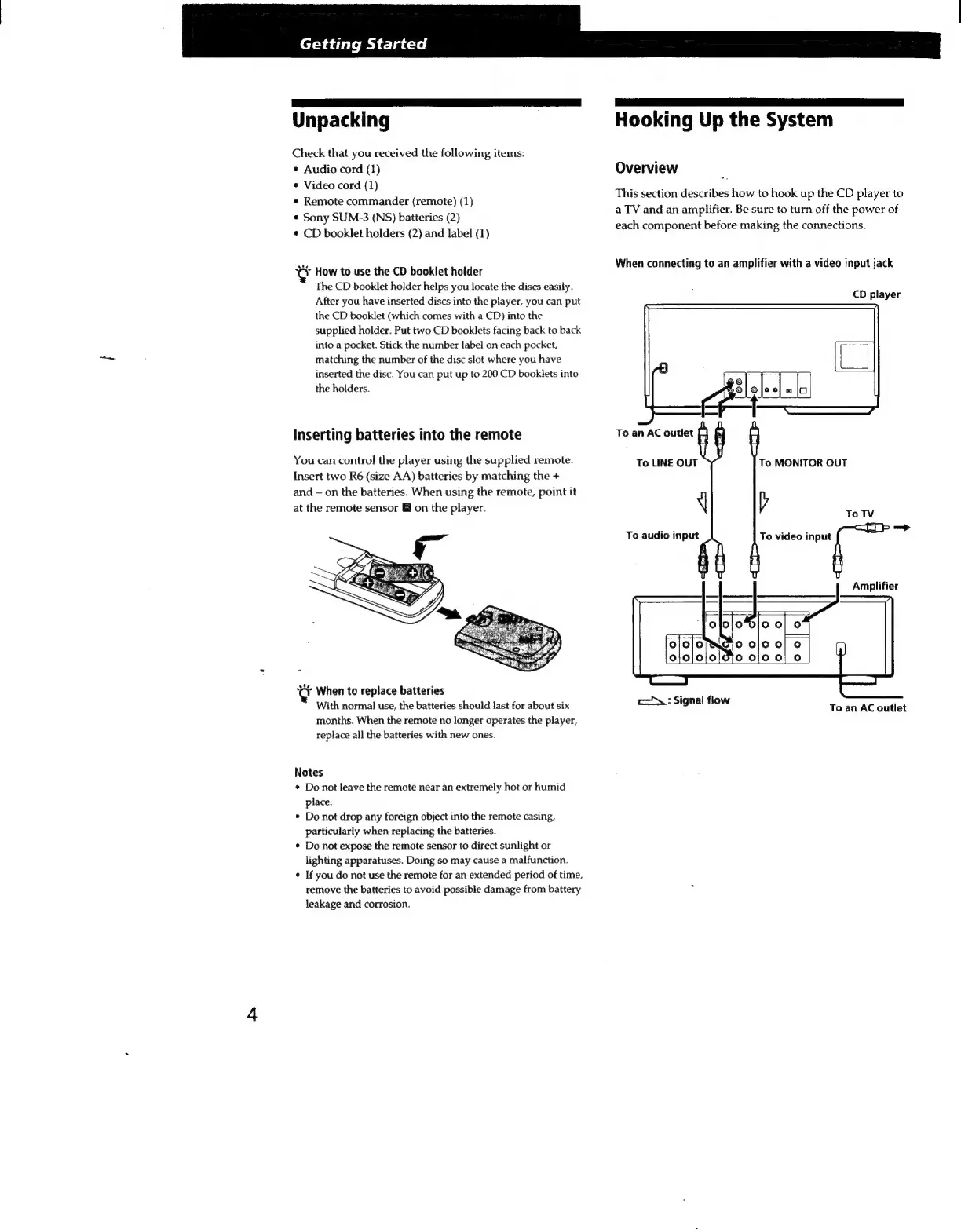
Overview
This
section
describes
how
to
hook
up
the
CD
player
to
a
TV
and
an
amplifier.
Be
sure
to
turn
off
the
power
of
each
component
before
making
the
connections.
When
connecting
to
an
amplifier
with
a
video
input
jack
CD
player
@
f3@|@
o
fas
To
an
AC
outlet
To
LINE
OUT
sa
i
To
audio
input
To
MONITOR
OUT
To
video
input
=
Amplifier
:
Si
1
fl
c:
Signal
flow
To
an
AC
outlet

Related product manuals