EasyManua.ls Logo

Sony CDP-XA7ES - Hookups

Sony CDP-XA7ES
93 pages
Print Icon
To Next Page IconTo Next Page
To Previous Page IconTo Previous Page
Loading...
e
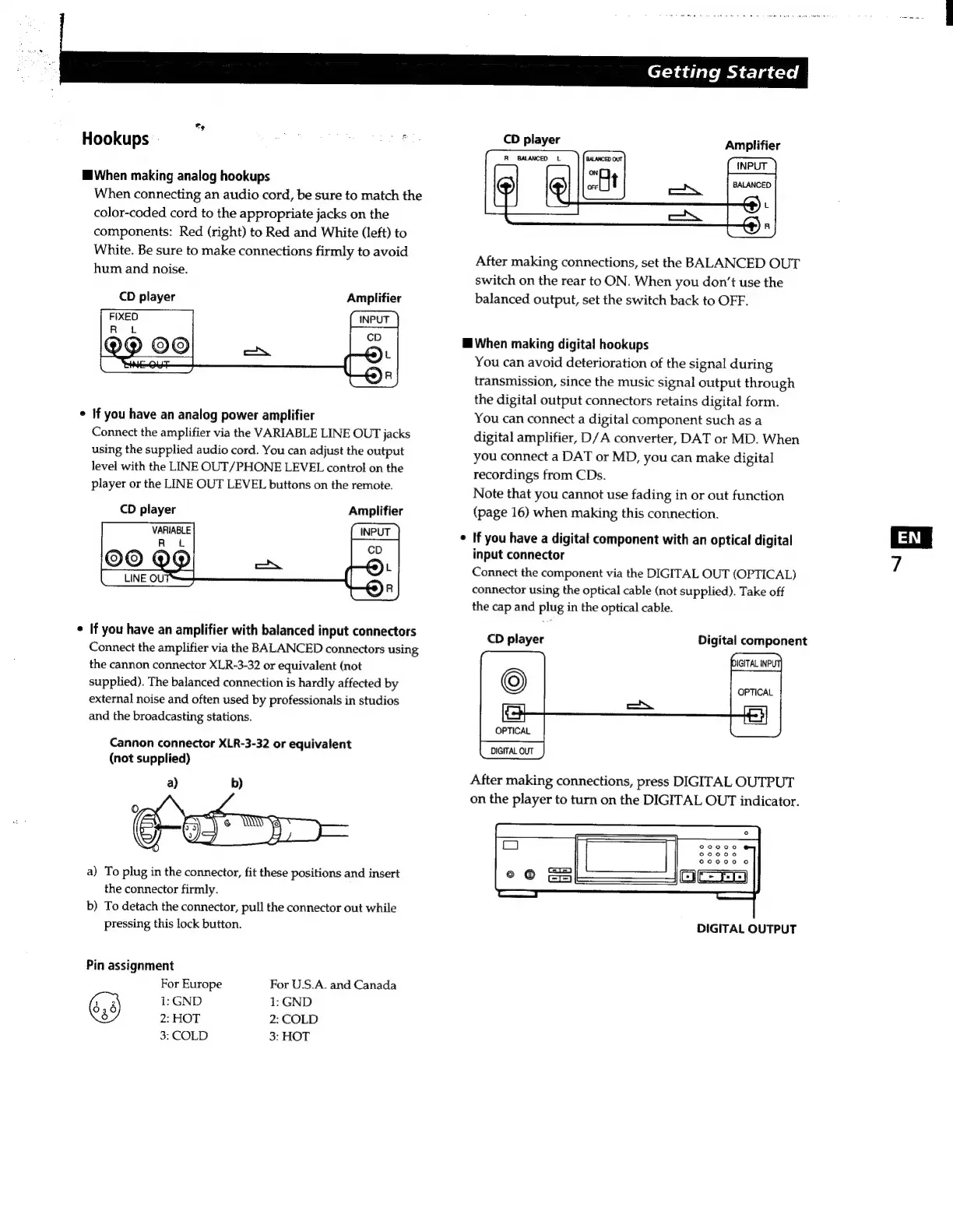
Hookups
`
When
making
analog
hookups
When
connecting
an
audio
cord,
be
sure
to
match
the
color-coded
cord
to
the
appropriate
jacks
on
the
components:
Red
(right)
to
Red
and
White
(left)
to
White.
Be
sure
to
make
connections
firmly
to
avoid
hum
and
noise.
CD
player
Amplifier
CINPUT
)
If
you
have
an
analog
power
amplifier
Connect
the
amplifier
via
the
VARIABLE
LINE
OUT
jacks
using
the
supplied
audio
cord.
You
can
adjust
the
output
level
with
the
LINE
OUT/PHONE
LEVEL
control
on
the
player
or
the
LINE
OUT
LEVEL
buttons
on
the
remote.
Amplifier
(INPUT
)
£o)
Ç)
If
you
have
an
amplifier
with
balanced
input
connectors
Connect
the
amplifier
via
the
BALANCED
connectors
using
the
cannon
connector
XLR-3-32
or
equivalent
(not
supplied).
The
balanced
connection
is
hardly
affected
by
external
noise
and
often
used
by
professionals
in
studios
and
the
broadcasting
stations.
Cannon
connector
XLR-3-32
or
equivalent
(not
supplied)
a)
To
plug
in
the
connector,
fit
these
positions
and
insert
the
connector
firmly.
b)
To
detach
the
connector,
pull
the
connector
out
while
pressing
this
lock
button.
Pin
assignment
For
Europe
For
U.S.A.
and
Canada
1:
GND
1:
GND
2:
HOT
2:
COLD
3:
COLD
3:
HOT
Getting
Started
CD
player
Amplifier
(INPUT
)
BALANCED
Ce)
L
(4)
n
After
making
connections,
set
the
BALANCED
OUT
switch
on
the
rear
to
ON.
When
you
don't
use
the
balanced
output,
set
the
switch
back
to
OFF.
H
When
making
digital
hookups
You
can
avoid
deterioration
of
the
signal
during
transmission,
since
the
music
signal
output
through
the
digital
output
connectors
retains
digital
form.
You
can
connect
a
digital
component
such
as
a
digital
amplifier,
D/A
converter,
DAT
or
MD.
When
you
connect
a
DAT
or
MD,
you
can
make
digital
recordings
from
CDs.
Note
that
you
cannot
use
fading
in
or
out
function
(page
16)
when
making
this
connection.
If
you
have
a
digital
component
with
an
optical
digital
input
connector
Connect
the
component
via
the
DIGITAL
OUT
(OPTICAL)
connector
using
the
optical
cable
(not
supplied).
Take
off
the
cap
and
plug
in
the
optical
cable.
CD
player
Digital
component
la;
OPTICAL
DIGITAL
OUT
After
making
connections,
press
DIGITAL
OUTPUT
on
the
player
to
turn
on
the
DIGITAL
OUT
indicator.
DIGITAL
OUTPUT
`H

Related product manuals