EasyManua.ls Logo

Sony CDP-XA7ES - Voltage Selector and Power; Pre-Operation Checks; Next Steps

Sony CDP-XA7ES
93 pages
Print Icon
To Next Page IconTo Next Page
To Previous Page IconTo Previous Page
Loading...
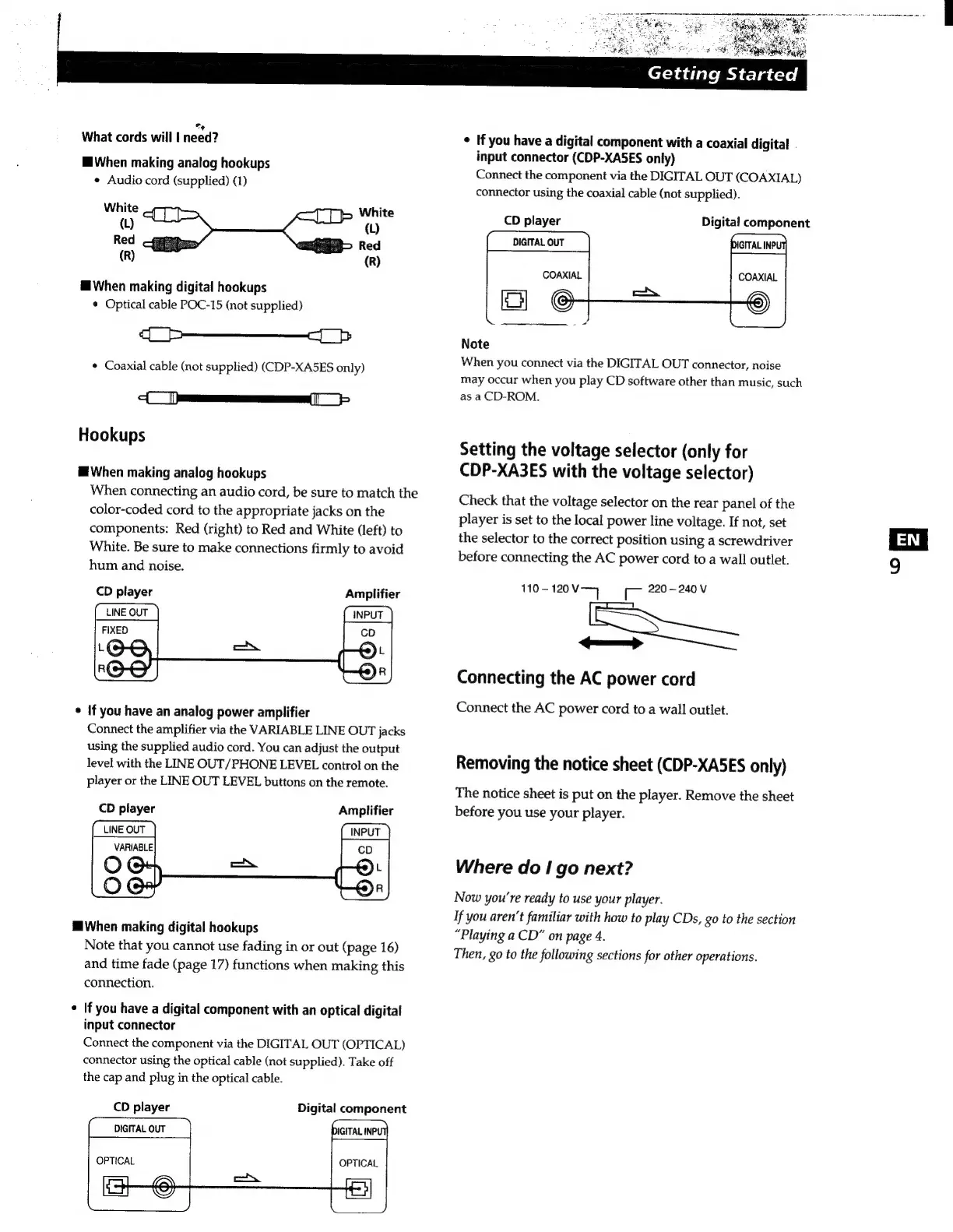
What
cords
will
|
need?
H
When
making
analog
hookups
e
Audio
cord
(supplied)
(1)
White
_,
(L)
Red
(R)
E
When
making
digital
hookups
*
Optical
cable
POC-15
(not
supplied)
DD
DD
e
Coaxial
cable
(not
supplied)
(CDP-XA5ES
only)
Dem
>
Hookups
E
When
making
analog
hookups
When
connecting
an
audio
cord,
be
sure
to
match
the
color-coded
cord
to
the
appropriate
jacks
on
the
components:
Red
(right)
to
Red
and
White
(left)
to
White.
Be
sure
to
make
connections
firmly
to
avoid
hum
and
noise.
CD
player
Amplifier
LINE
OUT
INPUT
If
you
have
an
analog
power
amplifier
Connect
the
amplifier
via
the
VARIABLE
LINE
OUT
jacks
using
the
supplied
audio
cord.
You
can
adjust
the
output
level
with
the
LINE
OUT/PHONE
LEVEL
control
on
the
player
or
the
LINE
OUT
LEVEL
buttons
on
the
remote.
CD
player
Amplifier
LINE
OUT
INPUT
H
When
making
digital
hookups
Note
that
you
cannot
use
fading
in
or
out
(page
16)
and
time
fade
(page
17)
functions
when
making
this
connection.
*
If
you
have
a
digital
component
with
an
optical
digital
input
connector
Connect
the
component
via
the
DIGITAL
OUT
(OPTICAL)
connector
using
the
optical
cable
(not
supplied).
Take
off
the
cap
and
plug
in
the
optical
cable.
CD
player
Digital
component
DIGITAL
OUT
DIGITAL
INP!
HS
E?
Getting
Started
e
If
you
have
a
digital
component
with
a
coaxial
digita!
.
input
connector
(CDP-XASES
only)
Connect
the
component
via
the
DIGITAL
OUT
(COAXIAL)
connector
using
the
coaxial
cable
(not
supplied).
CD
player
Digital
component
DIGITAL
OUT
COAXIAL
Note
When
you
connect
via
the
DIGITAL
OUT
connector,
noise
may
occur
when
you
play
CD
software
other
than
music,
such
as
a
CD-ROM.
Setting
the
voltage
selector
(only
for
CDP-XA3ES
with
the
voltage
selector)
Check
that
the
voltage
selector
on
the
rear
panel
of
the
player
is
set
to
the
local
power
line
voltage.
If
not,
set
the
selector
to
the
correct
position
using
a
screwdriver
before
connecting
the
AC
power
cord
to
a
wall
outlet.
110-
120V—]
C
220
-
240
V
—>
Connecting
the
AC
power
cord
Connect
the
AC
power
cord
to
a
wall
outlet.
Removing
the
notice
sheet
(CDP-XA5ES
only)
The
notice
sheet
is
put
on
the
player.
Remove
the
sheet
before
you
use
your
player.
Where
do
I
go
next?
Now
you're
ready
to
use
your
player.
If
you
aren't
familiar
with
how
to
play
CDs,
go
to
the
section
“Playing
a
CD”
on
page
4.
Then,
go
to
the
following
sections
for
other
operations.
H

Related product manuals