8
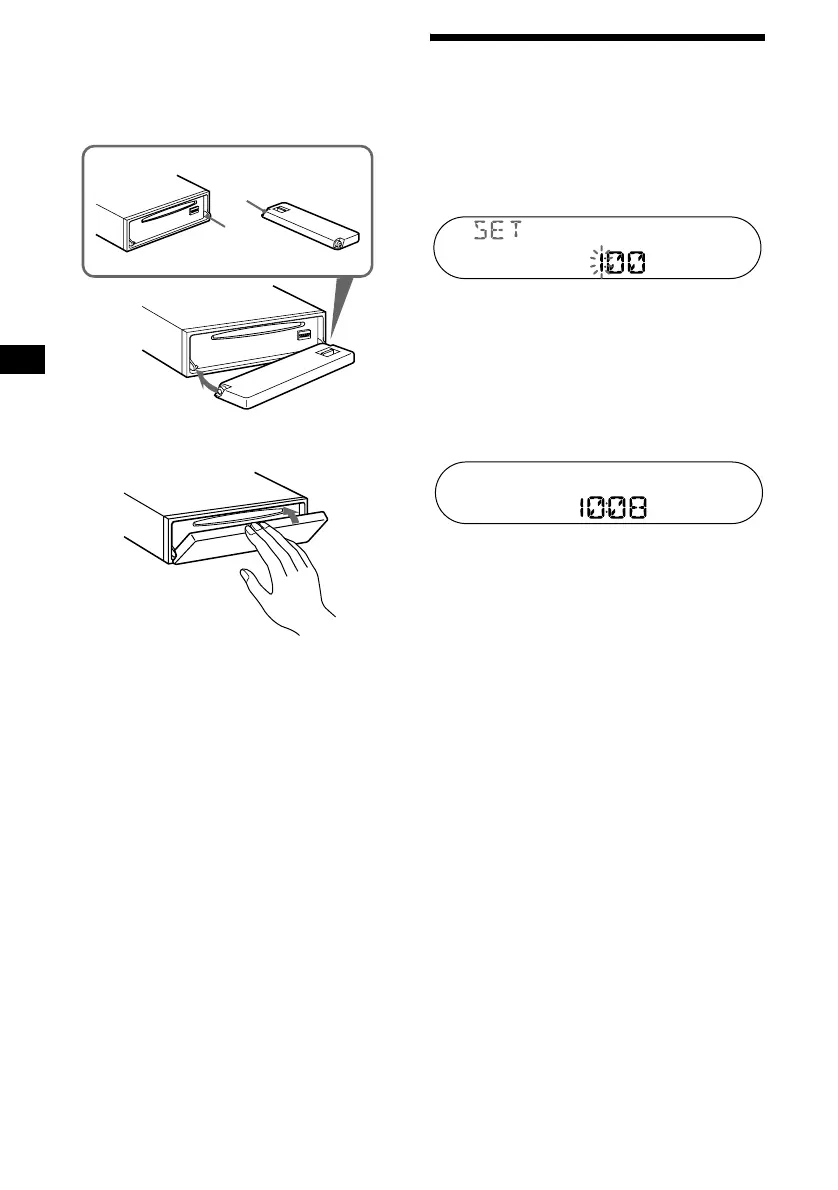
Attaching the front panel
Place hole A of the front panel onto the spindle
B on the unit, then lightly push the left side in.
Press (SOURCE) on the unit (or insert a CD) to
operate the unit.
Note
Do not put anything on the inner surface of the front
panel.
Setting the clock
The clock uses a 24-hour digital indication.
Example: To set the clock to 10:08
1 Press (DSPL) for 2 seconds.
The hour indication flashes.
1Press the volume +/– button to set
the hour.
2Press (SEL).
The minute indication flashes.
3Press the volume +/– button to set
the minute.
2 Press (DSPL).
The clock starts. After the clock setting is
completed, the display returns to normal play
mode.
Tip
You can set the clock automatically with the RDS
feature (page 20).
A
B
x



 To Next Page