CDX-GT72W/GT720/GT770
5
SECTION 2
GENERAL
This section is extracted
from instruction manual.
• LOCATION OF CONTROLS
• CDX-GT72W
• CDX-GT720
6
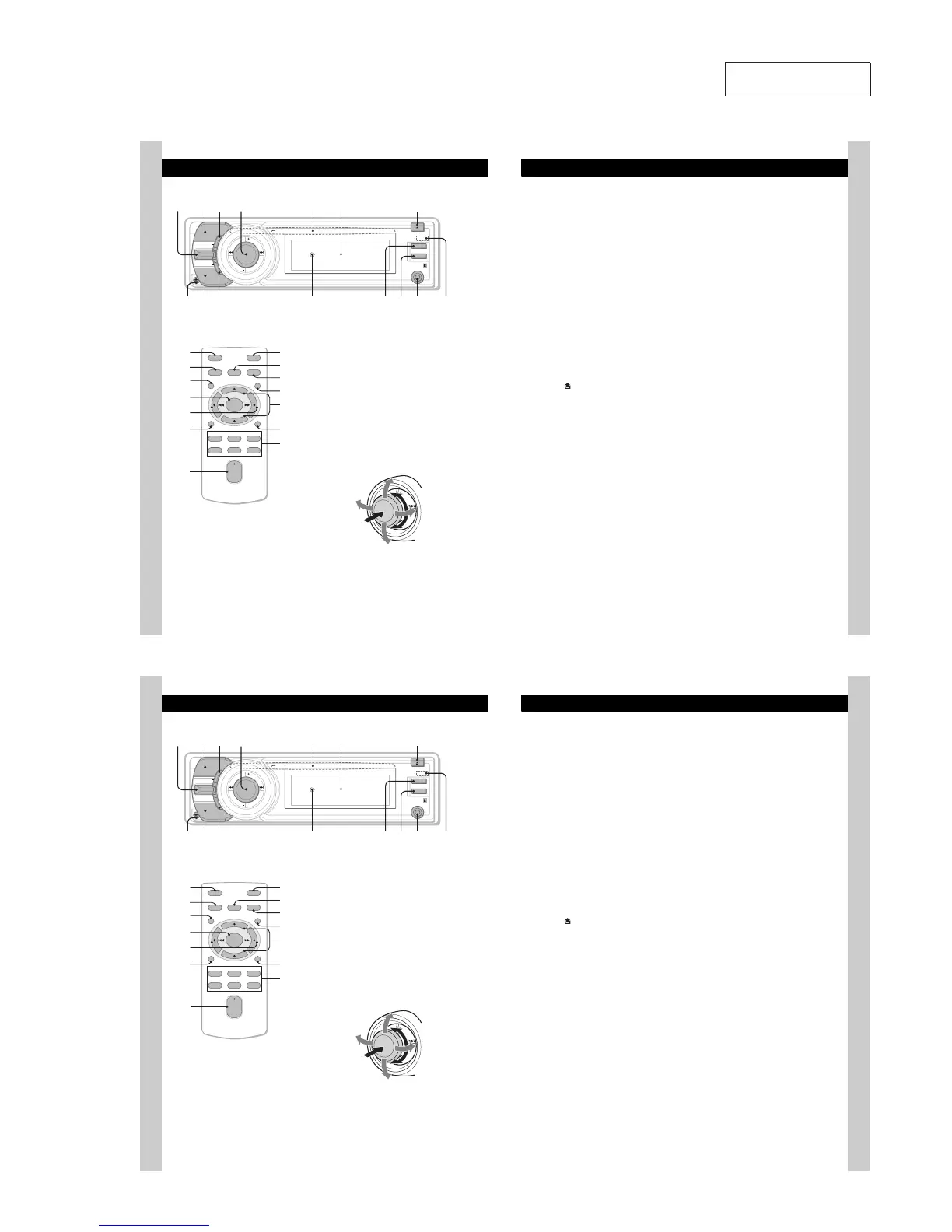
Location of controls and basic operations
Main unit
Card remote commander
RM-X152
This section contains instructions on the location
of controls and basic operations. For details, see
the respective pages.
For optional device (CD/MD changer, etc.)
operation, see “Using optional equipment” on
page 11.
The corresponding buttons on the card remote
commander control the same functions as those
on the unit.
" LIST/CAT*
1
/BACK control
Push (LIST/CAT*
1
) up: to list up (Radio).
Push (BACK) down: return to the previous
display.
# MODE button page 8
To select the radio band (FM/AM)*
2
.
$ SHUF (shuffle) button page 8
% Multi way encoder
Rotate to: Adjust the volume/select a menu
item.
Push up/down/left/right to: Select a menu
item.
Press to: Enter sound setting/apply a setting.
Press and hold to: Enter menu.
SCRL
OFF
MODE
SOURCE
BACK
LIST/
CAT
SHUF
PUSH ENTER
/
SOUND
/
MENU
DSPL
AUX
H
OFF
DSPL
REP SHUF
MENU
SCRL
SOURCE SOUND
MODE
PAU SE
132
465
ATT
VOL
+
–
+
–
ENTER
LIST/
CAT
RI
XB
RE
RL
RK
X
RM
XG
XE
XT
RT
7
CD:
Push up/down to:
–Skipalbums(push)*
3
.
–Skip albums continuously (push and
hold)*
3
.
Push left/right to:
– Skip tracks (push).
–Skip tracks continuously (push, then push
again within about 2 seconds and hold).
–Reverse/fast-forward a track (push and
hold).
Radio:
Push up/down to:
–Receive stored station.
Push left/right to:
– Tune in stations automatically (push).
–Find a station manually (push and hold).
& Disc slot page 5
To insert the disc.
' Display window
( ;(eject)/ANGLE button page 5
To eject the disc/slide down the front panel
(press); angle the front panel in 3 positions
(press and hold).
) (front panel release) button page 5
* SOURCE button
To power on; change the source (Radio/CD/
AUX)*
2
.
+ DSPL (display) button page 8
To change display items.
, RESET button (Location behind the front
panel) page 4
- SCRL (scroll) button
To scroll the display item.
. OFF button
To power off; stop the source.
/ AUX input jack page 11
To connect a portable audio device.
0 Receptor for the card remote
commander
The following buttons on the card remote
commander have also different buttons/functions
from the unit. Remove the insulation film before
use (page 4).
RI MENU button
To e nter menu.
RK ENTER button
To apply a setting.
RL / (SEEK –/+) buttons
The same as pushing the multi way encoder
left/right on the unit.
Setup, sound setting, etc., can be operated by
.
RM VOL (volume) +/– button
To a djust volume.
X ATT (attenuate) button
To attenuate the sound. To cancel, press
again.
XB SOUND button
To enter sound setting.
XT LIST/CAT*
1
button
To list up.
XE ./N (+/–) buttons
The same as pushing the multi way encoder
up/down on the unit.
Setup, sound setting, etc., can be operated by
.N.
XG Number buttons
CD:
: REP page 8
: SHUF page 8
: PAU SE
To pause playback. To cancel, press
again.
Radio:
To receive stored stations (press); store
stations (press and hold).
*1 When the SAT tuner is connected.
*2 In the case of a CD/MD changer, HD radio tuner or
SAT tuner being connected; when 4063$& is
pressed, the connected device (“MD,” “HD,” “XM” or
“SR”) will appear in the display, depending on
which device is connected. Furthermore, if
.0%& is pressed, you can switch the changer,
HD radio tuner band or SAT tuner band.
*3 When an MP3/WMA/AAC is played.
Note
If the unit is turned off and the display disappears, it
cannot be operated with the card remote commander
unless 4063$& on the unit is pressed, or a disc is
inserted to activate the unit first.
6
Location of controls and basic operations
Main unit
Card remote commander
RM-X152
This section contains instructions on the location
of controls and basic operations. For details, see
the respective pages.
For optional device (CD/MD changer, etc.)
operation, see “Using optional equipment” on
page 11.
The corresponding buttons on the card remote
commander control the same functions as those
on the unit.
" LIST/CAT*
1
/BACK control
Push (LIST/CAT*
1
) up: to list up (Radio).
Push (BACK) down: return to the previous
display.
# MODE button page 8
To select the radio band (FM/AM)*
2
.
$ SHUF (shuffle) button page 8
% Multi way encoder
Rotate to: Adjust the volume/select a menu
item.
Push up/down/left/right to: Select a menu
item.
Press to: Enter sound setting/apply a setting.
Press and hold to: Enter menu.
SCRL
OFF
MODE
SOURCE
BACK
LIST/
CAT
SHUF
PUSH ENTER
/
SOUND
/
MENU
DSPL
AUX
H
OFF
DSPL
REP SHUF
MENU
SCRL
SOURCE SOUND
MODE
PAU SE
132
465
ATT
VOL
+
–
+
–
ENTER
LIST/
CAT
RI
XB
RE
RL
RK
X
RM
XG
XE
XT
RT
7
CD:
Push up/down to:
–Skipalbums(push)*
3
.
–Skip albums continuously (push and
hold)*
3
.
Push left/right to:
– Skip tracks (push).
–Skip tracks continuously (push, then push
again within about 2 seconds and hold).
–Reverse/fast-forward a track (push and
hold).
Radio:
Push up/down to:
–Receive stored station.
Push left/right to:
– Tune in stations automatically (push).
–Find a station manually (push and hold).
& Disc slot page 5
To insert the disc.
' Display window
( ;(eject)/ANGLE button page 5
To eject the disc/slide down the front panel
(press); angle the front panel in 3 positions
(press and hold).
) (front panel release) button page 5
* SOURCE button
To power on; change the source (Radio/CD/
AUX)*
2
.
+ DSPL (display) button page 8
To change display items.
, RESET button (Location behind the front
panel) page 4
- SCRL (scroll) button
To scroll the display item.
. OFF button
To power off; stop the source.
/ AUX input jack page 11
To connect a portable audio device.
0 Receptor for the card remote
commander
The following buttons on the card remote
commander have also different buttons/functions
from the unit. Remove the insulation film before
use (page 4).
RI MENU button
To e nter menu.
RK ENTER button
To apply a setting.
RL / (SEEK –/+) buttons
The same as pushing the multi way encoder
left/right on the unit.
Setup, sound setting, etc., can be operated by
.
RM VOL (volume) +/– button
To a djust volume.
X ATT (attenuate) button
To attenuate the sound. To cancel, press
again.
XB SOUND button
To enter sound setting.
XT LIST/CAT*
1
button
To list up.
XE ./N (+/–) buttons
The same as pushing the multi way encoder
up/down on the unit.
Setup, sound setting, etc., can be operated by
.N.
XG Number buttons
CD:
: REP page 8
: SHUF page 8
: PAU SE
To pause playback. To cancel, press
again.
Radio:
To receive stored stations (press); store
stations (press and hold).
*1 When the SAT tuner is connected.
*2 In the case of a CD/MD changer, HD radio tuner or
SAT tuner being connected; when 4063$& is
pressed, the connected device (“MD,” “HD,” “XM” or
“SR”) will appear in the display, depending on
which device is connected. Furthermore, if
.0%& is pressed, you can switch the changer,
HD radio tuner band or SAT tuner band.
*3 When an MP3/WMA/AAC is played.
Note
If the unit is turned off and the display disappears, it
cannot be operated with the card remote commander
unless 4063$& on the unit is pressed, or a disc is
inserted to activate the unit first.


 To Next Page