5
01GB02CD-E.fm masterpage:Right
CDX-V5800
2-109-483-11 (1)
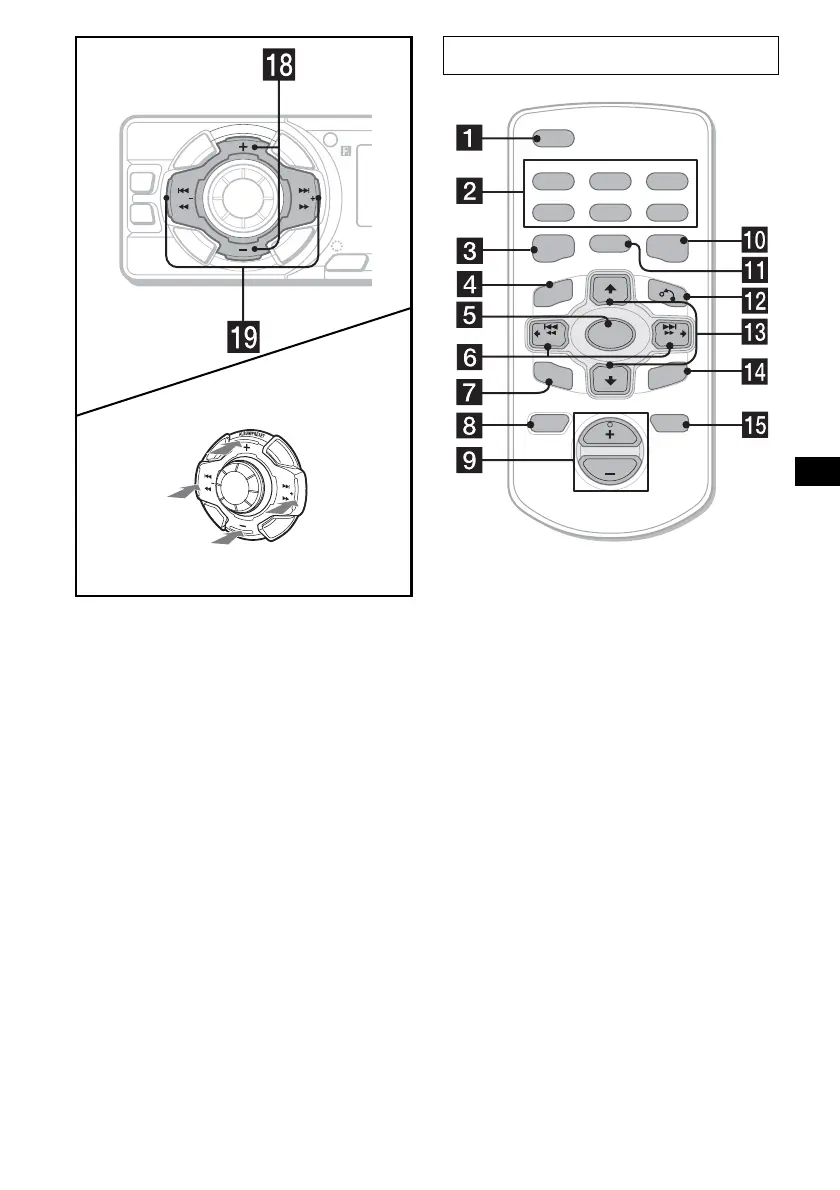
r ALBUM/PRESET buttons (+/–)
To receive preset stations, skip albums*.
* Available only when an MP3 file is played.
s SEEK buttons (–/+)
To skip tracks/fast-forward, reverse a track/
tune in stations automatically, find a station
manually/select a setting.
The corresponding buttons of the card
remote commander control the same
functions as those on this unit.
a DSPL button
b Number buttons
c DSO button
d PBC button 14
e SOURCE button
f SEEK (–/+) buttons
g SEL button
h OFF button
i VOL (+/–) buttons
j EQ3 button
k MODE button
l O (return) button 14
m PRESET (ALBUM) (+/–) buttons
n ENTER button 14
o ATT button
Note
If the display disappears by pressing (OFF), it cannot
be operated with the card remote commander unless
(SOURCE) on the unit is pressed, or a disc is inserted
to activate the unit first.
Tip
For details on how to replace the battery, see
“Replacing the lithium battery” on page 21.
SEEK
SEEK
P
U
S
H
D
I
A
L
S
E
L
E
C
T
S
O
U
R
C
E
A
L
B
U
M
/
P
R
E
S
E
T
SENS
EQ3
D
S
P
L
M
O
D
E
DSO
SEEK SEEK
S
C
R
L
(SEEK)
(–): to select
leftwards/
.
(SEEK)
(+): to select
rightwards/
>
(ALBUM/PRESET)
(+): to select upwards
(ALBUM/PRESET)
(–): to select downwards
Card remote commander RM-X138
continue to next page t
ATTOFF
REP SHUF SLOW
DSPL
1
4
MODE
OSDAUDIO PAUSE
2
5
3
6
SOURCE
PRESET
+
PRESET
-
SEEK
+
SEEK
–
SEL
ENTER
PBC
EQ3DSO
VOL


 To Next Page