4
CDX-V5800
2-109-483-11 (1)
01GB02CD-E.fm masterpage:Left
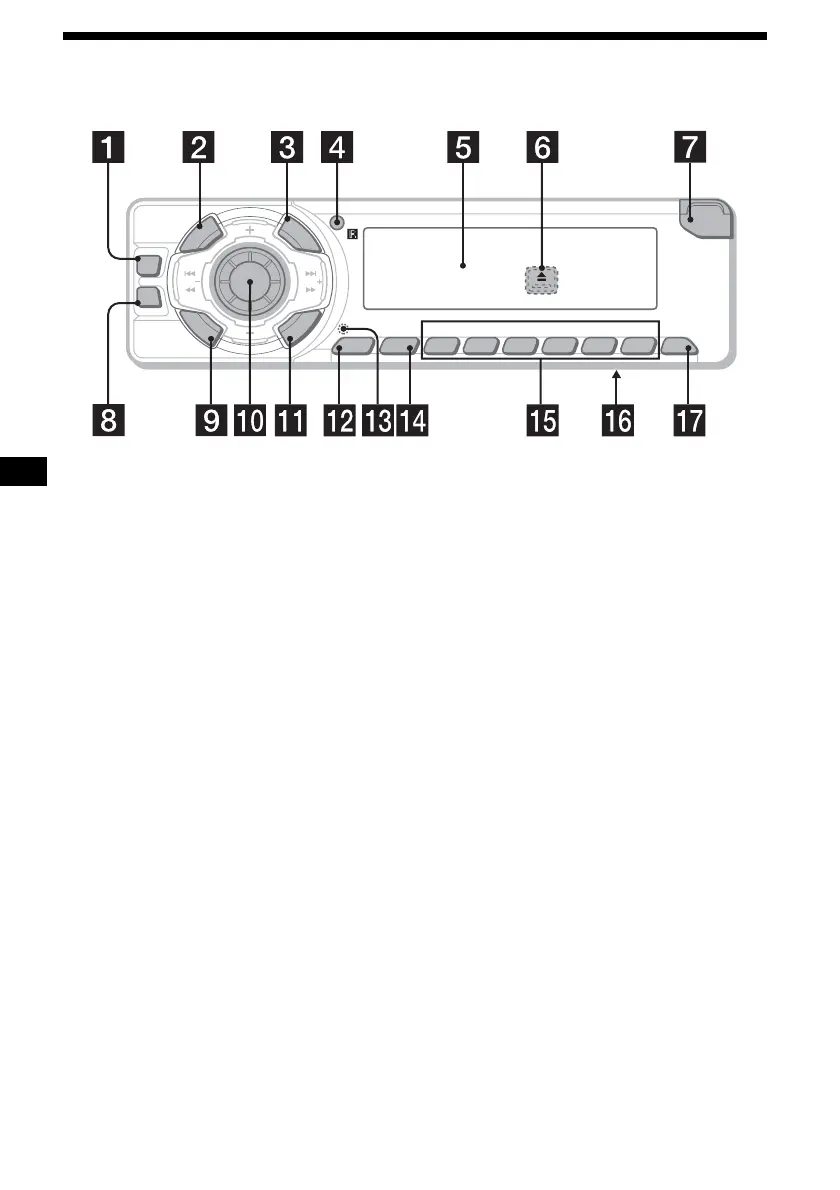
Location of controls
Refer to the pages listed for details.
a DSO button 19
b SOURCE (Power on/Radio/CD/AUX*
1
)
button
To select the source.
c SCRL button 14
d Receptor for the card remote
commander
e Display window
f Z (eject) button (located on the front side
of the unit, behind the front panel) 12, 13
g OPEN button 10, 12, 13
h EQ3 button 18
i MODE button
To change operation.
j Volume control dial/Select button
Rotate to:
– Adjust the volume.
– Adjust settings.
Press to:
– Select items.
k DSPL (display mode change) button
11, 14, 18
l SENS button 16
m RESET button (located on the front side of
the unit, behind the front panel) 10
n BTM button
o Number buttons 18
Radio:
To store stations/receive stored stations.
CD/VCD:
(1): REP 15
(2): SHUF 15
(3): SLOW 13
(4): AUDIO 14
(5): OSD 20
(6): PAUSE 12, 13
p Frequency select switch (located on the
bottom of the unit)
See “Frequency select switch” in the
Installation/Connections manual.
q OFF (Stop/Power off) button*
2
10, 12,
13
*1 Available only when an optional Sony portable
device is connected to AUX IN terminal of the unit.
*2 Warning when installing in a car without an
ACC (accessory) position on the ignition switch
After turning off the ignition, be sure to press and
hold (OFF) on the unit until the display disappears.
Otherwise, the display does not turn off and this causes
battery drain.
P
U
S
H
D
I
A
L
S
E
L
E
C
T
S
O
U
R
C
E
A
L
B
U
M
/
P
R
E
S
E
T
OPEN
6543
BBEAUDIO OSD PAUSESHUF SLOWREP
21
BTMSENS
EQ3
D
S
P
L
M
O
D
E
CDX-V5800
DSO
SEEK SEEK
S
C
R
L
OFF


 To Next Page