EasyManua.ls Logo

Sony CFD-765 - To Equalize the Sound Reproduced; To Enjoy Surround Effect

Sony CFD-765
40 pages
Print Icon
To Next Page IconTo Next Page
To Previous Page IconTo Previous Page
Loading...
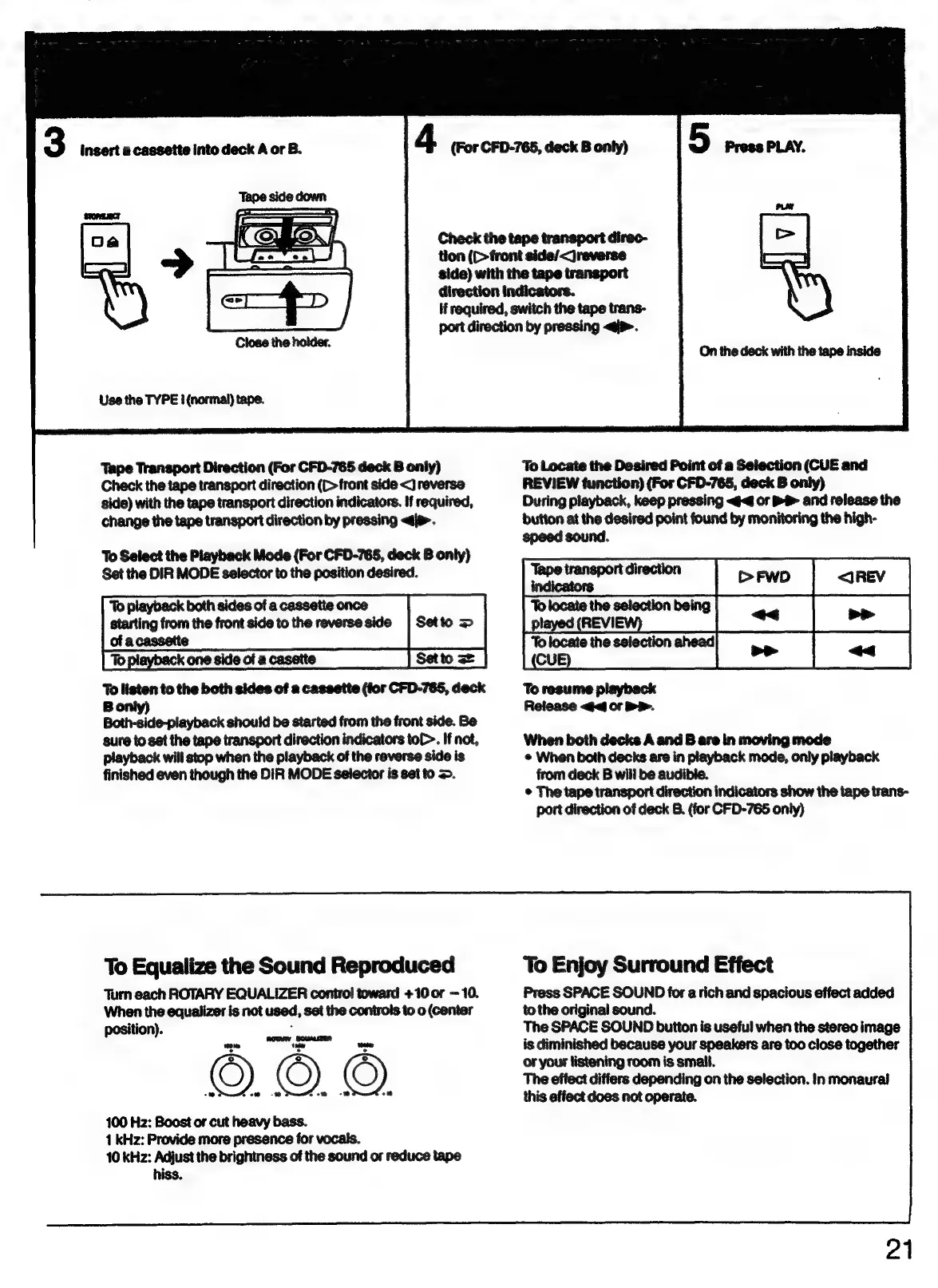
3
insert
a
cassette
into
deck
A
or
B.
4
(For
CFD-765,
deck
B
only)
Check
the
tape
transport
direc-
tion
(C>front
side/<jreverse
side)
with
the
tape
transport
direction
indicators.
H
required,
switch
the
tape
trans-
port
direction
by
pressing
<i>.
Use
the
TYPE
i
(normal)
tape.
Tape
Transport
Direction
(For
CFD-765
deck
B
only)
Check
the
tape
transport
direction
(D
front
side
<)
reverse
side)
with
the
tape
transport
direction
indicators.
If
required,
change
the
tape
transport
direction
by
pressing
<i>.
To
Select
the
Playback
Mode
(For
CFD-765,
deck
B
only)
Set
the
DIR
MODE
selector
to
the
position
desired.
‘To
playback
both
sides
of
a
cassette
once
sa
=
starting
from
the
front
side
to
the
reverse
side
of
acassetie
To
playback
one
side
of
a
casette
To
listen
to
the
both
sides
of
a
cassette
(for
CFD-765,
deck
Bonly)
Both-side-playback
should
be
started
from
the
front
side.
Be
sure
to
set
the
tape
transport
direction
indicators
toC-.
If
not,
playback
will
stop
when
the
playback
of
the
reverse
side
is
finished
even
though
the
DIR
MODE
selector
is
set
to
=>.
To
Equalize
the
Sound
Reproduced
Turn
each
ROTARY
EQUALIZER
control
toward
+10
or
10.
When
the
equalizer
is
not
used,
set
the
controls
to
o
(center
position).
:
we
tale
|
onted
100
Hz:
Boost
or
cut
heavy
bass.
1
kHz:
Provide
more
presence
for
vocals.
10
kHz:
Adjust
the
brightness
of
the
sound
or
reduce
tape
hiss.
On
the
deck
with
the
tape
inside
To
Locate
the
Desired
Point
of
a
Selection
(CUE
and
REVIEW
function)
(For
CFD-765,
deck
B
only)
During
playback,
keep
pressing
<4
or
.
and
release
the
button
at
the
desired
point
found
by
monitoring
the
high-
speed
sound.
Tape
transport
direction
indicators
To
locate
the
selection
being
played
(REVI
To
locate
the
selection
ahead
CU
To
resume
playback
Release
or
DP.
When
both
decks
A
and
B
are
in
moving
mode
e
When
both
decks
are
in
playback
mode,
only
playback
from
deck
B
will
be
audible.
©
The
tape
transport
direction
indicators
show
the
tape
trans-
port
direction
of
deck
8.
(for
CFD-765
only)
To
Enjoy
Surround
Effect
Press
SPACE
SOUND
for
a
rich
and
spacious
effect
added
to
the
original
sound.
The
SPACE
SOUND
button
is
useful
when
the
stereo
image
is
diminished
because
your
speakers
are
too
close
together
or
your
listening
room
is
small.
The
effect
differs
depending
on
the
selection.
In
monaural
this
effect
does
not
operate.
21

Related product manuals