EasyManua.ls Logo

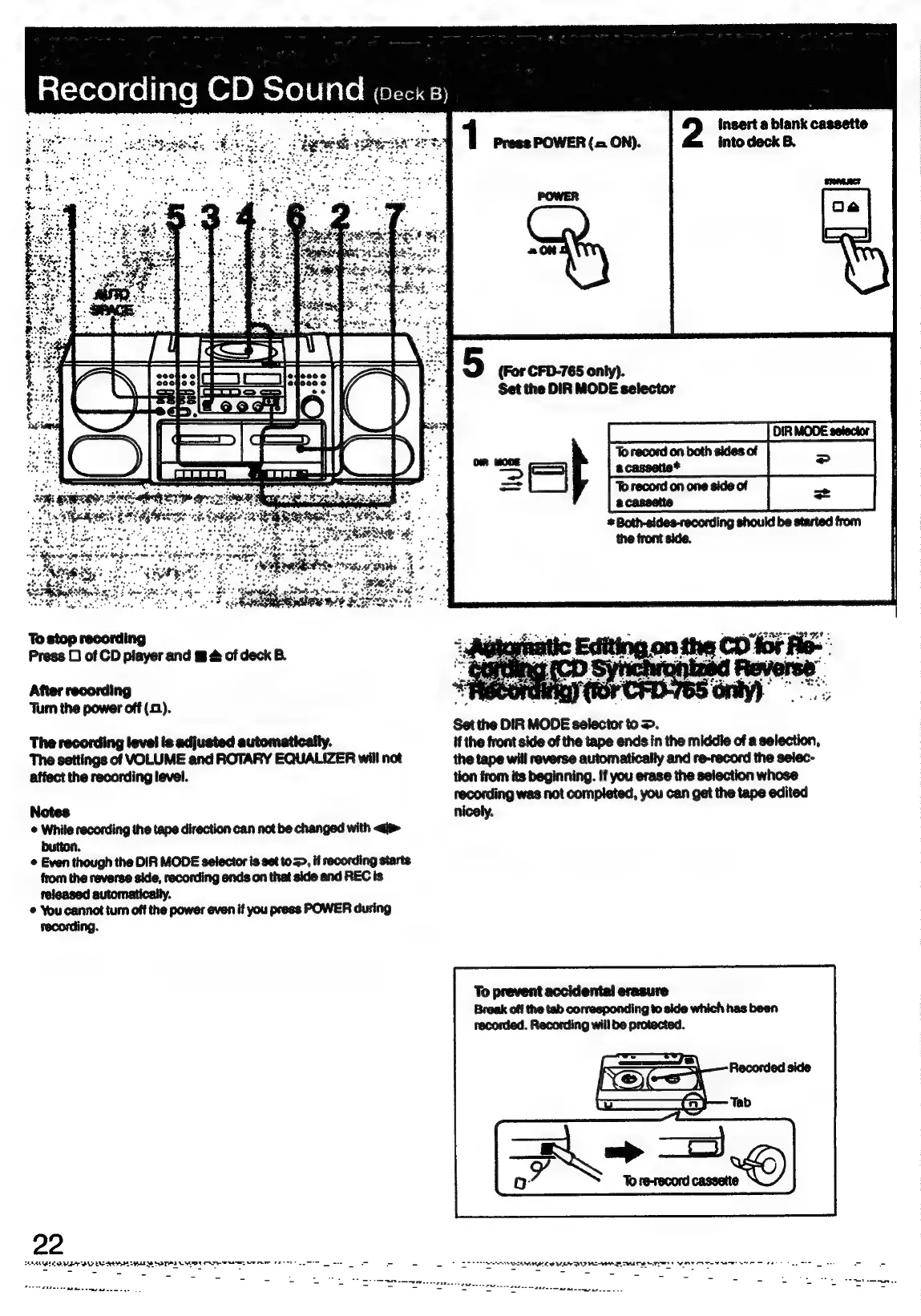
Sony CFD-765 - Recording CD Sound; Automatic Editing on the CD for Recording (CD Synchronized Reverse Recording)

Sony CFD-765
40 pages
Print Icon
To Next Page IconTo Next Page
To Previous Page IconTo Previous Page
Loading...
—X
ate
CD
Sound
1
insert
a
blank
cassette
Press
POWER
(=
ON).
into
deck
B.
Set
the
DIR
MODE
selector
æ
Both-sides-recording
should
be
started
from
the
front
side.
To
stop
recording
Press
O
of
CD
player
and
m
&
of
deck
B.
After
recording
‘Turn
the
power
off
(2).
ee
Set
the
DIR
MODE
selector
to
>.
The
recording
level
is
adjusted
automatically.
if
the
front
side
of
the
tape
ends
in
the
middie
of
a
selection,
The
settings
of
VOLUME
and
ROTARY
EQUALIZER
will
not
the
tape
will
reverse
automatically
and
re-record
the
selec-
affect
the
recording
level.
tion
from
its
beginning.
If
you
erase
the
selection
whose
recording
was not
completed,
you
can get
the
tape
edited
Notes
nicely.
While
recording
the
tape
direction
can
not
be
changed
with
<i>
button.
©
Even
though
the
DIR
MODE
selector
is
set
to
=>,
if
recording
starts
from
the
reverse
side, recording
ends
on
that side
and REC
is
teleased
automatically.
©
You
cannot
turn
off
the
power
even
if
you
press
POWER
during
recording.
To
prevent
accidental
erasure
Break
off
the
tab
corresponding
to
side
which
has
been
recorded.
Recording
will
be
protected.
22
AAU
RDA
BS
Ee
eT
em
ee
ree
en

Related product manuals