Setting Up24
Adjusting the
audio emphasis
(DYNAMIC SOUND SYSTEM)
You can adjust the audio emphasis of the
sound you are listening to.
Using the 5 BAND GRAPHIC EQUALIZER
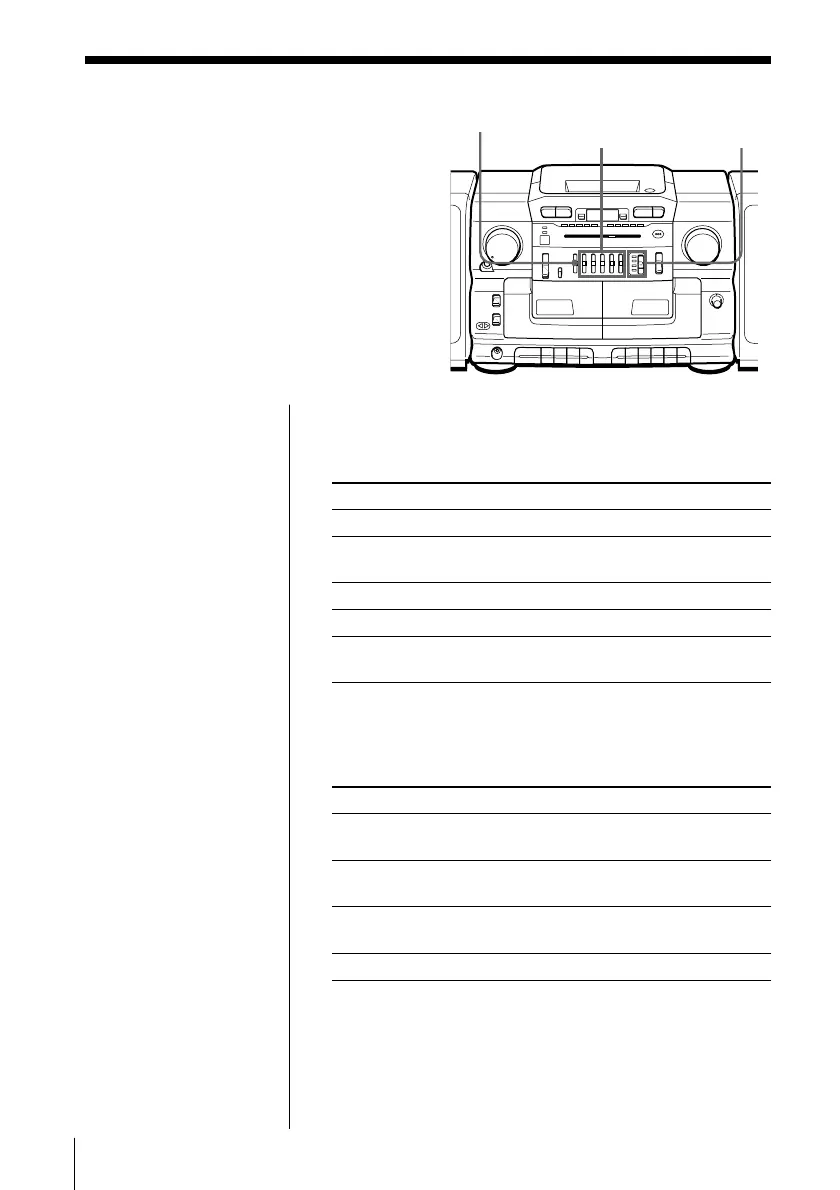
Slide 5 BAND GRAPHIC EQUALIZER to select the
audio emphasis you want.
Use To adjust
MEGA BASS deep bass sound
400 Hz speaking voice, middle frequencies of
instrumental music
1 kHz presence of vocals
4 kHz brightness of sound
10 kHz high treble sounds or to reduce high
frequency noise/tape hiss
Using the PRESET MODE
Set the PRESET MODE selector to the sound mode you
want.
Use To
MANUAL adjust the sound using the 5 BAND
GRAPHIC EQUALIZER.
DISCO get powerful, clear sounds emphasizing low
and high range audio.
PARTY get light, bright sounds emphasizing high
and middle range audio.
LIVE get wide-ranging sounds having presense.
Adjusting the sound balance of the left and
right speakers
Use BALANCE.
Note
When adjusting the 5
BAND GRAPHIC
EQUALIZER, be sure
to set the PRESET
MODE selector to
MANUAL. The
graphic equalizer will
not work in any other
position.
BALANCE PRESET
MODE
5 BAND GRAPHIC
EQUALIZER


 To Next Page