Tuner/Tape – Play
17
Tape – Play
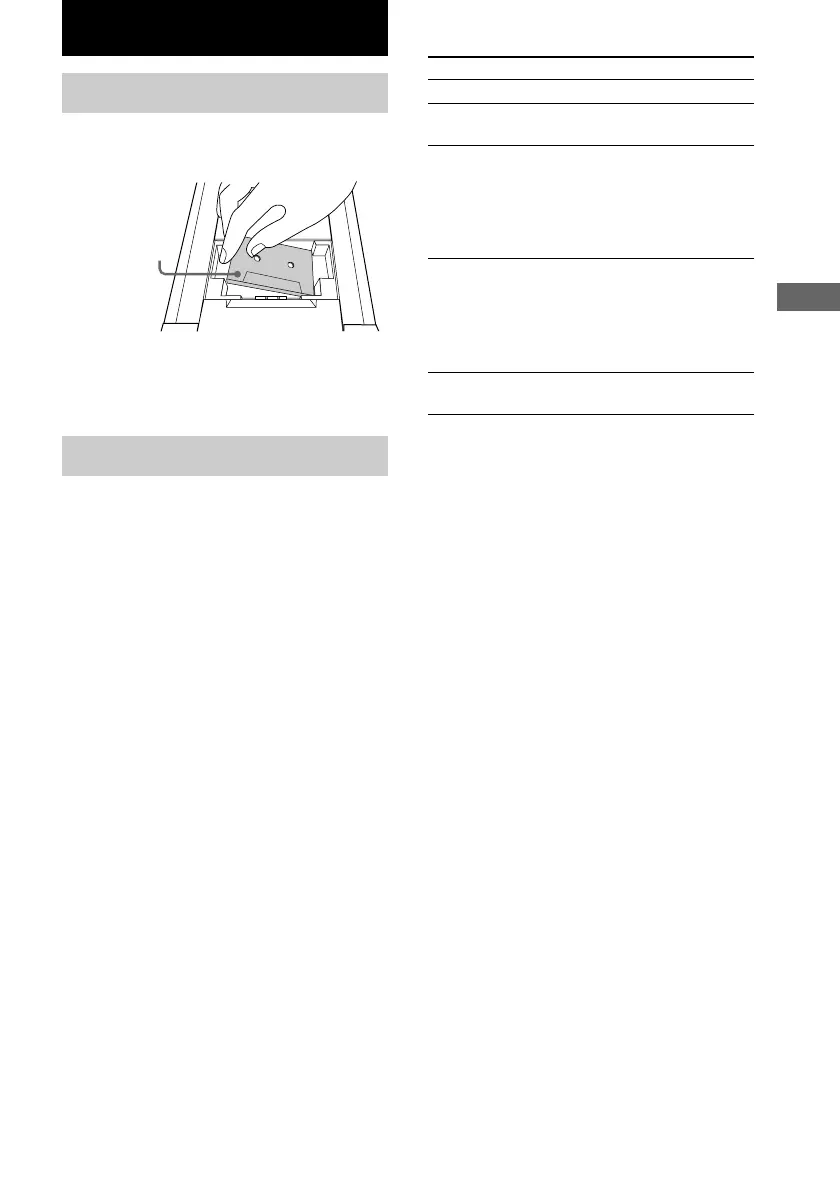
Loading a tape
1 Open the lid with your hand and insert
a tape.
To Do this
Pause Press X on the remote. Press again
to resume play.
Turn ./> counterclockwise
(or press . on the remote) for
the top side during playback.
Turn ./> clockwise (or
press > on the remote) for the
bottom side during playback.
Stop play Press x.
Turn ./> clockwise (or
press > on the remote) for the
top side during playback.
Turn ./> counterclockwise
(or press . on the remote) for
the bottom side during playback.
Press m or M.
*
2
The Automatic Music Sensor (AMS) feature
detects a blank space of more than four seconds
between tracks to locate tracks quickly.
Tip
The deck cannot identify the tape type, such as TYPE
I (normal), TYPE II (CrO
2
) or TYPE IV (metal).
Notes
• If you do not close the lid, you cannot start playing
the tape.
• If you open the lid while playing a tape, the deck
stops playing.
• The AMS feature may not work in the following
cases:
– the blank space between tracks is four seconds
or less.
– the TV is too close to the system.
With the side
you want to
play facing up
2 Close the lid with your hand.
To remove the tape, lift up the tape from the
side as shown in the illustration.
Playing a tape
1 Press FUNCTION repeatedly to switch
the function to TAPE.
2 Press PLAY MODE/DIRECTION
repeatedly until g appears to play one
side or h (or j
*
1
) to play both sides.
3 Press TAPE nN (or N on the
remote).
Press TAPE nN (or N on the remote)
again to play the bottom side.
*
1
The tape deck stops automatically after repeating
the sequence five times.
Find the
succeeding track
(AMS*
2
)
Find the
preceding track
(AMS*
2
)
Fast-forward or
rewind



 To Next Page