10
GB
CMT-U1.GB.2-683-463-11(1)
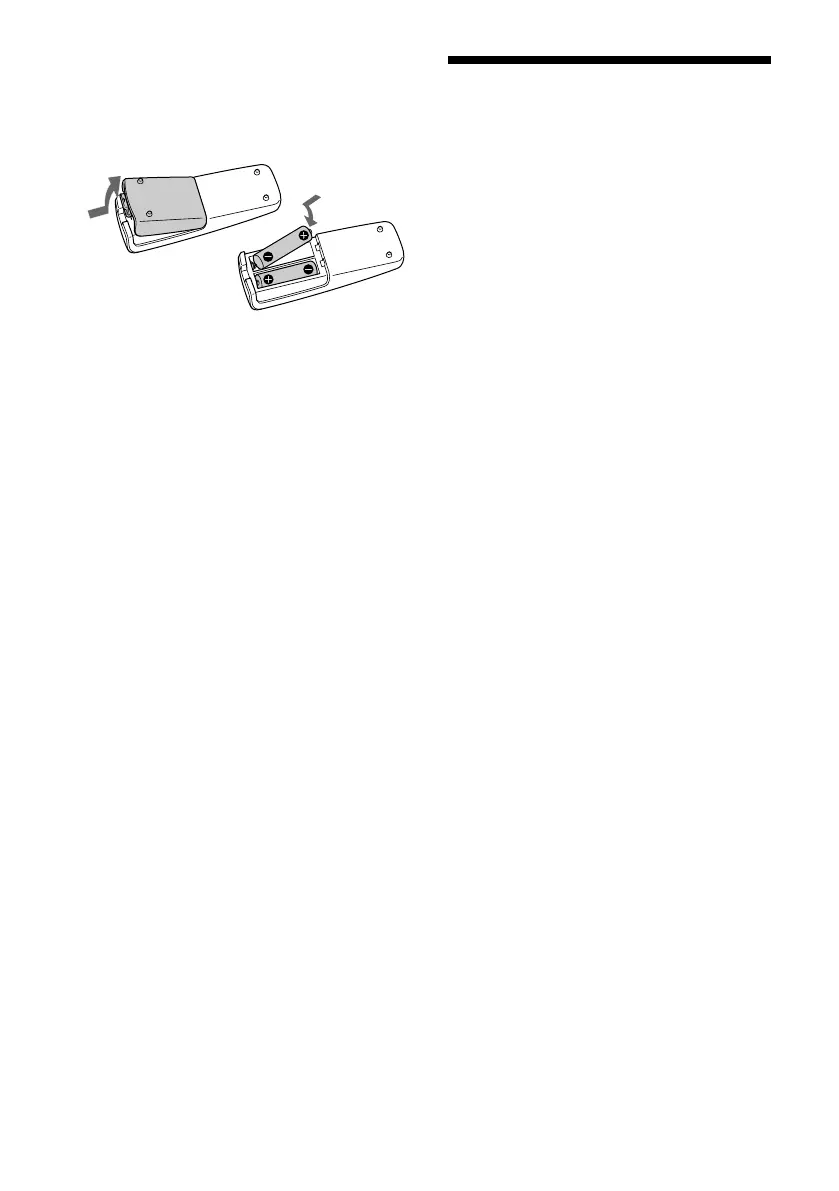
To use the remote
Slide and remove the battery compartment lid
, and insert the two supplied R6 (size AA)
batteries, side rst, matching the polarities
shown below.
Notes
• With normal use, the batteries should last for about six
months.
• Do not mix an old battery with a new one or mix
dierent types of batteries.
• If you do not use the remote for a long period of time,
remove the batteries to avoid damage from battery
leakage and corrosion.
Setting the clock
1
Press / (power)
to turn on the
system.
2
Press CLOCK/TIMER SET
.
If the current mode appears on the display,
press /
repeatedly to select
“CLOCK SET?” and then press ENTER
.
3
Press /
repeatedly to set
the hour, and then press ENTER
.
4
Use the same procedure to set the
minutes.
When you turn o the system aer setting
the clock, the clock display appears instead
of the demonstration display.
e clock settings are lost when you
disconnect the power cord or if a power
failure occurs.



 To Next Page