EasyManua.ls Logo

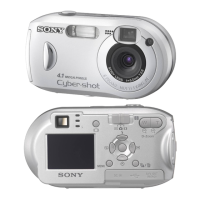
Sony Cyber-shot DSC-P41 - User Manual

Sony Cyber-shot DSC-P41
124 pages
Print Icon
To Next Page IconTo Next Page
Loading...
3-091-352-11(1)
Digital Still Camera
Operating Instructions
Before operating the unit, please read this manual thoroughly, and
retain it for future reference.
Owner’s Record
The model and serial numbers are located on the bottom. Record the
serial number in the space provided below. Refer to these numbers
whenever you call upon your Sony dealer regarding this product.
Model No. DSC-P41/P43
Serial No.
DSC-P41/P43
© 2004 Sony Corporation
Getting started_______________________
_
Shooting still images_________________
_
Viewing still images__________________
_
Deleting still images _________________
_
Before advanced operations ____________
_
Advanced still image shooting __________
_
Advanced still image viewing ___________
_
Still image editing _____________________
_
Still image printing ____________________
_
(PictBridge printer)
Enjoying movies ______________________
_
Enjoying images on your computer
_____
Troubleshooting ______________________
_
Additional information__________________
_
Index _____________________________
_

Table of Contents

Question and Answer IconNeed help?

Do you have a question about the Sony Cyber-shot DSC-P41 and is the answer not in the manual?

Summary

Getting Started

Operating Instructions

Provides essential guidance for safe and effective camera operation.

Owners Record

Section to record model and serial numbers for future reference.

Camera Handling and Basic Operations

Read This First

Crucial preliminary instructions and recommendations before using the camera.

Setting the Date and Time

Step-by-step guide to setting the camera's internal clock.

Still Image Shooting

Using Auto Mode

Guide on how to use the camera's automatic shooting mode.

Selecting a Flash Mode

Guide on choosing different flash settings like Auto, Forced, Slow Synchro, and No Flash.

Viewing and Managing Images

Viewing Images on LCD Screen

How to view images one by one or multiple at a time on the LCD.

Protecting Images

How to protect individual images from accidental deletion.

Computer Connectivity and Image Transfer

Copying Images to Computer (Windows)

System requirements for Windows PCs to connect and transfer images.

Connecting Camera to Computer

Detailed steps for establishing a USB connection between the camera and computer.

Troubleshooting and Precautions

Troubleshooting Common Issues

Solutions for common problems related to battery, power, connectivity, and operation.

Precautions and Camera Care

Guidance on safe handling, cleaning, and avoiding moisture condensation.

Summary

Getting Started

Operating Instructions

Provides essential guidance for safe and effective camera operation.

Owners Record

Section to record model and serial numbers for future reference.

Camera Handling and Basic Operations

Read This First

Crucial preliminary instructions and recommendations before using the camera.

Setting the Date and Time

Step-by-step guide to setting the camera's internal clock.

Still Image Shooting

Using Auto Mode

Guide on how to use the camera's automatic shooting mode.

Selecting a Flash Mode

Guide on choosing different flash settings like Auto, Forced, Slow Synchro, and No Flash.

Viewing and Managing Images

Viewing Images on LCD Screen

How to view images one by one or multiple at a time on the LCD.

Protecting Images

How to protect individual images from accidental deletion.

Computer Connectivity and Image Transfer

Copying Images to Computer (Windows)

System requirements for Windows PCs to connect and transfer images.

Connecting Camera to Computer

Detailed steps for establishing a USB connection between the camera and computer.

Troubleshooting and Precautions

Troubleshooting Common Issues

Solutions for common problems related to battery, power, connectivity, and operation.

Precautions and Camera Care

Guidance on safe handling, cleaning, and avoiding moisture condensation.

Sony Cyber-shot DSC-P41 Specifications

General IconGeneral
Sensor TypeCCD
Megapixels4.1 MP
Effective Pixels4.0 MP
Optical Zoom3x
Digital Zoom2x
LCD Pixels123, 000
ISO SensitivityAuto, 100, 200, 400
Aperture Rangef/2.8 - f/5.2
LCD Screen Size1.5"
ISO RangeAuto
Storage MediaMemory Stick
Battery Type2 x AA NiMH

Related product manuals