EasyManua.ls Logo

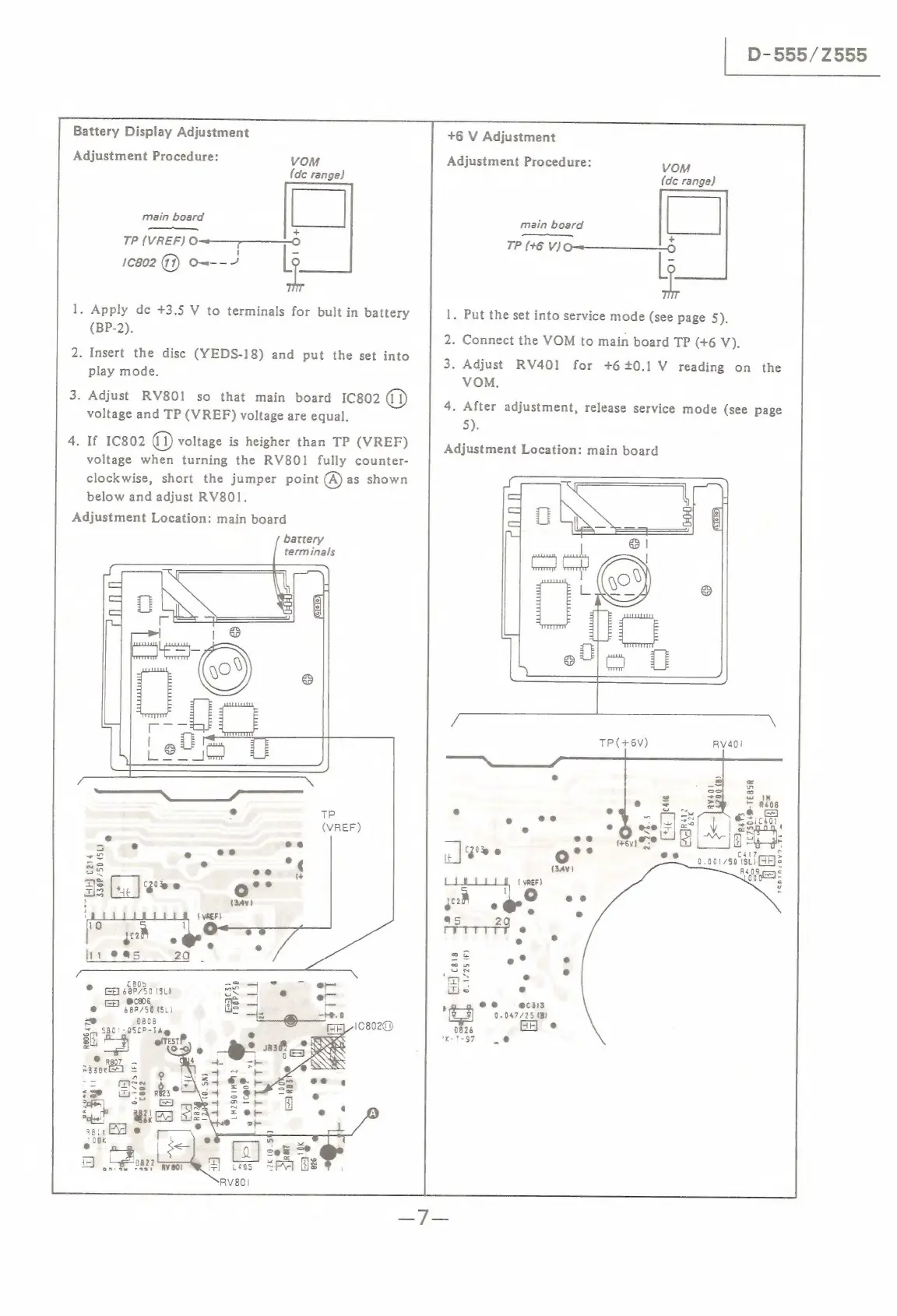
Sony D-555 - Battery Display Adjustment; +6 V Adjustment

Sony D-555
34 pages
Print Icon
To Next Page IconTo Next Page
To Previous Page IconTo Previous Page
Loading...
|
D-555/Z555
Battery
Display
Adjustment
+6
V
Adjustment
Adjustment
Procedure:
VOM
Adjustment
Procedure:
VOM
(de
range)
(de
range)
main
board
P|
main
board
|
|
+
TP
(VREF)
0-1.
IP
196
Vi9w———
6
10802
(3)
O=--/
1.
Put
the
set
into
service
mode
(see
page
5).
2.
Connect
the
VOM
to
main
board
TP
(+6
V).
3.
Adjust
RV401
for
+6+0.1
V
reading
on
the
VOM.
1.
Apply
dc
+3.5
V
to
terminals
for
bult
in
battery
(BP-2).
2.
Insert
the
disc
(YEDS-18)
and
put
the
set
into
play
mode.
3.
Adjust
RV801
so
that
main
board
IC802
(i)
voltage
and
TP
(VREF)
voltage
are
equal.
4.
If
1C802
a)
voltage
is
heigher
than
TP
(VREF)
voltage
when
turning
the
RV801
fully
counter-
clockwise,
short
the
jumper
point
(A)
as
shown
below
and
adjust
RV801.
Adjustment
Location:
main
board
4.
After
adjustment,
release
service
mode
(see
page
5).
Adjustment
Location:
main
board
battery
terminals
TP(+6V)
TP
(VREF)
~
°
1C7504@-TEBSR
dig
eS
~
=
rs
renincav7—
Ea4%
Gee
ee
si
C417
kine
°
ed
0.001750
(SL)
FF}
330P/50
(SL)
e
e
=
+4,
|Soee
o°°
(34)
"fad
cars
{
VREF)
f
°
yet
e
ov
11
@@5
2
=
:
=
in
on
£805
Tie
e
©
ce
48P/50
SL)
e
pe
Ge
@c906
,
ee
@c3is
@
68P/50
(SL)
me
0.047/25
(B)
~e
0808
°
x
'
2826
x
530'-05LP-lag
1K-7-97
oftesr?
Re06
iva
DACUPR
|
FF
ue
2eF

Related product manuals